




Here's how it works



How to use or fill out HS ELS Incident Report with our platform

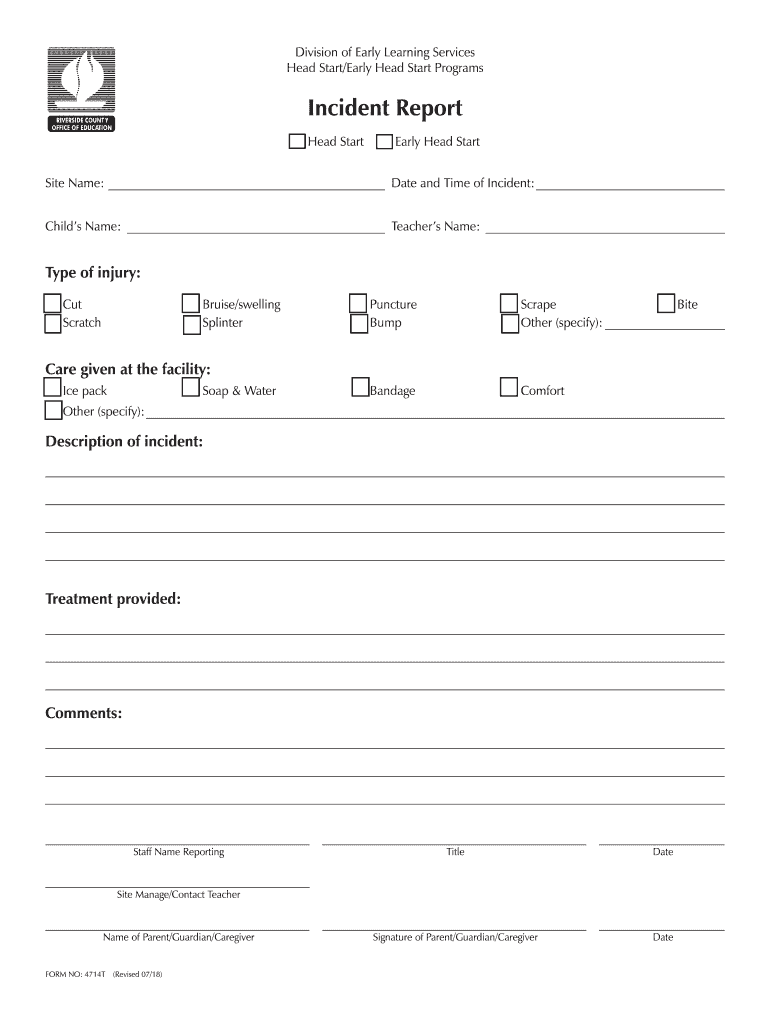
- Click ‘Get Form’ to open the HS ELS Incident Report in the editor.
- Begin by entering the Site Name and Date and Time of Incident in the designated fields. This information is crucial for record-keeping.
- Fill in the Child’s Name and Teacher’s Name to identify those involved in the incident.
- Select the Type of Injury by checking the appropriate box, such as Cut, Bruise, or Other. If 'Other' is selected, specify the injury type in the provided space.
- Indicate any Care Given at the facility by checking relevant options like Ice pack or Soap & Water.
- In the Description of Incident section, provide a detailed account of what occurred. Use clear language to ensure understanding.
- Document Treatment Provided in detail to outline any actions taken post-incident.
- Complete the Comments section for any additional notes that may be relevant.
- Finally, have Staff Name Reporting and Site Manager/Contact Teacher sign and date where indicated, along with obtaining a signature from Parent/Guardian/Caregiver.
Start using our platform today to easily fill out your HS ELS Incident Report online for free!
It's free
See more HS ELS Incident Report versions
| Versions | Form popularity | Fillable & printable |
|---|---|---|
| 2018 | 4.9 Satisfied (36 Votes) |
Got questions?
Can I draw my electronic signature to sign my HS ELS Incident Report?
Yes, electronically drawing your signature is appropriate, but only if you use a tool that complies with industry laws and regulations. Consider DocHub, which ensures eSignature validity under ESIGN and UETA requirements. All you need to eSign your HS ELS Incident Report is an account with DocHub and an internet connection. When you open your paperwork in our editor, click Sign and select the Draw option.
How do you edit HS ELS Incident Report on Android?
Document editing with DocHub is equally convenient on desktop and mobile devices. You just need an internet browser to revise your HS ELS Incident Report on Android. Open our website and sign in to access the tools you require. Add your file and introduce your intended changes. Next, you can keep your form in your file storage or send it out right away.
Security and compliance
At DocHub, your data security is our priority. We follow HIPAA, SOC2, GDPR, and other standards, so you can work on your documents with confidence.
Learn more


