CDCES verification order form - cbdce 2026

Get Form
CDCES verification order form - cbdce Preview on Page 1

Here's how it works

01. Edit your form online
Type text, add images, blackout confidential details, add comments, highlights and more.

02. Sign it in a few clicks
Draw your signature, type it, upload its image, or use your mobile device as a signature pad.

03. Share your form with others
Send it via email, link, or fax. You can also download it, export it or print it out.

How to use or fill out CDCES verification order form - cbdce with our platform

Form edit decoration
9.5
Ease of Setup
DocHub User Ratings on G2
9.0
Ease of Use
DocHub User Ratings on G2
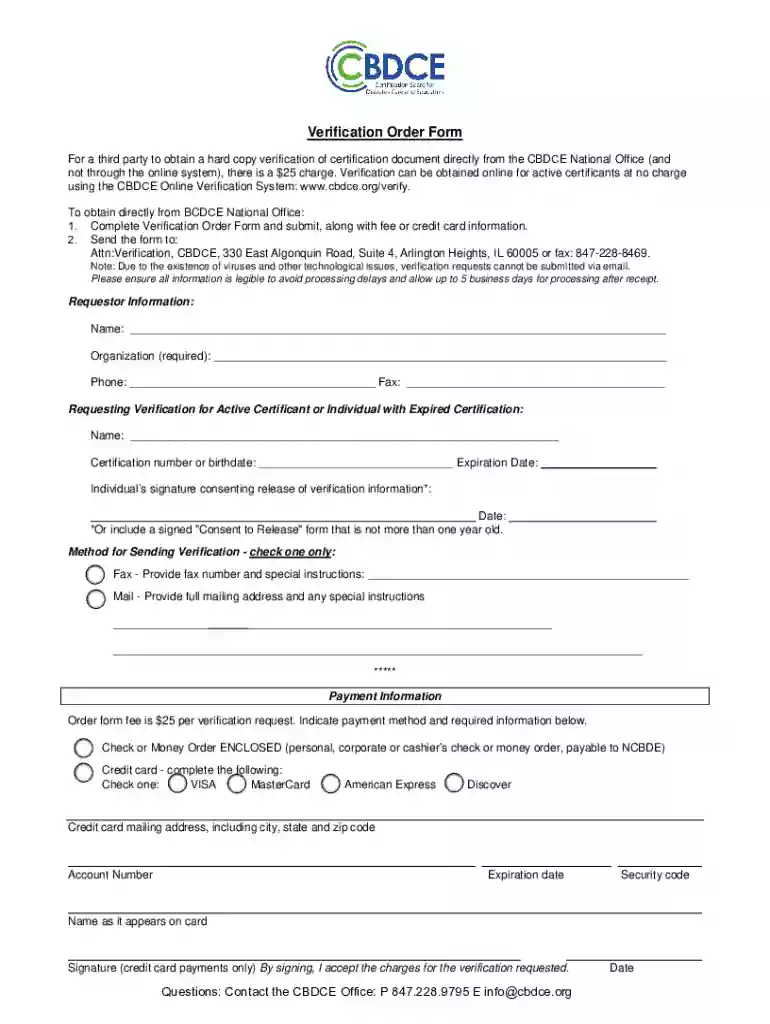
  1. Click ‘Get Form’ to open the CDCES verification order form in the editor.
  2. Begin by filling out the Requestor Information section. Enter your name, organization, phone number, and fax number clearly to ensure accurate processing.
  3. Next, provide details for the individual whose verification you are requesting. Include their name, certification number or birthdate, and expiration date.
  4. In the consent section, ensure that the individual signs to authorize the release of their verification information. If necessary, attach a signed 'Consent to Release' form dated within the last year.
  5. Select your preferred method for sending verification by checking either 'Fax' or 'Mail'. Provide any additional instructions as needed.
  6. Complete the Payment Information section. Indicate your payment method (check/money order or credit card) and fill in all required details accurately.
  7. Review all entered information for clarity and accuracy before submitting the form. Ensure legibility to avoid processing delays.

Start using our platform today to streamline your document editing and submission process for free!

See more CDCES verification order form - cbdce versions

We've got more versions of the CDCES verification order form - cbdce form. Select the right CDCES verification order form - cbdce version from the list and start editing it straight away!
Versions Form popularity Fillable & printable
2017 4.8 Satisfied (36 Votes)
be ready to get more

Complete this form in 5 minutes or less

Get form

Got questions?

We have answers to the most popular questions from our customers. If you can't find an answer to your question, please contact us.
Contact us
The change in the designation of the specialty title from diabetes educator to diabetes care and education specialist. occurred in 2020.
CDCES is a credential qualifying healthcare providers can obtain with special training and certification. The credential used to be called certified diabetes educator (CDE). Several types of providers can become certified as a CDCES. Some examples include: Registered nurses (RNs).
Employers, healthcare providers, and people with diabetes look for the CDCES credential when working with a diabetes care and education specialist. The certification ensures you possess the skills and knowledge to deliver high-quality diabetes care and education.
You wont have to provide proof of eligibility but be prepared to do so in case your application is audited. The final step in the application process is to pay the initial CDCES certification cost, which is $350 for regular applicants, and $200 for UQ applicants.

Security and compliance

At DocHub, your data security is our priority. We follow HIPAA, SOC2, GDPR, and other standards, so you can work on your documents with confidence.

Learn more
ccpa2
pci-dss
gdpr-compliance
hipaa
soc-compliance
be ready to get more

Complete this form in 5 minutes or less

Get form