




Here's how it works



How to use or fill out Supplement 18-2 TITLE 17 TRANSPORTATION CHAPTER 5 with our platform

- Click ‘Get Form’ to open it in the editor.
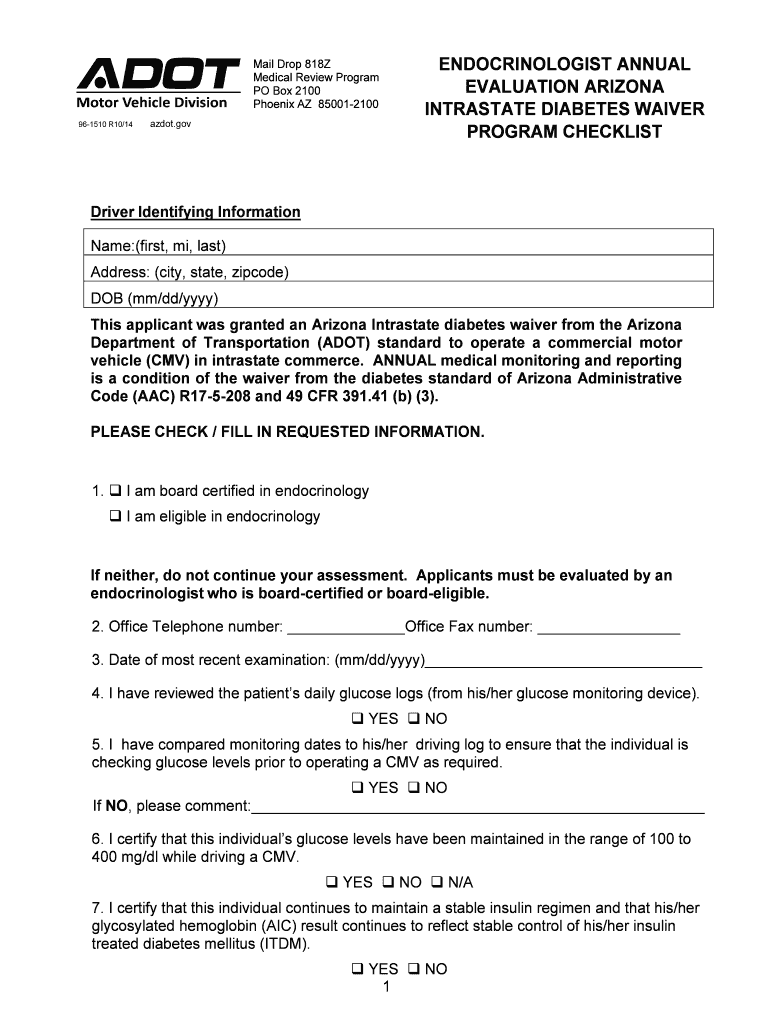
- Begin by entering the Driver Identifying Information, including the applicant's name, address, and date of birth. Ensure accuracy as this information is crucial for identification.
- In section 1, check the appropriate box to indicate if you are board certified or eligible in endocrinology. If neither applies, do not proceed with the assessment.
- Fill in your office telephone and fax numbers in section 2. This information is essential for communication regarding the applicant's evaluation.
- Continue through each question methodically, providing detailed responses where required. For example, confirm whether you have reviewed the patient’s glucose logs and driving log as per sections 4 and 5.
- Complete all certification statements in sections 6 to 16 by checking 'YES' or 'NO' based on your medical opinion about the applicant's diabetes management and ability to operate a CMV safely.
- Finally, ensure that you print your name, sign, and provide your license number along with today's date before submitting the form as instructed at the end.
Start using our platform today to fill out Supplement 18-2 TITLE 17 TRANSPORTATION CHAPTER 5 easily and for free!
It's free
See more Supplement 18-2 TITLE 17 TRANSPORTATION CHAPTER 5 versions
| Versions | Form popularity | Fillable & printable |
|---|---|---|
| 2014 | 4.8 Satisfied (47 Votes) |
Got questions?
How can I eSign my Supplement 18-2 TITLE 17 TRANSPORTATION CHAPTER 5 in Word?
Microsoft Word doesn’t have signing tools to generate valid electronic signatures and enforceable forms. Luckily, DocHub is an online eSignature-compliant editor that works with various document formats, such as .doc files. Log in to your account and upload the Word version of your Supplement 18-2 TITLE 17 TRANSPORTATION CHAPTER 5 from your device and cloud, or URL - our editor will automatically turn it into an editable PDF. Make all essential alterations in your document and click Sign to generate your own legally-binding electronic signature. There are four signing methods from which to choose.
Can I sign my Supplement 18-2 TITLE 17 TRANSPORTATION CHAPTER 5 while I edit it?
When you edit your Supplement 18-2 TITLE 17 TRANSPORTATION CHAPTER 5 with DocHub, you simply will not need to look for other software or solutions to eSign it. An electronic signature is a component of DocHub’s extensive editing toolset, which enables you to implement changes in your form without jumping between websites. Just complete your form, double-check the correctness of the data and put your electronic signature at the end to make it submission-ready within a few minutes.
Security and compliance
At DocHub, your data security is our priority. We follow HIPAA, SOC2, GDPR, and other standards, so you can work on your documents with confidence.
Learn more


