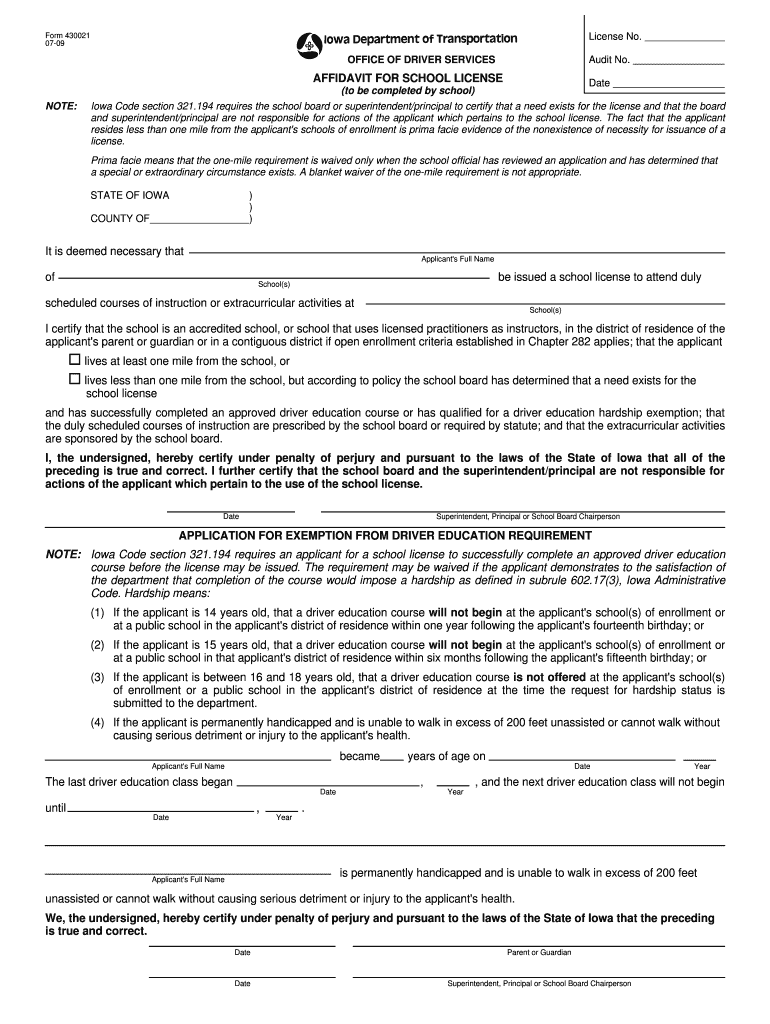
Form school license 2026

Get Form
form school license Preview on Page 1

Here's how it works

01. Edit your form school license online
Type text, add images, blackout confidential details, add comments, highlights and more.
02. Sign it in a few clicks
Draw your signature, type it, upload its image, or use your mobile device as a signature pad.
03. Share your form with others
Send it via email, link, or fax. You can also download it, export it or print it out.

How to use or fill out form school license with our platform

Form edit decoration
9.5
Ease of Setup
DocHub User Ratings on G2
9.0
Ease of Use
DocHub User Ratings on G2
  1. Click ‘Get Form’ to open the school license application in the editor.
  2. Begin by entering the applicant's full name and address in the designated fields. Ensure accuracy as this information is crucial for processing.
  3. In the certification section, confirm whether the applicant lives at least one mile from their school. If they live closer, provide justification based on special circumstances as required.
  4. Complete the driver education exemption section if applicable. Indicate the applicant's age and any hardships that may prevent them from completing a driver education course.
  5. Obtain signatures from a parent or guardian and a school official, ensuring all parties understand their responsibilities regarding the school license.
  6. Review all entries for accuracy before submitting. Use our platform’s tools to make any necessary edits easily.

Start filling out your form school license today for free using our platform!

See more form school license versions

We've got more versions of the form school license form. Select the right form school license version from the list and start editing it straight away!
Versions Form popularity Fillable & printable
2009 4.9 Satisfied (59 Votes)
2005 4 Satisfied (57 Votes)
be ready to get more

Complete this form in 5 minutes or less

Get form

Got questions?

We have answers to the most popular questions from our customers. If you can't find an answer to your question, please contact us.
Contact us
Group A PRIMARY ACCEPTABLE ID Drivers license from a U.S. state. Federal or state ID card. Military ID card. U.S. passport.
Yes, the Verification of Enrollment Form is an official document that can be used to prove that the student is enrolled in a school. Other documents that may work include a report card or transcript.
An employment verification can help an employee get a loan or housing, obtain employment with a prospective employer, authorize an employee to work, and more. Employers also complete other forms to comply with state and federal regulations.
While driving schools like Coastline Academy can administer drivers education courses and in some states, even the road test, your actual license to drive will always come from your official state driving office.
Texas law requires a VOE form. htm Driver for those under 18 applying for a learners permit or provisional drivers license who dont have a high school diploma. It verifies that youre enrolled in public, home, or private school and attend classes.

Security and compliance

At DocHub, your data security is our priority. We follow HIPAA, SOC2, GDPR, and other standards, so you can work on your documents with confidence.

Learn more
ccpa2
pci-dss
gdpr-compliance
hipaa
soc-compliance
be ready to get more

Complete this form in 5 minutes or less

Get form

People also ask

A Verification of Enrollment (VOE), also known as a Certificate of Enrollment or Proof of School Enrollment, is an official document provided by the school as a confirmation of the students enrollment in that school.

Related links