




Here's how it works



How to use or fill out MEDICAL EXAMINER'S CERTIFICATE - transportation wv with our platform

- Click ‘Get Form’ to open the MEDICAL EXAMINER'S CERTIFICATE in the editor.
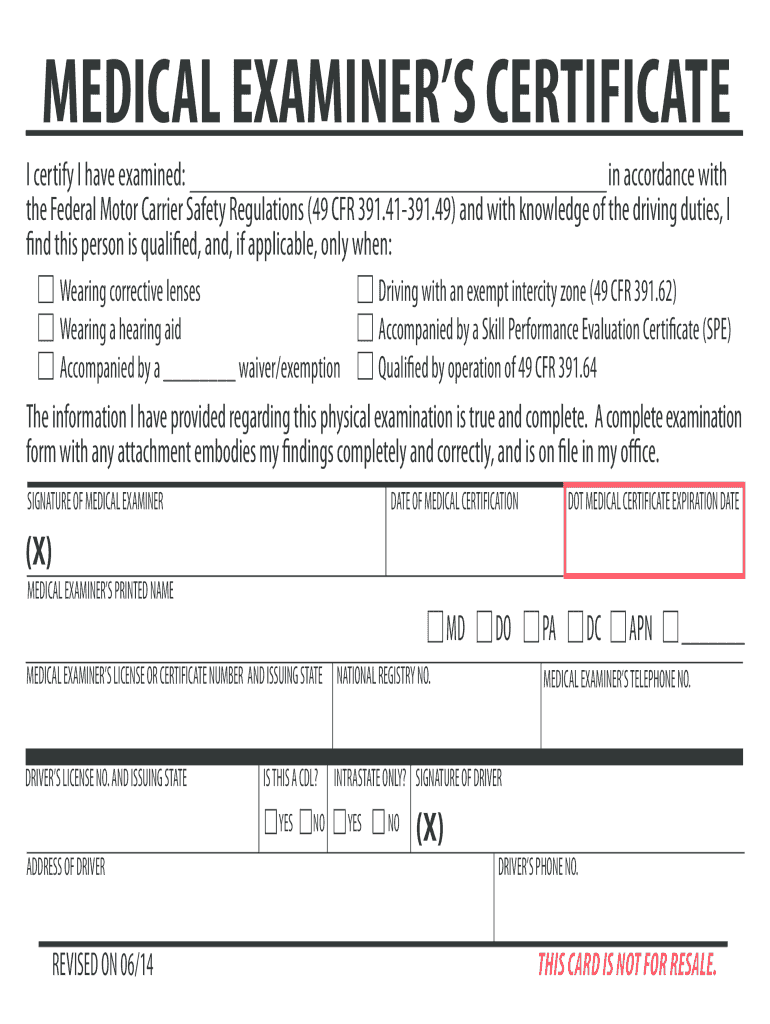
- Begin by entering the name of the individual being examined in the designated field. Ensure accuracy as this is crucial for certification.
- Review the Federal Motor Carrier Safety Regulations section and check any applicable conditions, such as wearing corrective lenses or a hearing aid.
- If applicable, indicate if the driver is accompanied by a waiver/exemption or has a Skill Performance Evaluation Certificate (SPE).
- Fill in the date of medical certification and ensure that all information provided regarding the physical examination is true and complete.
- The medical examiner should sign and print their name, along with their license number and issuing state.
- Complete the driver's information, including their license number, address, and phone number. Confirm if they hold a CDL.
- Finally, review all entries for accuracy before saving or exporting your completed form.
Start using our platform today to easily fill out your MEDICAL EXAMINER'S CERTIFICATE for free!
It's free
See more MEDICAL EXAMINER'S CERTIFICATE - transportation wv versions
| Versions | Form popularity | Fillable & printable |
|---|---|---|
| 2014 | 4.9 Satisfied (40 Votes) |
Got questions?
What do I need to sign my MEDICAL EXAMINER'S CERTIFICATE - transportation wv electronically?
Electronic document signing demands a software solution that works in compliance with data security and eSignature regulations. DocHub is an excellent tool for that, because it meets all the above mentioned requirements. Whatever method you prefer to sign your MEDICAL EXAMINER'S CERTIFICATE - transportation wv in DocHub, your electronic signature will be legally binding and court-admissible.
How to manage my MEDICAL EXAMINER'S CERTIFICATE - transportation wv from Gmail?
If your go-to electronic mail service is Gmail, it is simple to integrate your DocHub editor into your work. Edit your MEDICAL EXAMINER'S CERTIFICATE - transportation wv with DocHub tools and attach it to your drafts in Gmail. See how straightforward it is to exchange papers and work together with a swift PDF editing solution at hand.
What happens if you let your DOT medical card expire in WV?
How much is a DOT physical in WV?
What are the vision requirements for driving in West Virginia?
Security and compliance
At DocHub, your data security is our priority. We follow HIPAA, SOC2, GDPR, and other standards, so you can work on your documents with confidence.
Learn more


