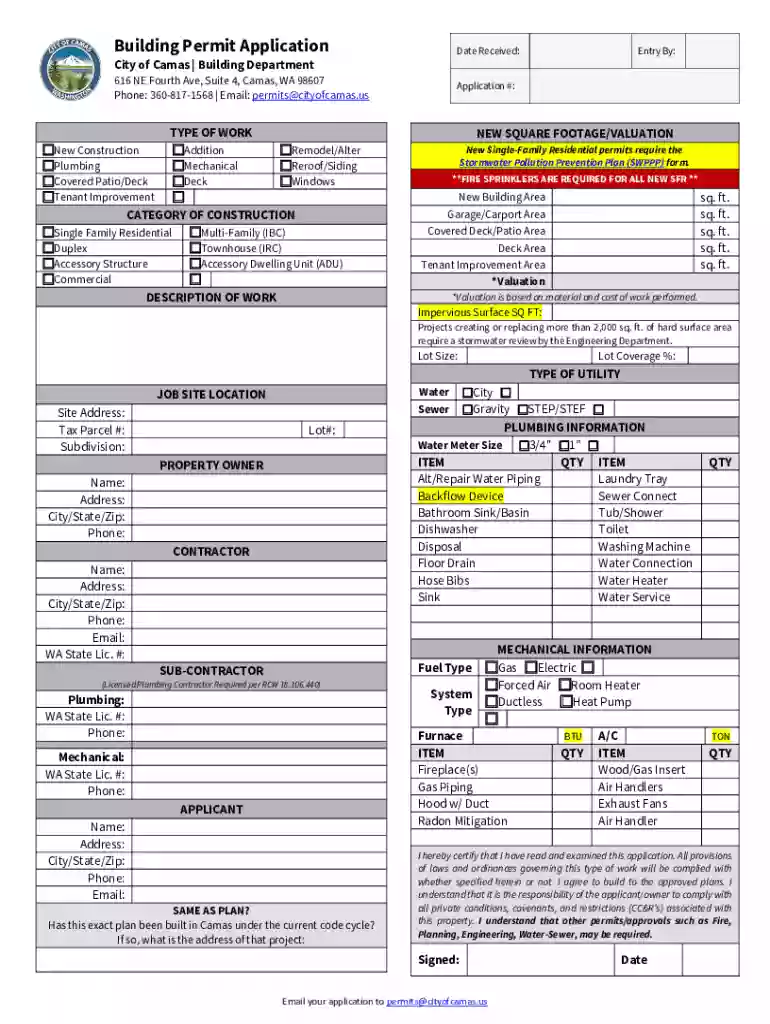
PDF Building Permit Application - City of Camas 2026

Get Form
PDF Building Permit Application - City of Camas Preview on Page 1

Here's how it works

01. Edit your form online
Type text, add images, blackout confidential details, add comments, highlights and more.

02. Sign it in a few clicks
Draw your signature, type it, upload its image, or use your mobile device as a signature pad.

03. Share your form with others
Send it via email, link, or fax. You can also download it, export it or print it out.

How to use or fill out PDF Building Permit Application - City of Camas with DocHub

Form edit decoration
9.5
Ease of Setup
DocHub User Ratings on G2
9.0
Ease of Use
DocHub User Ratings on G2
  1. Click ‘Get Form’ to open the PDF Building Permit Application in our editor.
  2. Begin by entering the 'Date Received' and 'Application #' at the top of the form. This helps track your application efficiently.
  3. Select the 'TYPE OF WORK' by checking the appropriate box for your project, such as New Construction or Plumbing.
  4. Fill in the 'NEW SQUARE FOOTAGE/VALUATION' section, ensuring you provide accurate measurements and valuations as required.
  5. In the 'DESCRIPTION OF WORK' field, provide a detailed description of your project to give clarity on what is being applied for.
  6. Complete the 'JOB SITE LOCATION' section with precise details about where the work will take place, including Site Address and Tax Parcel #.
  7. Finally, ensure all signatures are completed at the bottom before submitting your application via email to permits@cityofcamas.us.

Start using our platform today to fill out your Building Permit Application quickly and easily!

See more PDF Building Permit Application - City of Camas versions

We've got more versions of the PDF Building Permit Application - City of Camas form. Select the right PDF Building Permit Application - City of Camas version from the list and start editing it straight away!
Versions Form popularity Fillable & printable
2022 4.8 Satisfied (236 Votes)
be ready to get more

Complete this form in 5 minutes or less

Get form

Got questions?

We have answers to the most popular questions from our customers. If you can't find an answer to your question, please contact us.
Contact us

Sure, a typed name is recognized as a valid electronic signature when you add it to your paperwork utilizing a compliant solution like DocHub. Simply upload your PDF Building Permit Application - City of Camas to our editor, click Sign in the top tool pane → Create your signature → Type your name in the appropriate tab, and select how it will look on your document.

You can quickly fill out, modify, and even eSign your PDF Building Permit Application - City of Camas using DocHub. Create a new account and start your free trial. After that, you can add the document with the form and simply make all the needed edits. No need to print on paper or use a third-party application to sign it, as you can put your electronic signature on your document faster through DocHub.

Goal for all permits is 4-6 weeks.
Steps to Draw a Building Plan Create a beginning point and proper scale for the project. Practice altering the scale. Create a plan of building and current property lines to scale, which should be done in an overhead view. Add some information to the plan. Sketch the details of the property. Label everything.
For residential detached structures more than 200 square feet in size (including all floors if a two story building) and for commercial structures more than 120 square feet in size (including all floors if a two story building), a building permit is required.

Security and compliance

At DocHub, your data security is our priority. We follow HIPAA, SOC2, GDPR, and other standards, so you can work on your documents with confidence.

Learn more
ccpa2
pci-dss
gdpr-compliance
hipaa
soc-compliance

People also ask

How to Manually Draft a Basic Floor Plan Step 1: Engineering Scale Tutorial. Sketch Exterior Walls. Step 3: Draw Reference Lines. Step 4: Interior Walls. Step 5: Locate Doors. Step 6: Add Windows. Step 7: Place Cabinets, Kitchen Appliances and Bathroom Fixtures. Step 8: Dimension the Plan.

Related links