




Here's how it works



How to use or fill out Affidavit of No Change in Circumstances Requiring the Filing of a - courts ky with our platform

- Click ‘Get Form’ to open it in the editor.
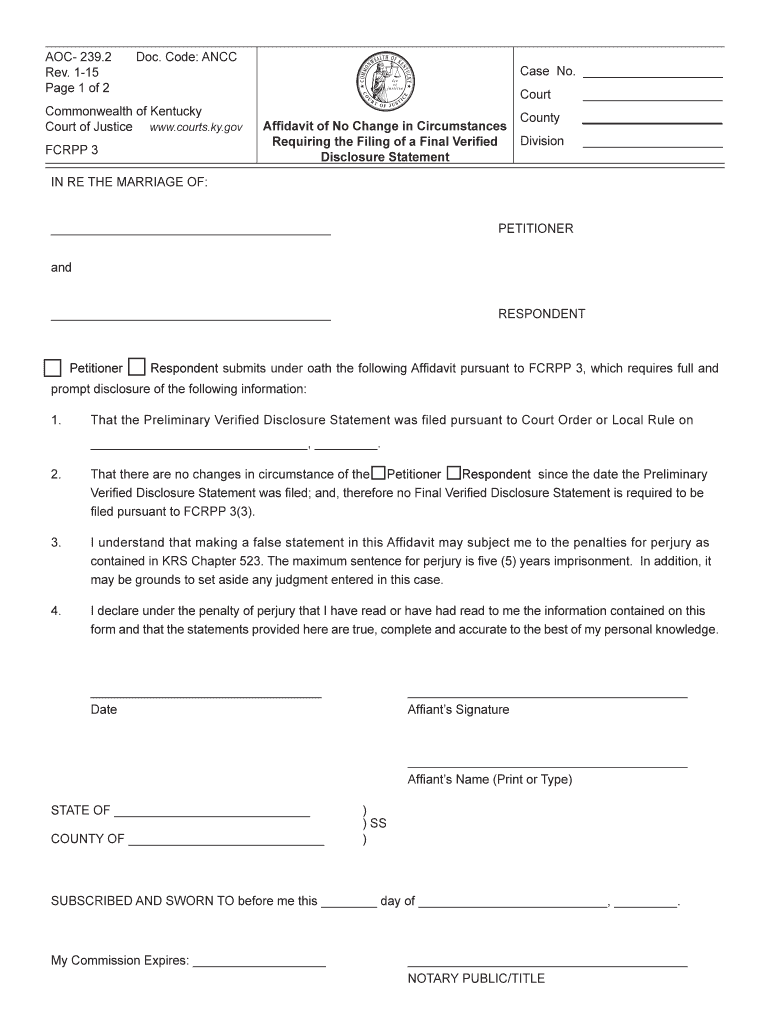
- Begin by entering the Case Number, Court, County, and Division at the top of the form. This information is crucial for identifying your case.
- In the section labeled 'IN RE THE MARRIAGE OF', fill in the names of both the Petitioner and Respondent. Ensure that these names match those on previous filings.
- Indicate whether you are submitting this affidavit as the Petitioner or Respondent by checking the appropriate box.
- Provide the date when the Preliminary Verified Disclosure Statement was filed. This is essential for compliance with court requirements.
- Confirm that there have been no changes in circumstances since that date by checking the corresponding box for either Petitioner or Respondent.
- Read through the statement regarding penalties for perjury carefully, then sign and date where indicated as Affiant.
- Complete the Notary Public section by providing necessary details and ensuring it is signed appropriately.
- Finally, fill out the Certificate of Service section to confirm how this affidavit was served, including recipient details and your signature.
Start using our platform today to complete your Affidavit easily and efficiently!
It's free
See more Affidavit of No Change in Circumstances Requiring the Filing of a - courts ky versions
Got questions?
Can I complete and sign my Affidavit of No Change in Circumstances Requiring the Filing of a - courts ky online?
Sure, and it’s really straightforward! DocHub is a web-based PDF editor with advanced document management functions that allow you quickly adjust your forms, fill out blank fields and drop new ones for others to fill out, and create electronic signatures in several ways. Add your Affidavit of No Change in Circumstances Requiring the Filing of a - courts ky, provide information as requested, and choose how you want to eSign your template - by typing your name, drawing your signature, uploading its picture, or using a QR code.
Can I sign my Affidavit of No Change in Circumstances Requiring the Filing of a - courts ky while I edit it?
If you edit your Affidavit of No Change in Circumstances Requiring the Filing of a - courts ky with DocHub, you will not need to look for other software or solutions to eSign it. An electronic signature is part of DocHub’s comprehensive editing toolset, which allows you to implement changes in your form without switching between websites. Simply complete your form, double-check the correctness of your data and place your electronic signature at the end to make it submission-ready in minutes.
Security and compliance
At DocHub, your data security is our priority. We follow HIPAA, SOC2, GDPR, and other standards, so you can work on your documents with confidence.
Learn more


