NYSHFA-NYSCAL-Membership-Application-fillable-form 2026

Get Form
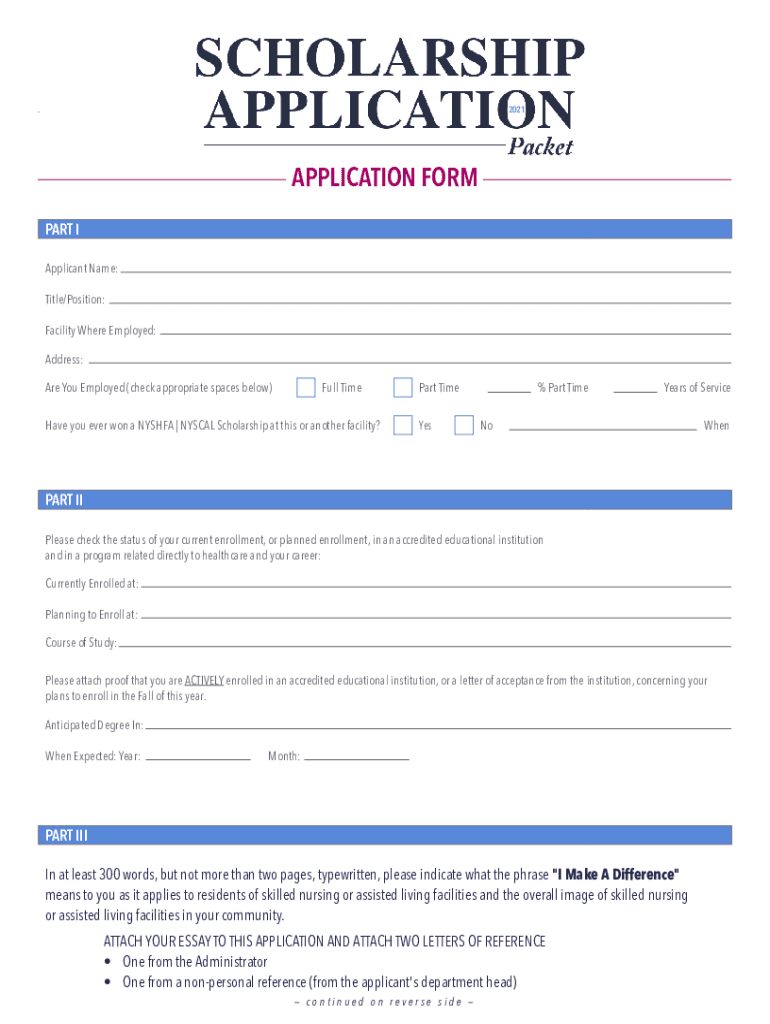
NYSHFA-NYSCAL-Membership-Application-fillable-form Preview on Page 1

Here's how it works

01. Edit your form online
Type text, add images, blackout confidential details, add comments, highlights and more.
02. Sign it in a few clicks
Draw your signature, type it, upload its image, or use your mobile device as a signature pad.
03. Share your form with others
Send it via email, link, or fax. You can also download it, export it or print it out.

How to use or fill out NYSHFA-NYSCAL-Membership-Application-fillable-form with DocHub

Form edit decoration
9.5
Ease of Setup
DocHub User Ratings on G2
9.0
Ease of Use
DocHub User Ratings on G2
  1. Click ‘Get Form’ to open the NYSHFA-NYSCAL-Membership-Application-fillable-form in our editor.
  2. Begin by filling out Part I. Enter your name, title, and facility where you are employed. Indicate your employment status by checking either 'Full Time' or 'Part Time', and provide the percentage if applicable.
  3. In Part II, check your current enrollment status in an accredited educational institution. Specify where you are currently enrolled or planning to enroll, along with your course of study. Remember to attach proof of enrollment or a letter of acceptance.
  4. For Part III, type your essay on what 'I Make A Difference' means to you. Ensure it is between 300 words and two pages long. Attach this essay along with two letters of reference as specified.
  5. Complete Part IV by signing the application and obtaining signatures from your administrator and supervisor. Make sure all dates are filled in correctly.

Start using our platform today for free to complete your application seamlessly!

See more NYSHFA-NYSCAL-Membership-Application-fillable-form versions

We've got more versions of the NYSHFA-NYSCAL-Membership-Application-fillable-form form. Select the right NYSHFA-NYSCAL-Membership-Application-fillable-form version from the list and start editing it straight away!
Versions Form popularity Fillable & printable
2021 4.8 Satisfied (20 Votes)
be ready to get more

Complete this form in 5 minutes or less

Get form

Got questions?

We have answers to the most popular questions from our customers. If you can't find an answer to your question, please contact us.
Contact us
To make a form, you should do the following: Gather personal information like date of birth, phone number and mailing address. Describe the application process and any membership requirements. Provide information about membership levels. Tell them all about membership benefits. Explain membership fees and payment options.
Building Your Membership Site In 10 Steps Step 1: Identify your audience. Step 2: Pick a membership model. Step 3: Choose your membership software. Step 4: Reuse content. Step 5: Create premium content. Step 6: Build the website and your brand. Step 7: Create a member onboarding strategy. Step 8: Decide on a pricing model.
Lets show you how to make membership cards in minutes without coding or design skills. Sign up and start a 45-day free trial. Choose a membership card template from the Pass Designer. Customize the design and branding. Add QR code and membership details. Distribute your digital membership cards. Boost customer engagement.
Steps to Obtain the MDF (Online and In-Person) Step 1: Access the Official PAG-IBIG Website. Step 2: Make an Online Account. Step 3: Fill out the Registration Form. Step 4: Send in Your Registration. Step 5: Retrieve Your MDF. Step 6: Verify Your Email for Confirmation. Step 7: Download and Print Your MDF.
In this step-by-step guide, well show you how to create a registration form using Google Forms. Go to Google Forms. Start a New Form. Title and Description. Add Questions. Customize Your Registration Form. Adjust Settings. Design Your Form. Preview Your Form.

Security and compliance

At DocHub, your data security is our priority. We follow HIPAA, SOC2, GDPR, and other standards, so you can work on your documents with confidence.

Learn more
ccpa2
pci-dss
gdpr-compliance
hipaa
soc-compliance