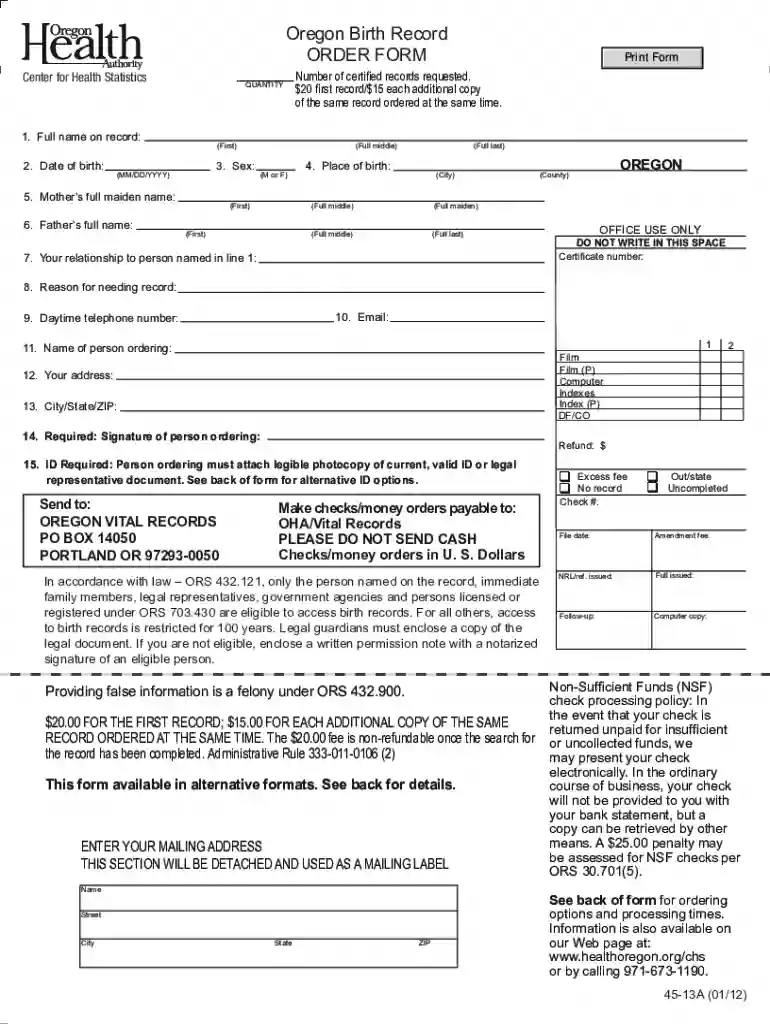
replacement birth certificate oregon Preview on Page 1

Oregon birth certificate application form pdf 2026

Here's how it works

  • 01. Edit your replacement birth certificate oregon online

    Type text, add images, blackout confidential details, add comments, highlights and more.

  • 02. Sign it in a few clicks

    Draw your signature, type it, upload its image, or use your mobile device as a signature pad.

  • 03. Share your form with others

    Send oregon birth certificate replacement via email, link, or fax. You can also download it, export it or print it out.

How to use or fill out Oregon Birth Certificate Application Form PDF with our platform

Form edit decoration
9.5
Ease of Setup
DocHub User Ratings on G2
9.0
Ease of Use
DocHub User Ratings on G2
  1. Click ‘Get Form’ to open the Oregon Birth Certificate Application Form in the editor.
  2. Begin by filling in the 'Full name on record' field with the individual's complete name as it appears on their birth certificate.
  3. Enter the 'Date of birth' in MM/DD/YYYY format, ensuring accuracy for processing.
  4. Select the 'Sex' of the individual by marking either 'M' for male or 'F' for female.
  5. Provide the 'Mother’s full maiden name' and 'Father’s full name', including first, middle, and last names.
  6. Fill in the 'Place of birth', specifying both city and county.
  7. Indicate your relationship to the person named in line 1, followed by your contact information including email and daytime telephone number.
  8. Sign and date the form where indicated, ensuring you attach a photocopy of your ID as required.

Start using our platform today to easily fill out your Oregon Birth Certificate Application Form for free!

See more replacement birth certificate oregon versions

We've got more versions of the replacement birth certificate oregon form. Select the right replacement birth certificate oregon version from the list and start editing it straight away!

VersionsForm popularityFillable & printable
20243.9 Satisfied (31 Votes)
20214.8 Satisfied (192 Votes)
20184.3 Satisfied (131 Votes)
20124 Satisfied (24 Votes)

be ready to get more

Complete this form in 5 minutes or less

Got questions?

We have answers to the most popular questions from our customers. If you can't find an answer to your question, please contact us.

In person through the State Vital Records Office. Office hours: 9 a.m. to 4 p.m. Monday through Friday. Orders must be submitted by 3:30 p.m. to receive the same day. Ordering in person is limited to immediate family members of the person named on the record.
You may order copies of Oregon vital records through VitalChek on an expedited basis. Oregon Vital Records requires all applicants to submit a copy of their government issued photo identification. Appropriate forms will be provided at the end of the order process.
You can use a register office to: register a birth, death, marriage or civil partnership. find records of a birth, death, marriage or civil partnership (if it was registered at that register office) order copies of certificates.
How to fill out the Official Birth Certificate Template Download? Begin by entering the childs full name. Fill in the birth date and time accurately. Provide the names of both parents. Sign the document where indicated. Review the information for accuracy.

Security and compliance

At DocHub, your data security is our priority. We follow HIPAA, SOC2, GDPR, and other standards, so you can work on your documents with confidence.

free oregon birth certificate

Changing your name

You will need: A photocopy of your ID. Your DocHubd application. A form called a Birth Record Order Form. Money to pay the fees for your name change.Read more

Learn more
Birth Certificate Order Form

To receive a certificate, you must: Sign the completed form. Include the payment for your order. Include a copy of your current ID (words must be legibleRead more

Learn more
Recognition (USA)

This article gives information on recognition of nonbinary gender identities in law, government, services, and businesses in the USA.Read more

Learn more
If you believe that this page should be taken down, please follow our DMCA take down process here