Membership Application An Invitation to Builder Membership 2026

Get Form
Membership Application An Invitation to Builder Membership Preview on Page 1

Here's how it works

01. Edit your form online
Type text, add images, blackout confidential details, add comments, highlights and more.
02. Sign it in a few clicks
Draw your signature, type it, upload its image, or use your mobile device as a signature pad.
03. Share your form with others
Send it via email, link, or fax. You can also download it, export it or print it out.

How to use or fill out Membership Application An Invitation to Builder Membership

Form edit decoration
9.5
Ease of Setup
DocHub User Ratings on G2
9.0
Ease of Use
DocHub User Ratings on G2
  1. Click ‘Get Form’ to open it in the editor.
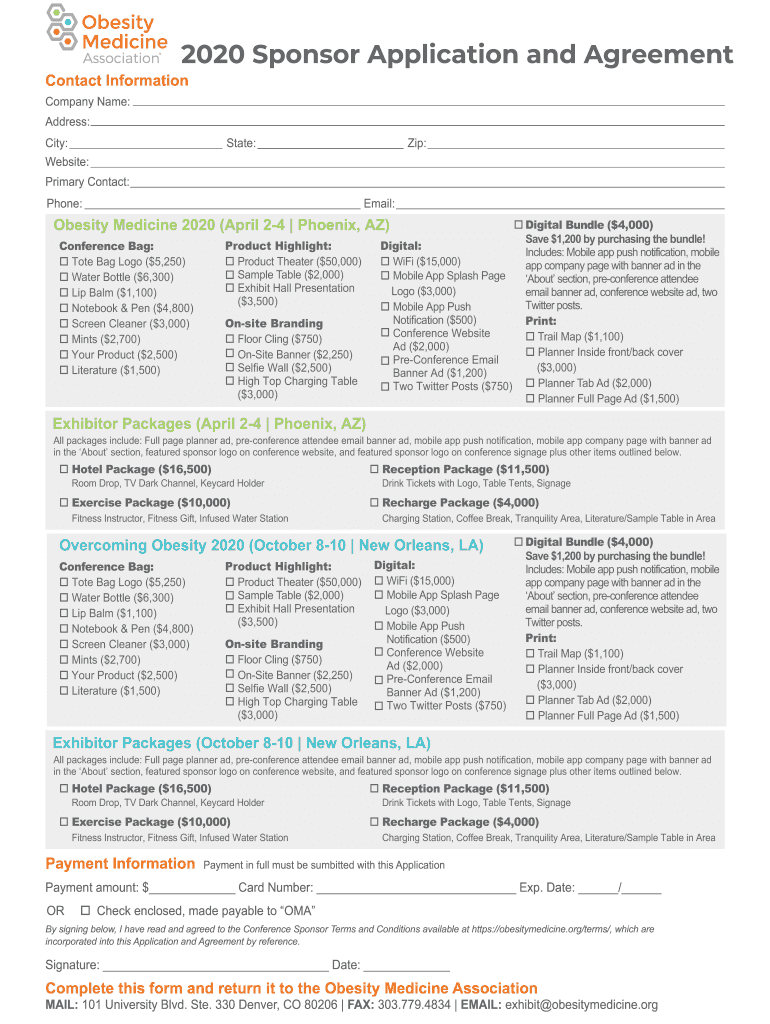
  2. Begin by entering your Contact Information. Fill in the Company Name, Address, City, State, Zip, Website, Primary Contact, Phone, and Email. Ensure all details are accurate for effective communication.
  3. Next, select your desired Product Highlights and Conference Bag options. Check the boxes next to the items you wish to sponsor or include in the conference bag.
  4. Proceed to On-site Branding and Exhibitor Packages sections. Review the available options and check those that align with your sponsorship goals.
  5. In the Payment Information section, indicate your payment amount and method. If paying by card, enter your Card Number and Expiration Date. Alternatively, check if you are enclosing a check.
  6. Finally, sign and date the application at the bottom of the form to confirm your agreement with the terms outlined.

Start filling out your Membership Application today using our platform for free!

See more Membership Application An Invitation to Builder Membership versions

We've got more versions of the Membership Application An Invitation to Builder Membership form. Select the right Membership Application An Invitation to Builder Membership version from the list and start editing it straight away!
Versions Form popularity Fillable & printable
2020 4.8 Satisfied (52 Votes)
be ready to get more

Complete this form in 5 minutes or less

Get form

Got questions?

We have answers to the most popular questions from our customers. If you can't find an answer to your question, please contact us.
Contact us
Think of membership application forms as the first step in the getting-to-know-you process. Not only are prospective members sharing their personal information, but theyre also being officially introduced to your organization.
Its crucial to be clear in your membership invitation email about the benefits of membership and whats in it for the recipients without overwhelming them with too much information. Clarity ensures they understand what theyre signing up for and are more likely to accept your membership offer.
To make a form, you should do the following: Gather personal information like date of birth, phone number and mailing address. Describe the application process and any membership requirements. Provide information about membership levels. Tell them all about membership benefits. Explain membership fees and payment options.
What Do You Write in a Membership Application Letter? The name of the person who wanted to apply for membership. The kind of membership that the individual wants to acquire. The name of the club, organization, or establishment that a person wants to be a member of. The qualifications of the person to be a member.

Security and compliance

At DocHub, your data security is our priority. We follow HIPAA, SOC2, GDPR, and other standards, so you can work on your documents with confidence.

Learn more
ccpa2
pci-dss
gdpr-compliance
hipaa
soc-compliance