




Here's how it works



How to use or fill out Marathon County 4-H Enrollment Summary and Invoice with DocHub

- Click ‘Get Form’ to open the Marathon County 4-H Enrollment Summary and Invoice in our platform.
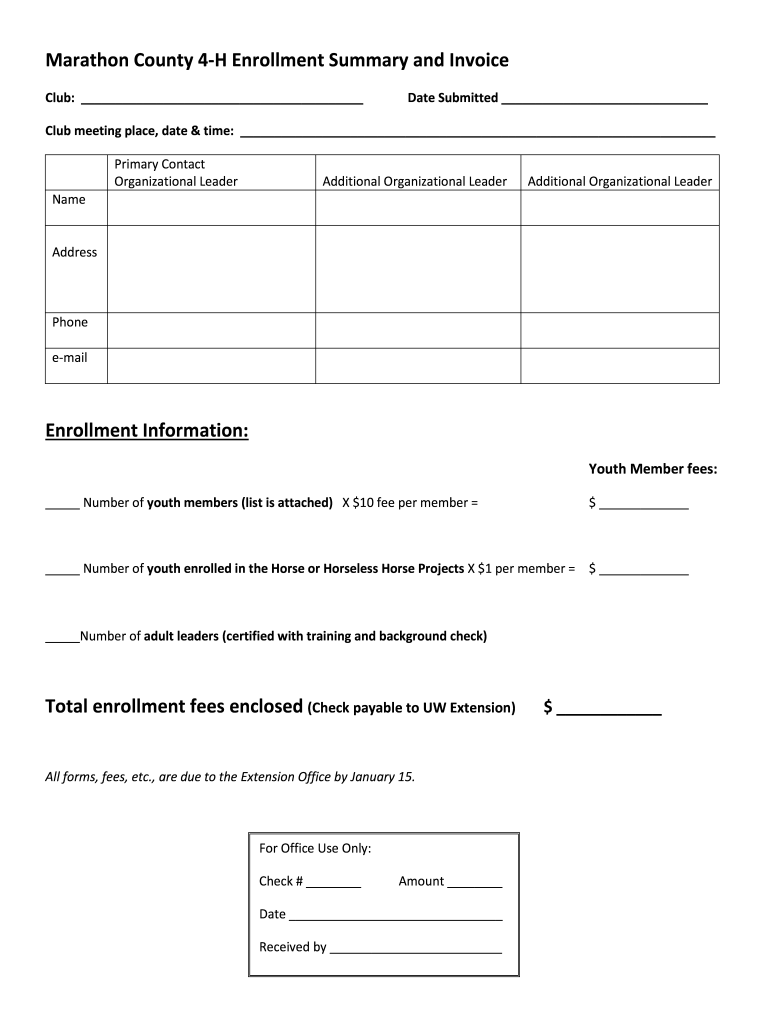
- Begin by filling in the 'Club' name and 'Date Submitted' at the top of the form. Ensure accuracy as this information is crucial for processing.
- In the 'Club meeting place, date & time' section, provide detailed information about your club's meeting schedule to facilitate communication.
- For the 'Primary Contact' section, enter the names, addresses, phone numbers, and emails of all organizational leaders. This ensures that all relevant parties are informed.
- In the 'Enrollment Information' section, calculate youth member fees by entering the number of youth members and multiplying by $10. Also, include any horse project members at $1 each.
- Total your enrollment fees and ensure that all forms and fees are submitted to the Extension Office by January 15.
- Finally, complete the 'For Office Use Only' section with check number, amount, date received, and who received it for internal tracking.
Start using our platform today to easily fill out your Marathon County 4-H Enrollment Summary and Invoice for free!
It's free
See more Marathon County 4-H Enrollment Summary and Invoice versions
| Versions | Form popularity | Fillable & printable |
|---|---|---|
| 2019 | 4.8 Satisfied (170 Votes) |
Got questions?
How do I sign my Marathon County 4-H Enrollment Summary and Invoice on iOS?
With DocHub, you can quickly sign your Marathon County 4-H Enrollment Summary and Invoice or any other paperwork on iOS, even without installing extra programs. You can access your DocHub account from any web-connected browser and fill out and sign your form in any way you like with just a few clicks.
How do you complete Marathon County 4-H Enrollment Summary and Invoice online?
You may complete and sign your Marathon County 4-H Enrollment Summary and Invoice online, even on a tight deadline. All you need to access high quality editing tools on any device is a DocHub account, which you can sign up in a few moments. After you sign up, upload your file or find what you are looking for in our catalog, complete it using the editing tools you want, and put your electronic signature on it at the end.
Security and compliance
At DocHub, your data security is our priority. We follow HIPAA, SOC2, GDPR, and other standards, so you can work on your documents with confidence.
Learn more


