Workforce financial aid 2026

Get Form
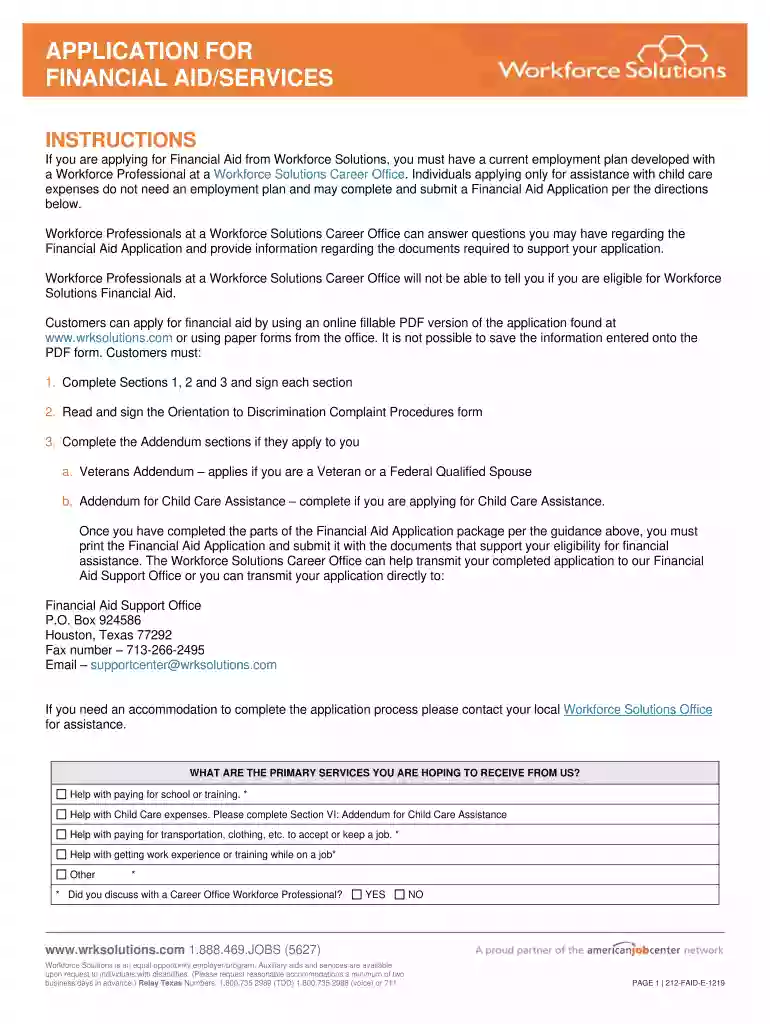
workforce financial aid Preview on Page 1

Here's how it works

01. Edit your workforce financial aid online
Type text, add images, blackout confidential details, add comments, highlights and more.

02. Sign it in a few clicks
Draw your signature, type it, upload its image, or use your mobile device as a signature pad.

03. Share your form with others
Send workforce application financial aid via email, link, or fax. You can also download it, export it or print it out.

How to use or fill out workforce financial aid with our platform

Form edit decoration
9.5
Ease of Setup
DocHub User Ratings on G2
9.0
Ease of Use
DocHub User Ratings on G2
  1. Click ‘Get Form’ to open the workforce financial aid application in the editor.
  2. Begin by filling out Section I: Applicant Information. Provide your name, date of birth, address, and contact details. Ensure all fields are completed accurately.
  3. Move to Section II: Family Information. List all household members, their relationship to you, and their income details for the last six months.
  4. In Section III: Family Income Detail, check applicable income sources for each household member and attach necessary documentation.
  5. Complete Section IV: Family Employment History by detailing employment for the past six months. Include employer names, addresses, and job details.
  6. If applicable, fill out Section V: Veterans Addendum or Section VI: Addendum for Child Care Assistance based on your situation.
  7. Review all sections for accuracy before signing the disclaimers in the final section of the form.

Start using our platform today to streamline your workforce financial aid application process!

See more workforce financial aid versions

We've got more versions of the workforce financial aid form. Select the right workforce financial aid version from the list and start editing it straight away!
Versions Form popularity Fillable & printable
2019 4.8 Satisfied (75 Votes)
2017 3.7 Satisfied (27 Votes)
be ready to get more

Complete this form in 5 minutes or less

Get form

Got questions?

We have answers to the most popular questions from our customers. If you can't find an answer to your question, please contact us.
Contact us
The large majority of workforce education students with documented financial need do receive some form of traditional student financial aid.
Only courses required for your current major and your degree program are eligible. Courses required for a minor may be eligible for financial aid if they also fulfill core, major, or elective requirements for your degree.
In order to receive Financial Aid for developmental (prep) courses, you must declare an eligible major. If you must take developmental classes, your coursework will be considered a part of your program. Federal regulations prohibit your receiving federal student aid for more than 30 hours of developmental coursework.
How to qualify An incoming freshman or new transfer student. Apply for admission no later than June 1. A Missouri resident. A U.S. citizen or eligible non-citizen. Eligible to receive a Federal Pell Grant. Student Aid Index (SAI) of 12,000 or less, as determined by the FAFSA. Seeking an undergraduate degree.
Tuition Aid Grant (TAG) The Tuition Aid Grant (TAG) offers need-based assistance to New Jersey students enrolled at approved New Jersey higher education institutions, covering a substantial portion of tuition for more than a quarter of all full-time undergraduate students.

Security and compliance

At DocHub, your data security is our priority. We follow HIPAA, SOC2, GDPR, and other standards, so you can work on your documents with confidence.

Learn more
ccpa2
pci-dss
gdpr-compliance
hipaa
soc-compliance
be ready to get more

Complete this form in 5 minutes or less

Get form