Type text, add images, blackout confidential details, add comments, highlights and more.
02. Sign it in a few clicks
Draw your signature, type it, upload its image, or use your mobile device as a signature pad.
03. Share your form with others
Send it via email, link, or fax. You can also download it, export it or print it out.
How to use or fill out ptsa roster with our platform
Ease of Setup
DocHub User Ratings on G2
Ease of Use
DocHub User Ratings on G2
Click ‘Get Form’ to open the ptsa roster in the editor.
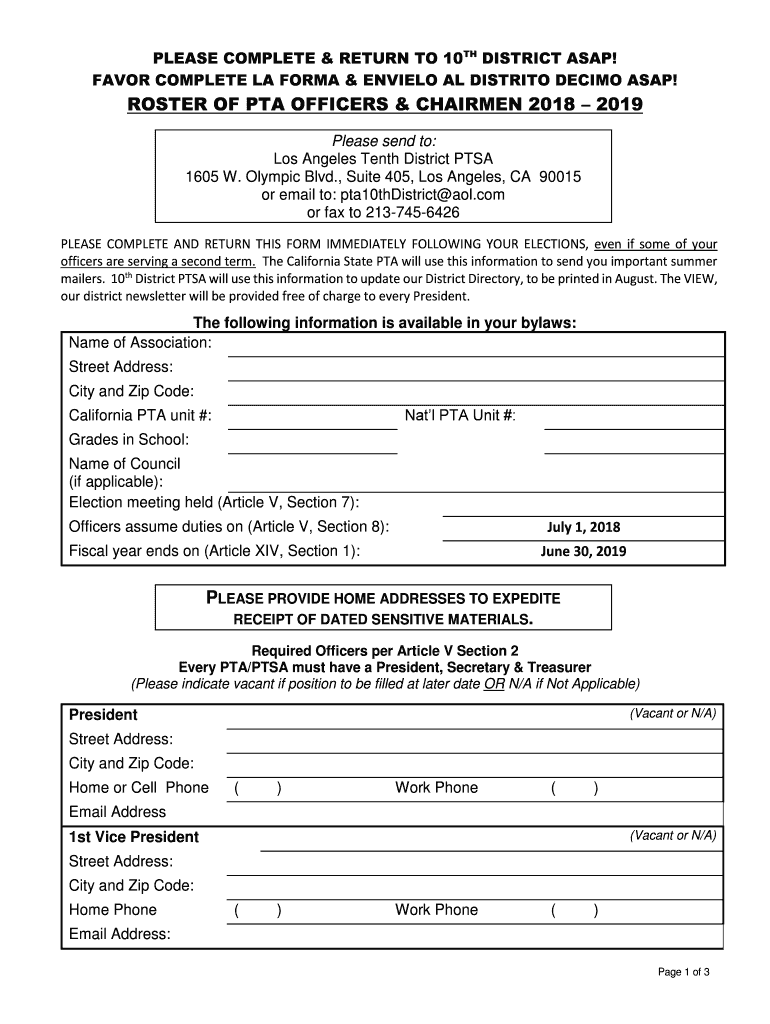
Begin by entering your association's name, street address, city, and zip code in the designated fields. This information is crucial for accurate communication.
Fill in the National PTA Unit number and California PTA unit number as required. Ensure these numbers are correct to avoid any issues with your registration.
Indicate the grades represented in your school and provide the name of your council if applicable. This helps in categorizing your PTA effectively.
Complete the officer details section by filling out names, addresses, phone numbers, and email addresses for each position. If a position is vacant or not applicable, indicate this clearly.
Review all entered information for accuracy before submitting. Once satisfied, save your changes and send the completed form via email or fax as instructed.
Start using our platform today to easily complete your ptsa roster online for free!
The short answer: PTSA stands for Parent Teacher Student Association. It is a version of the traditional PTA (Parent Teacher Association), but with an important twist. Students are full members too. That small change can open up new opportunities for leadership, collaboration, and fresh ideas at your school.
What is the role of a PTSA?
Overview of PTSA PTSA, or p-toluenesulfonic acid, is an organic compound with the chemical formula CH3C6H4SO3H. It belongs to the class of aromatic sulfonic acids and is commonly used in various industrial applications due to its strong acidic nature and excellent solubility in water and organic solvents.
What does PTSA mean?
Daily pre-task hazard prevention planning will be conducted by all crews. This planning, hazard recognition, and determination of controls will be documented daily on Pre-Task Safety Analysis (PTSA) forms.
Related Searches
Ardsley PTSAPlano West PTSAJasper PTAArdsley ptsa calendar
Security and compliance
At DocHub, your data security is our priority. We follow HIPAA, SOC2, GDPR, and other standards, so you can work on your documents with confidence.
Cookie consent notice
This site uses cookies to enhance site navigation and personalize your experience.
By using this site you agree to our use of cookies as described in our Privacy Notice.
You can modify your selections by visiting our Cookie and Advertising Notice.