




Here's how it works



How to use or fill out Risk Management Forms California State University, Northridge with our platform

- Click ‘Get Form’ to open the Risk Management Form in the editor.
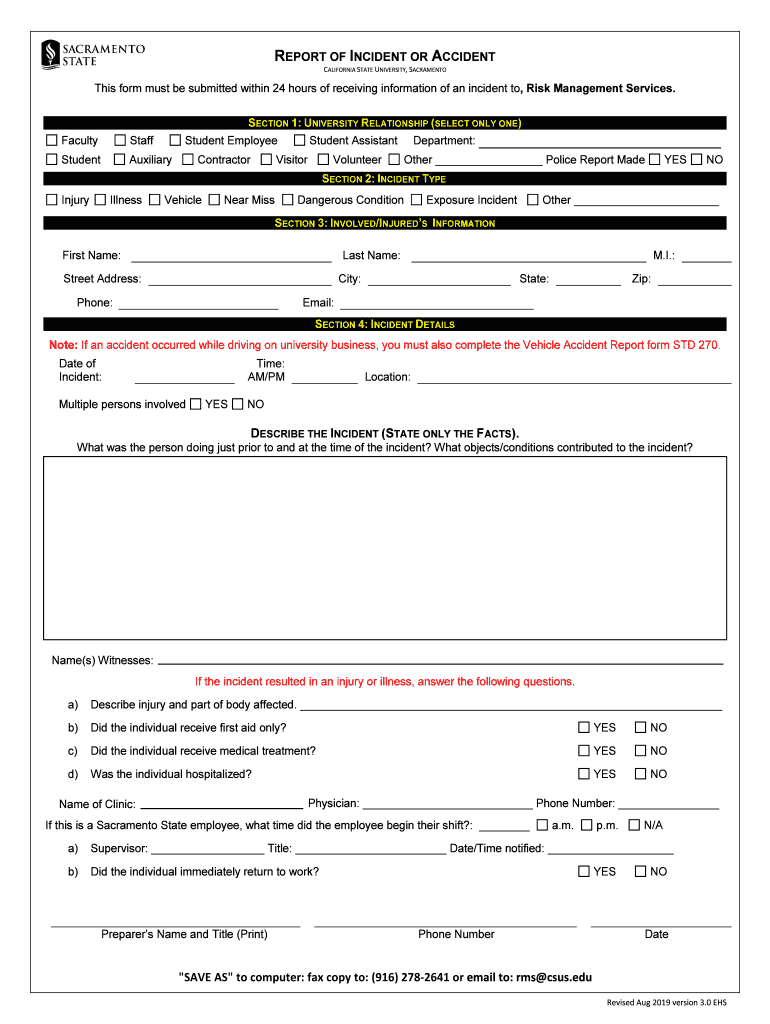
- Begin by selecting your university relationship from Section 1. Choose only one option that best describes your status, such as Faculty, Staff, or Student.
- In Section 2, indicate the type of incident by selecting one from the list provided. Options include Injury, Illness, Vehicle, and more.
- Fill out Section 3 with the involved/injured person's information. Ensure you provide accurate details including their name, address, phone number, and email.
- In Section 4, describe the incident in detail. Include the date and time of the incident and any witnesses present. Be factual and concise.
- If applicable, answer questions regarding injuries sustained and medical treatment received. This includes whether first aid was administered or if hospitalization occurred.
- Once completed, utilize our platform's 'SAVE AS' feature to save a copy to your computer. You can also fax or email it directly to Risk Management Services.
Start using our platform today for free to streamline your form completion process!
It's free
See more Risk Management FormsCalifornia State University, Northridge versions
| Versions | Form popularity | Fillable & printable |
|---|---|---|
| 2019 | 4.8 Satisfied (46 Votes) |
Got questions?
Can I sign my Risk Management FormsCalifornia State University, Northridge in electronic format?
Based on eSignature regulations, forms signed digitally have the same validity as traditionally approved ones. You can electronically sign almost any business and personal documentation. Four types of documents still require wet signatures only - wills and testamentary trusts, court orders and other court papers, state statutes regulating divorce, adoption, or other family law, and notice of cancellation of utility services. If you follow the regulations and utilize a secure and compliant software solution, like DocHub, you can eSign your Risk Management FormsCalifornia State University, Northridge without printing it.
Can I print my Risk Management FormsCalifornia State University, Northridge and complete it on my own?
If you go for analog ways of completing your Risk Management FormsCalifornia State University, Northridge, you can easily download your file for printing. Search DocHub’s Forms & Templates catalog to locate the exact document template you need and open it for editing or download it on your gadget in the format of your liking. It is possible to complete your form electronically and put your handwritten signature on it right after printing or eSign your document with DocHub.
What major is CSUN known for?
What is Northridge known for?
What is Cal State Northridge known for?
Security and compliance
At DocHub, your data security is our priority. We follow HIPAA, SOC2, GDPR, and other standards, so you can work on your documents with confidence.
Learn more


