Students wlu caacademicssupport-and-advisingGrade Reassessment FormFoundationsStudents - Wilfrid 2026

Get Form
students wlu caacademicssupport-and-advisingGrade Reassessment FormFoundationsStudents - Wilfrid Preview on Page 1

Here's how it works

01. Edit your form online
Type text, add images, blackout confidential details, add comments, highlights and more.
02. Sign it in a few clicks
Draw your signature, type it, upload its image, or use your mobile device as a signature pad.
03. Share your form with others
Send it via email, link, or fax. You can also download it, export it or print it out.

How to use or fill out students wlu caacademicssupport-and-advisingGrade Reassessment FormFoundationsStudents - Wilfrid

Form edit decoration
9.5
Ease of Setup
DocHub User Ratings on G2
9.0
Ease of Use
DocHub User Ratings on G2
  1. Click ‘Get Form’ to open it in the editor.
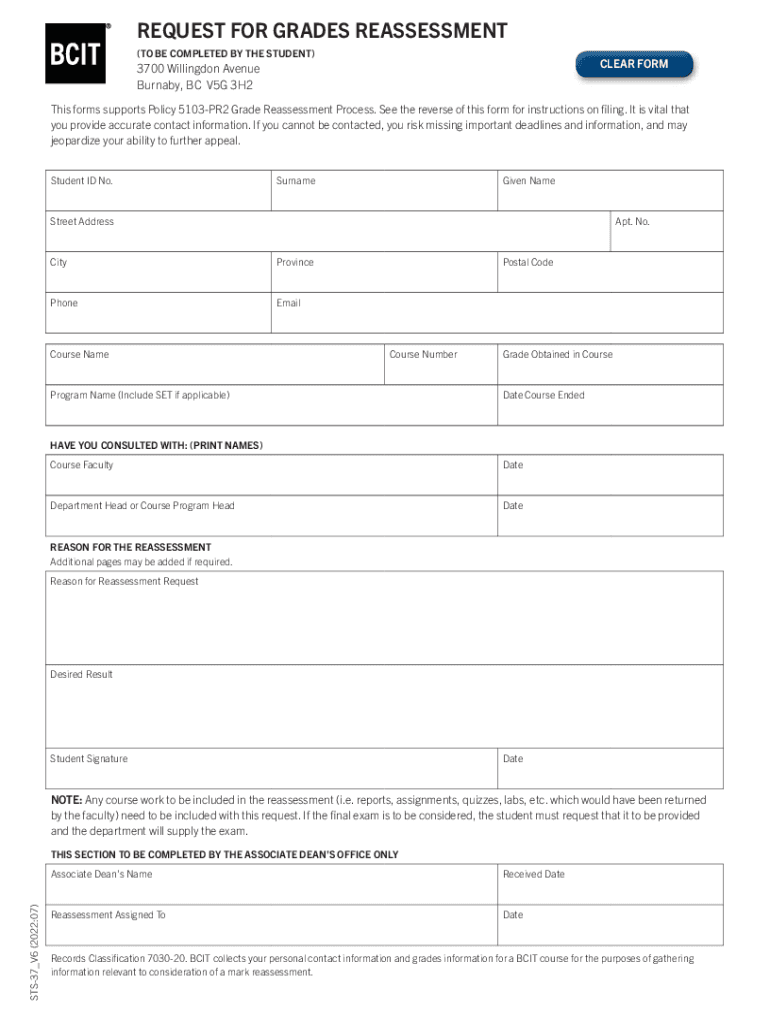
  2. Begin by entering your Student ID No., Surname, and Given Name in the designated fields. Ensure that all information is accurate to avoid any delays.
  3. Fill in your contact details, including Street Address, Apt. No., City, Province, Phone, and Email. This information is crucial for communication regarding your reassessment request.
  4. Provide details about the course by entering the Course Name, Course Number, Program Name, Grade Obtained in Course, and Date Course Ended.
  5. In the 'HAVE YOU CONSULTED WITH' section, print the names of the Course Faculty and Department Head or Course Program Head along with the respective dates.
  6. Clearly state your Reason for Reassessment and Desired Result. If necessary, you can add additional pages for more detailed explanations.
  7. Sign and date the form at the bottom before submitting it to ensure it is valid.

Start using our platform today to streamline your form completion process for free!

See more students wlu caacademicssupport-and-advisingGrade Reassessment FormFoundationsStudents - Wilfrid versions

We've got more versions of the students wlu caacademicssupport-and-advisingGrade Reassessment FormFoundationsStudents - Wilfrid form. Select the right students wlu caacademicssupport-and-advisingGrade Reassessment FormFoundationsStudents - Wilfrid version from the list and start editing it straight away!
Versions Form popularity Fillable & printable
2022 4.8 Satisfied (34 Votes)
2019 4.4 Satisfied (31 Votes)
2013 4.7 Satisfied (47 Votes)
be ready to get more

Complete this form in 5 minutes or less

Get form

Got questions?

We have answers to the most popular questions from our customers. If you can't find an answer to your question, please contact us.
Contact us

With DocHub, you can easily approve your students wlu caacademicssupport-and-advisingGrade Reassessment FormFoundationsStudents - Wilfrid or any other document on iOS, even without setting up extra applications. You can access your DocHub account from any internet-connected browser and fill out and sign your document in any way you like with just a few clicks.

If you store your paperwork in Google Drive, there is no need to download your students wlu caacademicssupport-and-advisingGrade Reassessment FormFoundationsStudents - Wilfrid on the computer and upload it back to our editor. A much easier way is to set up a browser extension created by DocHub to streamline this flow. The extension allows editing PDFs right in your internet browser. Alternatively, you may integrate your DocHub and Gmail accounts for more efficient modifying.

Senior student A student who has completed at least 4.0 credits and is classified as Year 2, Year 3, Year 4, post-degree, etc.
Once you repeat a course, the new mark replaces the earlier mark and becomes part of your overall GPA.
When courses are taken twice but passed once, both grades are included in average calculations regardless of whether the failure occurred on the first or subsequent registration. In such cases, both a credit and a failure are recorded.

Security and compliance

At DocHub, your data security is our priority. We follow HIPAA, SOC2, GDPR, and other standards, so you can work on your documents with confidence.

Learn more
ccpa2
pci-dss
gdpr-compliance
hipaa
soc-compliance
be ready to get more

Complete this form in 5 minutes or less

Get form

People also ask

Once a course is repeated, only the higher grade earned is used to calculate the GPA. All courses remain on the students transcript. Department policies may require a student to repeat a major course if a grade is obtained that is less than the required minimum.
LORIS (Laurier Online Registration and Information System) is the administration tool used to update your personal information, complete course registration, view student accounts and funding opportunities, check your grades, get safety notifications and much more.
When a course is repeated the grade received in the second attempt will be used to calculate the GPA. Special averages (i.e., those calculated for distinctions) do not conform to this practice. Students in degree programs may repeat courses up to a maximum of 2.0 credits.