




Here's how it works

01. Edit your form online
Type text, add images, blackout confidential details, add comments, highlights and more.

02. Sign it in a few clicks
Draw your signature, type it, upload its image, or use your mobile device as a signature pad.

03. Share your form with others
Send it via email, link, or fax. You can also download it, export it or print it out.
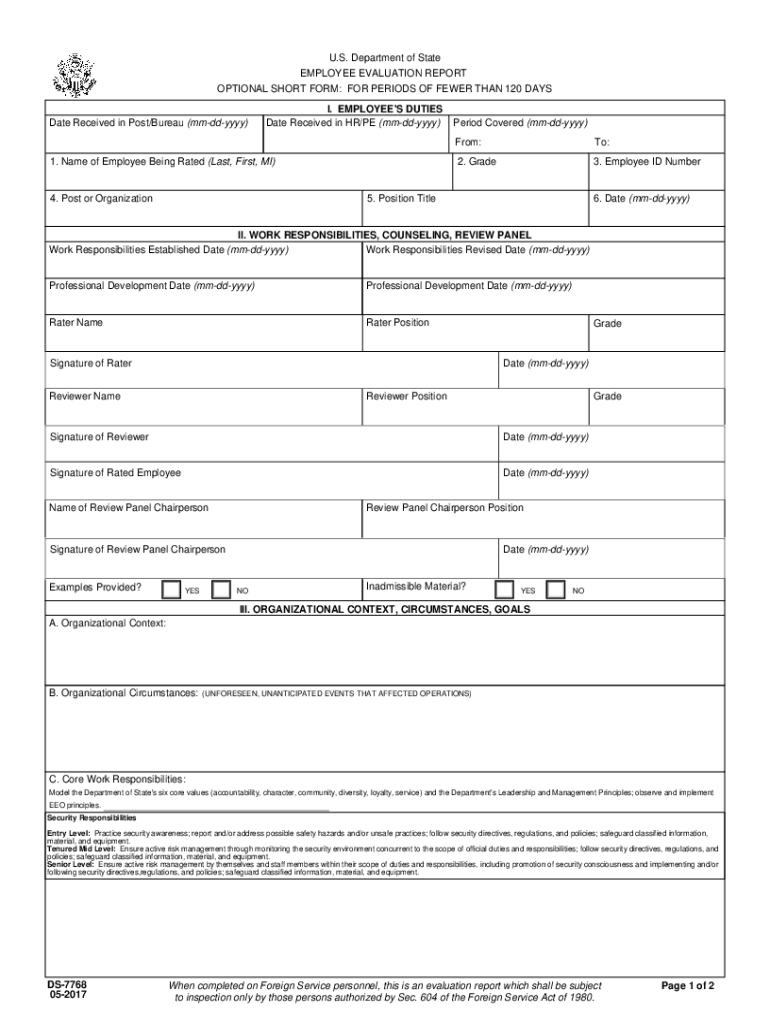
How to use or fill out eforms state Formsds7768U S Department of State EMPLOYEE EVALUATION REPORT OPTIONAL

- Click ‘Get Form’ to open it in the editor.
- Begin by entering the 'Date Received in Post/Bureau' and 'Date Received in HR/PE' in the specified format (mm-dd-yyyy).
- Fill in the employee's details under 'I. EMPLOYEE'S DUTIES', including their name, grade, employee ID number, position title, and organization.
- In section II, provide information regarding work responsibilities, including established and revised dates for these responsibilities.
- Complete the evaluation sections by having the rater and reviewer fill out their names, positions, signatures, and dates.
- Utilize section VI for any optional statements that the rated employee wishes to include for clarification or correction.
Start using our platform today to streamline your form completion process for free!
Fill out eforms state Formsds7768U S Department of State EMPLOYEE EVALUATION REPORT OPTIONAL online
It's free
It's free
See more eforms state Formsds7768U S Department of State EMPLOYEE EVALUATION REPORT OPTIONAL versions
We've got more versions of the eforms state Formsds7768U S Department of State EMPLOYEE EVALUATION REPORT OPTIONAL form. Select the right eforms state Formsds7768U S Department of State EMPLOYEE EVALUATION REPORT OPTIONAL version from the list and start editing it straight away!
| Versions | Form popularity | Fillable & printable |
|---|---|---|
| 2017 | 4.8 Satisfied (178 Votes) |
Got questions?
We have answers to the most popular questions from our customers. If you can't find an answer to your question, please contact us.
Contact us
What does employee evaluation mean?
When you fill the form: Be honest and critical. Analyze your failures and mention the reasons for it. Keep the words minimal. Identify weaknesses. Mention your achievements. Link achievements to the job description and the organizations goals. Set the goals for the next review period. Resolve conflicts and grievances.
What is the employee evaluation form?
An employee evaluation form is a tool that employers use to provide feedback on employees work performance.
Security and compliance
At DocHub, your data security is our priority. We follow HIPAA, SOC2, GDPR, and other standards, so you can work on your documents with confidence.
Learn more


