Aps claims 2026

Get Form
aps claims Preview on Page 1

Here's how it works

01. Edit your aps claims online
Type text, add images, blackout confidential details, add comments, highlights and more.

02. Sign it in a few clicks
Draw your signature, type it, upload its image, or use your mobile device as a signature pad.

03. Share your form with others
Send it via email, link, or fax. You can also download it, export it or print it out.

How to use or fill out aps claims with our platform

Form edit decoration
9.5
Ease of Setup
DocHub User Ratings on G2
9.0
Ease of Use
DocHub User Ratings on G2
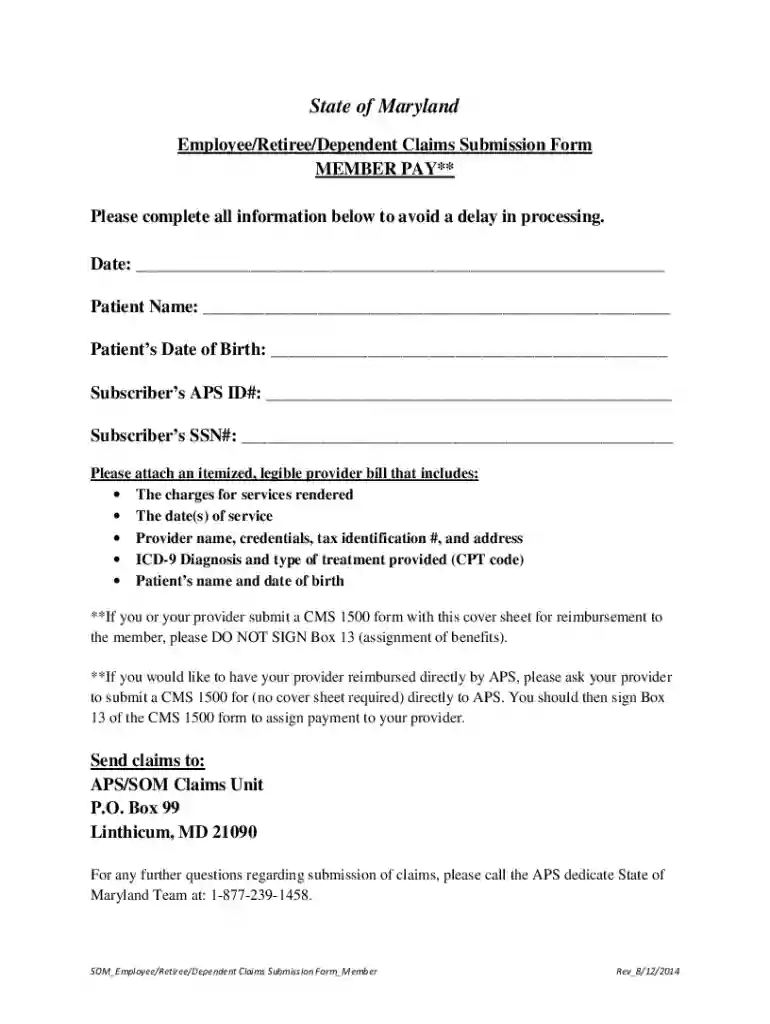
  1. Click ‘Get Form’ to open the aps claims submission form in the editor.
  2. Begin by entering the date of the claim at the top of the form. This helps in tracking your submission.
  3. Fill in the patient’s name and date of birth accurately to ensure proper identification.
  4. Enter your Subscriber’s APS ID# and SSN#. These details are crucial for processing your claim without delays.
  5. Attach an itemized provider bill that includes all required information such as charges, dates of service, provider details, and diagnosis codes. Use our platform's upload feature for convenience.
  6. If applicable, ensure you do not sign Box 13 on the CMS 1500 form if submitting with this cover sheet. For direct reimbursement requests, sign Box 13 on the CMS 1500 form instead.
  7. Finally, send your completed claims to APS/SOM Claims Unit at the provided address. You can also save a copy using our platform for your records.

Start filling out your aps claims today for free using our platform!

See more aps claims versions

We've got more versions of the aps claims form. Select the right aps claims version from the list and start editing it straight away!
Versions Form popularity Fillable & printable
2014 4.8 Satisfied (68 Votes)
2012 4 Satisfied (55 Votes)
be ready to get more

Complete this form in 5 minutes or less

Get form

Got questions?

We have answers to the most popular questions from our customers. If you can't find an answer to your question, please contact us.
Contact us
An Attending Physician Statement (APS) is a form questionnaire from the insurance company that your treating doctor must complete. The purpose of the APS is for your doctor to docHub your inability to work.
Arizona Public Service (APS) is an electric utility serving central Arizona. The utility continued to promote energy efficiency with offerings across multiple sectors, with its ENERGY STAR programs saving more than 140,700 megawatt hours of energy over the past year.
Pinnacle West Capital Arizona Public Service / Parent organization
The insurance provider requires detailed evidence of how the condition affects the patients ability to work, so the attending physician completes an APS template to document the patients diagnosis, progressive symptoms, treatment plan, and specific functional limitations.
Pinnacle West Capital Corporation is an American utility holding company that owns Arizona Public Service (APS). It is publicly traded on the New York Stock exchange and a component of the SP 500 stock market index.

Security and compliance

At DocHub, your data security is our priority. We follow HIPAA, SOC2, GDPR, and other standards, so you can work on your documents with confidence.

Learn more
ccpa2
pci-dss
gdpr-compliance
hipaa
soc-compliance
be ready to get more

Complete this form in 5 minutes or less

Get form