Ultc 100 2 2026

Get Form
ultc 100 2 Preview on Page 1

Here's how it works

01. Edit your ultc 100 2 online
Type text, add images, blackout confidential details, add comments, highlights and more.

02. Sign it in a few clicks
Draw your signature, type it, upload its image, or use your mobile device as a signature pad.

03. Share your form with others
Send it via email, link, or fax. You can also download it, export it or print it out.

How to use or fill out ultc 100 2 with our platform

Form edit decoration
9.5
Ease of Setup
DocHub User Ratings on G2
9.0
Ease of Use
DocHub User Ratings on G2
  1. Click ‘Get Form’ to open the ultc 100 2 in the editor.
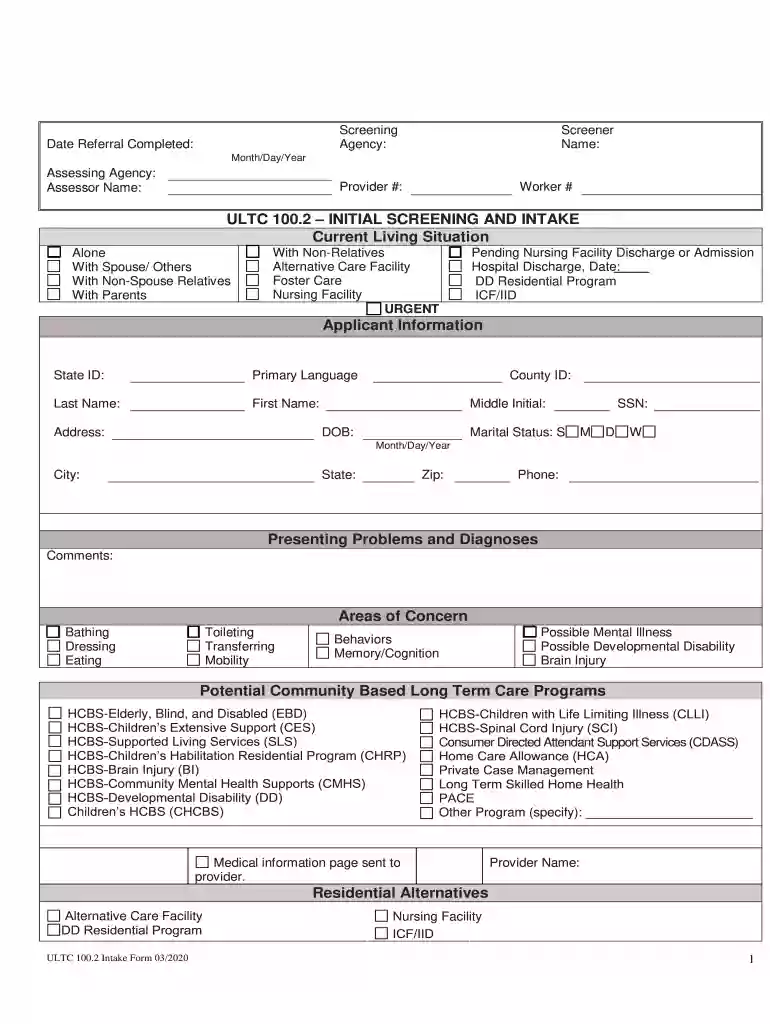
  2. Begin by filling out the 'Agency' and 'Date Referral Completed' fields at the top of the form. Ensure accuracy as this information is crucial for processing.
  3. In the 'Current Living Situation' section, select one of the options that best describes your living arrangement. This helps assess your needs effectively.
  4. Provide your personal details in the 'Applicant Information' section, including State ID, name, address, and date of birth. Double-check for any typos.
  5. In 'Presenting Problems and Diagnoses', indicate any areas of concern such as bathing or mobility. Use checkboxes for clarity.
  6. Complete the 'Financial Information' section by detailing income sources and assets. This information is vital for eligibility assessment.
  7. Finally, review all entries for completeness before signing at the bottom of the form to certify accuracy.

Start using our platform today to fill out your ultc 100 2 form easily and efficiently!

See more ultc 100 2 versions

We've got more versions of the ultc 100 2 form. Select the right ultc 100 2 version from the list and start editing it straight away!
Versions Form popularity Fillable & printable
2020 4.8 Satisfied (147 Votes)
2003 4 Satisfied (36 Votes)
be ready to get more

Complete this form in 5 minutes or less

Get form

Got questions?

We have answers to the most popular questions from our customers. If you can't find an answer to your question, please contact us.
Contact us
Approximate Monthly Income To Qualify for Health First Colorado Family SizeAdults 19-65Children 0-18 Family of 1 up to $1,670 up to $1,783 Family of 2 up to $2,266 up to $2,419 Family of 3 up to $2,862 up to $3,056 Family of 4 up to $3,458 up to $3,6921 more row
Health Screening and Underwriting Depending on your age and health issues, a face-to-face assessment in your home may be required too. The underwriting process typically takes from 4 6 weeks depending on how quickly your medical records are received and reviewed.
The value of 100P2 is 9900. Step-by-step explanation: 100P2 stands for the number of permutation of 100 different things taken 2 at a time.
Colorado Medicaids look-back rule This is the 5-year period that immediately precedes ones date of application. During the look-back, Medicaid checks all asset transfers to ensure none were sold or gifted under fair market value. This includes asset transfers made by ones spouse.
It may take up to 45 days or up to 90 days if the application requires a disability determination from the date your application was received for a case number to be assigned to you. Once you are assigned a case number, you can check your status and benefits online through Colorado PEAK.

Security and compliance

At DocHub, your data security is our priority. We follow HIPAA, SOC2, GDPR, and other standards, so you can work on your documents with confidence.

Learn more
ccpa2
pci-dss
gdpr-compliance
hipaa
soc-compliance
be ready to get more

Complete this form in 5 minutes or less

Get form

People also ask

Apply For Health First Colorado Apply by phone: Call 1-800-221-3943 / State Relay: 711. Phone applications are available Monday through Friday from 8 a.m. to 4 p.m. Apply by mail: Download and print a paper application. Explore options: If you applied and didnt qualify, you can learn more about your options.

Related links