Type text, add images, blackout confidential details, add comments, highlights and more.
02. Sign it in a few clicks
Draw your signature, type it, upload its image, or use your mobile device as a signature pad.
03. Share your form with others
Send it via email, link, or fax. You can also download it, export it or print it out.
How to use or fill out cc dr 6 form with our platform
Ease of Setup
DocHub User Ratings on G2
Ease of Use
DocHub User Ratings on G2
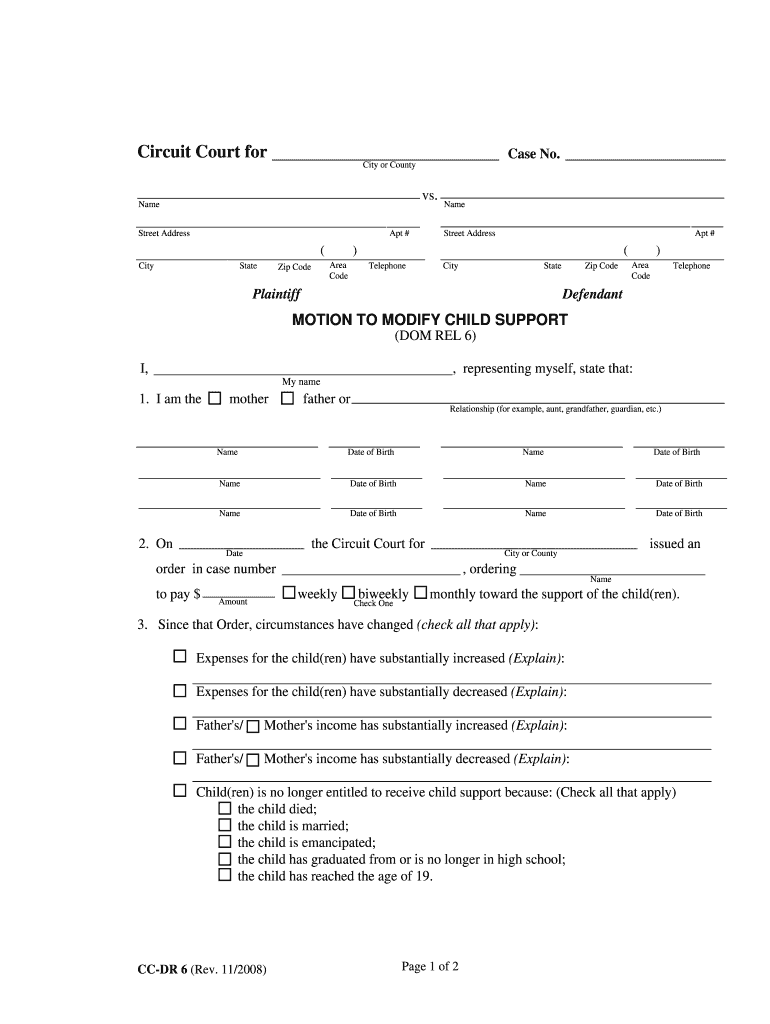
Click ‘Get Form’ to open the cc dr 6 form in the editor.
Begin by entering your name and relationship to the child(ren) in the designated fields. Ensure accuracy as this information is crucial for your case.
Fill in the details of the existing court order, including the case number, amount of support, and frequency of payments (weekly, biweekly, or monthly).
Indicate any changes in circumstances that have affected child support by checking the relevant boxes and providing explanations where necessary.
Select your requests to the court regarding child support adjustments. Be sure to check all applicable options for clarity.
Affix your signature and date at the bottom of the form to affirm that all information provided is true.
Complete a financial statement using Form DOM REL 30 or DOM REL 31 as required before submitting your motion.
Start editing your cc dr 6 form online for free today!
MD child support modification formCC DR 007Motion to modify child support MarylandFinancial Statement General cc dr 031Form DR 7CC-DR-112Child support forms MarylandChild support increase form
Security and compliance
At DocHub, your data security is our priority. We follow HIPAA, SOC2, GDPR, and other standards, so you can work on your documents with confidence.
PETITION/MOTION TO MODIFY CHILD SUPPORT. INSTRUCTIONS FOR COMPLETING FORM CC-DR-006. If you have a court order to pay or receive child support (for example,Read more
Student Information Academic Renewal Petition Processing Time: 7 to 10 business days Application for Admission: PDF Online Application for Refund of FeesRead more
Cookie consent notice
This site uses cookies to enhance site navigation and personalize your experience.
By using this site you agree to our use of cookies as described in our Privacy Notice.
You can modify your selections by visiting our Cookie and Advertising Notice.