




Here's how it works



How to use or fill out landstown high school parking with our platform

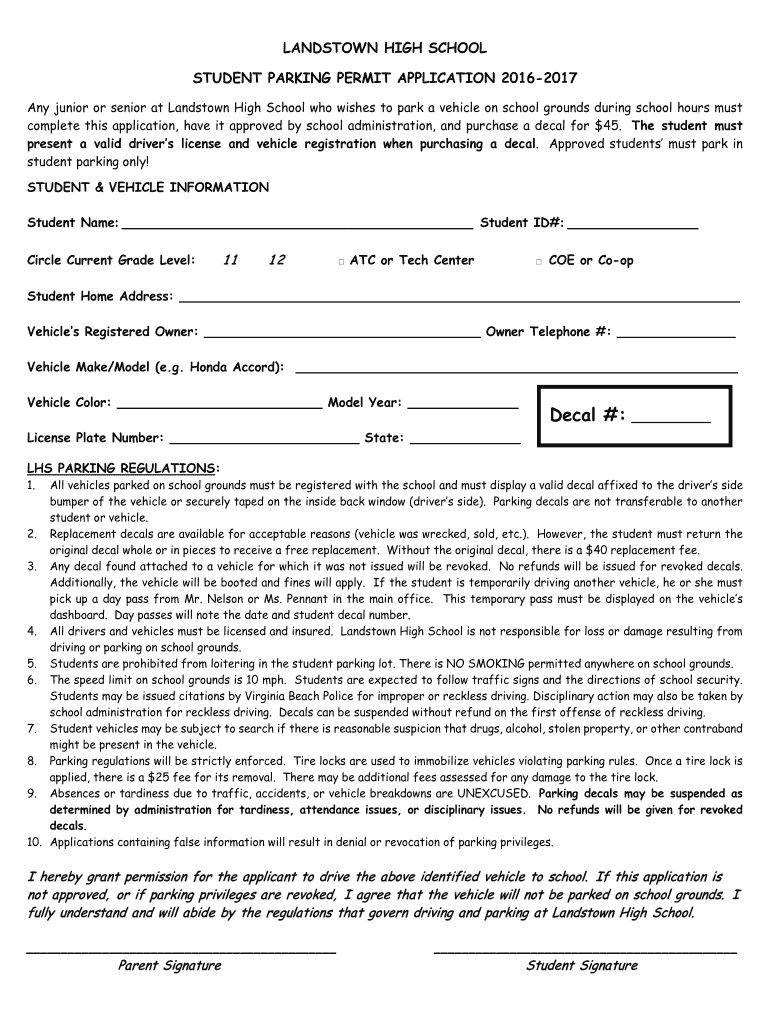
- Click ‘Get Form’ to open the Landstown High School Student Parking Permit Application in the editor.
- Begin by entering your Student Name and Student ID# in the designated fields. Ensure that you circle your current grade level (11, 12, ATC/Tech Center, or COE/Co-op).
- Fill out your home address and provide details about the vehicle, including the Registered Owner's name and telephone number.
- Complete the Vehicle Make/Model, Color, Model Year, Decal #, License Plate Number, and State fields accurately.
- Review the LHS Parking Regulations carefully. Acknowledge your understanding by signing in the designated areas for both parent and student.
Start filling out your Landstown High School parking application online for free today!
It's free
See more landstown high school parking versions
| Versions | Form popularity | Fillable & printable |
|---|---|---|
| 2017 | 4.8 Satisfied (201 Votes) |
Got questions?
How can I send my landstown high school parking from Google Drive for signing?
If you often deal with documents stored in your Google Drive, DocHub is an excellent solution for you to easily and quickly fill out, adjust, and approve them. This editor integrates well with Google apps, so you can export your landstown high school parking from your Google Drive to the editor without downloading and re-uploading it. Right-click on your document, select Open With → DocHub PDF Sign and Edit. In our editor, add and assign Signature Fields for all people involved, then click on the Menu button above → Send → select how you want to share your form.
Do I need to set up software to modify my landstown high school parking?
If you edit your landstown high school parking with DocHub, you merely need a stable web connection and virtually any browser installed on your device. No need to set up any third-party software or study guides. Simply open a tab with DocHub, drag and drop your file, and edit it immediately.
Security and compliance
At DocHub, your data security is our priority. We follow HIPAA, SOC2, GDPR, and other standards, so you can work on your documents with confidence.
Learn more


