




Here's how it works



How to use or fill out Kansas vs Accused person’s name NOTICE TO APPEAR - kansasjudicialcouncil with our platform

- Click ‘Get Form’ to open it in the editor.
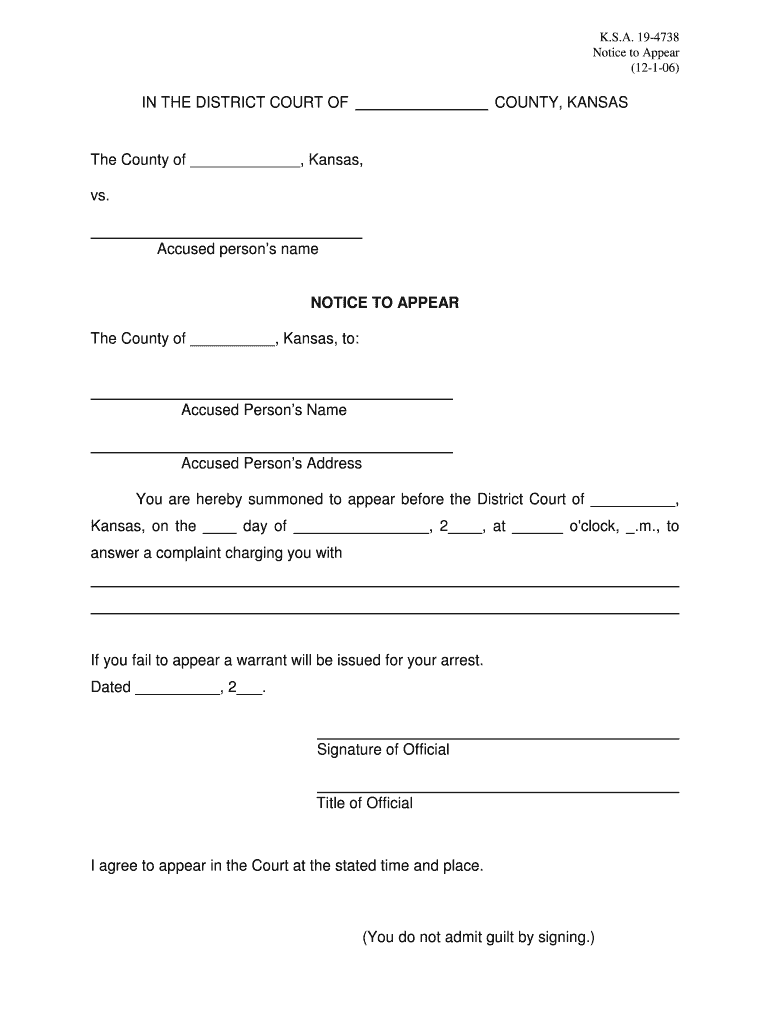
- Begin by filling in the 'County' field at the top of the form. This specifies the jurisdiction of your case.
- Enter the 'Accused Person’s Name' and 'Address' in the designated fields. Ensure accuracy as this information is crucial for legal proceedings.
- In the section that states 'You are hereby summoned to appear...', fill in the date and time you are required to appear before the District Court.
- Sign and date where indicated to acknowledge your understanding of the notice. Remember, signing does not imply guilt.
- Complete the 'RETURN ON SERVICE OF NOTICE TO APPEAR' section if applicable, detailing how the notice was served.
Start using our platform today for free to streamline your document editing and ensure a smooth process!
It's free
See more Kansas vs Accused person39s name NOTICE TO APPEAR - kansasjudicialcouncil versions
| Versions | Form popularity | Fillable & printable |
|---|---|---|
| 2006 | 4.8 Satisfied (164 Votes) |
Got questions?
How can I sign my Kansas vs Accused person39s name NOTICE TO APPEAR - kansasjudicialcouncil on iOS?
With DocHub, you can quickly approve your Kansas vs Accused person39s name NOTICE TO APPEAR - kansasjudicialcouncil or any other paperwork on iOS, even without installing additional programs. You can access your DocHub account from any internet-connected browser and complete and sign your document in any preferred method with just a couple of clicks.
How do you edit Kansas vs Accused person39s name NOTICE TO APPEAR - kansasjudicialcouncil on Android?
Document editing with DocHub is equally convenient on desktop and mobile devices. You just need an internet browser to revise your Kansas vs Accused person39s name NOTICE TO APPEAR - kansasjudicialcouncil on Android. Open our website and sign in to access the tools you require. Add your file and introduce your intended modifications. After that, you can keep your form in your file storage or send it out immediately.
Security and compliance
At DocHub, your data security is our priority. We follow HIPAA, SOC2, GDPR, and other standards, so you can work on your documents with confidence.
Learn more


