




Here's how it works



How to use or fill out Rev 07 2016 KSJC 1 334 IN THE DISTRICT COURT OF COUNTY - kansasjudicialcouncil

- Click ‘Get Form’ to open it in the editor.
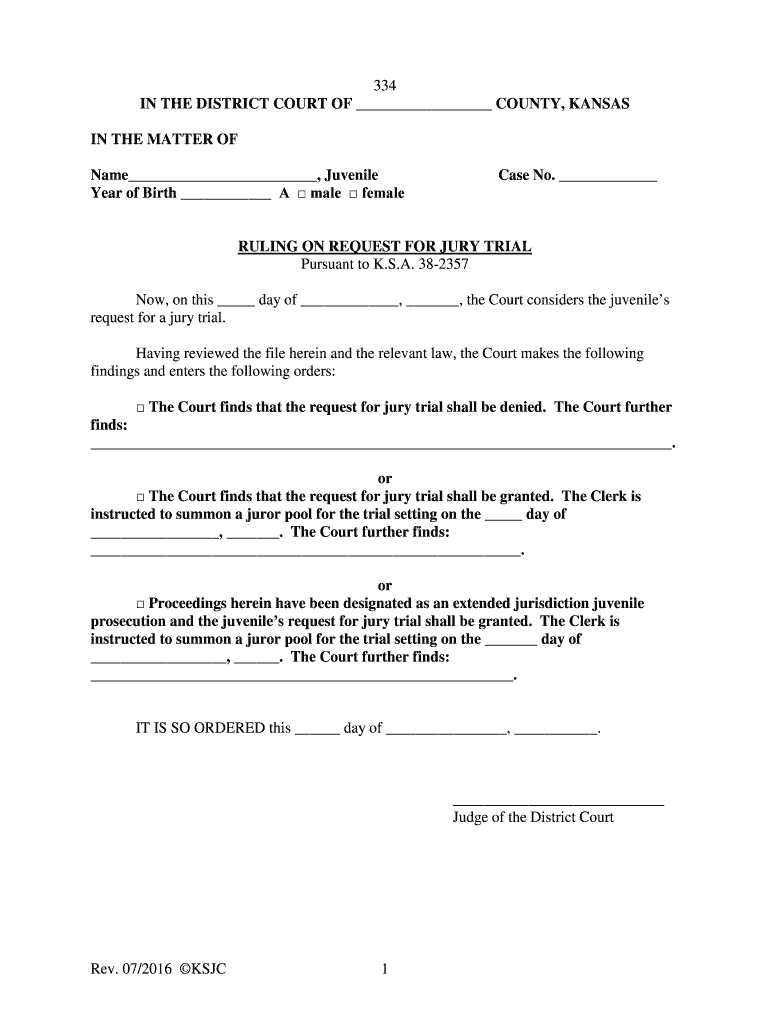
- Begin by entering the juvenile's name and year of birth in the designated fields. Ensure accuracy as this information is crucial for identification.
- Select the gender of the juvenile by checking either the 'male' or 'female' box.
- Fill in the case number in the appropriate section to link this form to its corresponding legal case.
- In the ruling section, choose one of the three options regarding the jury trial request. Make sure to provide any necessary findings or additional comments in the space provided.
- Finally, enter the date and have it signed by the judge at the bottom of the form. This step finalizes your submission.
Start using our platform today to easily complete and manage your legal documents for free!
It's free
See more Rev 07 2016 KSJC 1 334 IN THE DISTRICT COURT OF COUNTY - kansasjudicialcouncil versions
| Versions | Form popularity | Fillable & printable |
|---|---|---|
| 2016 | 4.8 Satisfied (82 Votes) |
Got questions?
How do I sign my Rev 07 2016 KSJC 1 334 IN THE DISTRICT COURT OF COUNTY - kansasjudicialcouncil online?
Log in to your DocHub account and add your Rev 07 2016 KSJC 1 334 IN THE DISTRICT COURT OF COUNTY - kansasjudicialcouncil to our editor using one of its upload methods - from your device, cloud storage, secure URL, or your DocHub folders if you have already managed your form before. Open our editor, click the Sign key in the top toolbar, and decide on your signing method. You can upload a picture of your handwritten signature, draw it, type in your name, or utilize a QR code as an alternative.
Can I print my Rev 07 2016 KSJC 1 334 IN THE DISTRICT COURT OF COUNTY - kansasjudicialcouncil and complete it by myself?
When you go for analog methods of completing your Rev 07 2016 KSJC 1 334 IN THE DISTRICT COURT OF COUNTY - kansasjudicialcouncil, it is simple to download your file for printing. Search DocHub’s Forms & Templates catalog to get the exact file template you require and open it for editing or download it on your device in the format of your choice. It is easy to complete your form electronically and put your handwritten signature on it after printing or eSign your file with DocHub.
Security and compliance
At DocHub, your data security is our priority. We follow HIPAA, SOC2, GDPR, and other standards, so you can work on your documents with confidence.
Learn more


