2010 kansas petition change sample-2026

Get Form
example petition for name change of child for kansas Preview on Page 1

Here's how it works

01. Edit your example petition for name change of child for kansas online
Type text, add images, blackout confidential details, add comments, highlights and more.

02. Sign it in a few clicks
Draw your signature, type it, upload its image, or use your mobile device as a signature pad.

03. Share your form with others
Send ks name change form via email, link, or fax. You can also download it, export it or print it out.

How to use or fill out 2010 Kansas Petition Change Sample with DocHub

Form edit decoration
9.5
Ease of Setup
DocHub User Ratings on G2
9.0
Ease of Use
DocHub User Ratings on G2
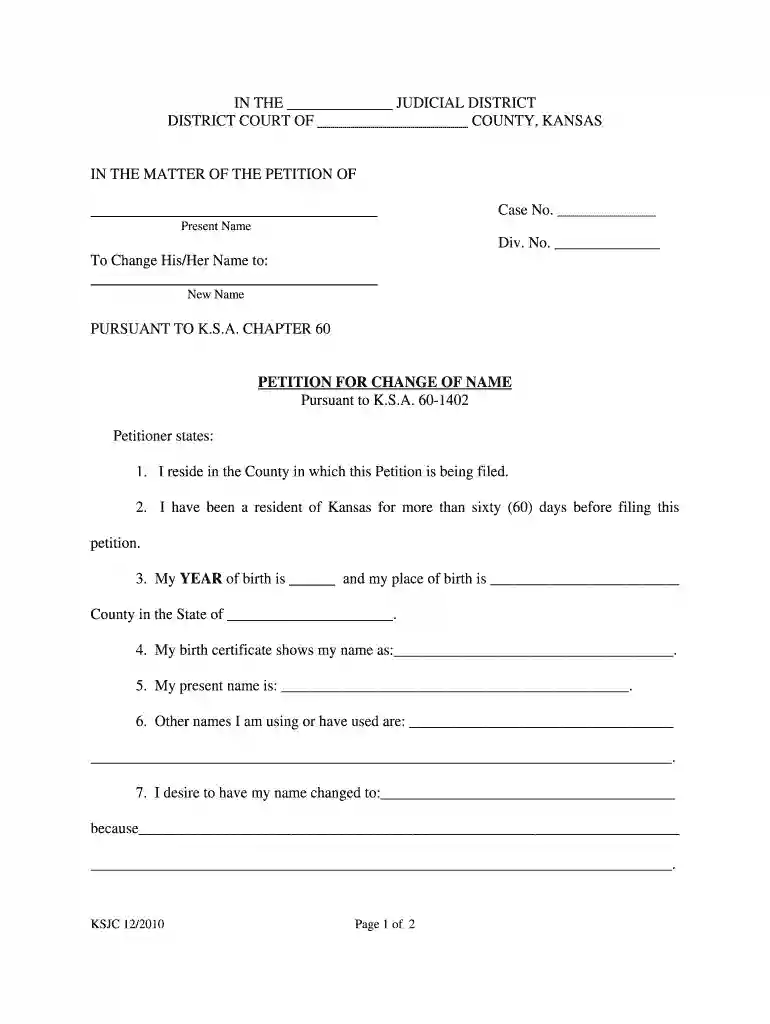
  1. Click ‘Get Form’ to open the 2010 Kansas Petition Change Sample in our editor.
  2. Begin by filling in your present name in the designated field. This is crucial as it identifies you in the petition.
  3. Next, provide your new desired name. Ensure that this is the name you wish to be legally recognized as.
  4. Complete the residency information by stating how long you have lived in Kansas and your county of residence.
  5. Fill out your date and place of birth accurately, as this information is essential for identification purposes.
  6. List any other names you have used or are currently using, which helps clarify your identity history.
  7. In the section explaining why you want to change your name, provide a clear and concise reason for your request.
  8. Finally, review all entries for accuracy before signing at the bottom of the form to affirm that all statements are true.

Start using our platform today to easily complete your 2010 Kansas Petition Change Sample for free!

See more 2010 kansas petition change sample versions

We've got more versions of the 2010 kansas petition change sample form. Select the right 2010 kansas petition change sample version from the list and start editing it straight away!
Versions Form popularity Fillable & printable
2010 4.8 Satisfied (233 Votes)
be ready to get more

Complete this form in 5 minutes or less

Get form

Got questions?

We have answers to the most popular questions from our customers. If you can't find an answer to your question, please contact us.
Contact us

Yes, it is possible with DocHub. This trustworthy and compliant online service features a phone-based signing option. Once you log in to your DocHub account and import your name change state ofkanas to our editor, fill out all blank areas and utilize the Sign tool on the upper barf. Click on Create your signature and choose Phone from the available choices. Here, you scan a QR code using your smartphone and draw your signature on your phone display, as you normally do when approving physical papers. If you access DocHub right from your mobile device, you can electronically sign your paperwork by drawing your eSignature, uploading its image, or simply with a typed name.

Apart from a comprehensive toolset for editing PDFs on mobile phones, DocHub enables you to sign your unified government of wyandotte county kansas name change forms along the way. Open our editor in your web browser, make modifications using DocHub’s toolset, and complete your editing by eSigning the finished form.

Whether youre planning to change your name after marriage, after gender reassignment for any one of a host of other reasons, you can get it done in an hour to a couple of weeks. If youre researching how to change your name, the application process is quite straightforward.
Sign the Petition in front of a Notary. 4. File the original and 1 copy with the Clerk of the District Court. The filing fee is $156 with $10 surcharge for a total of $166.
How to Change Your Name (7 steps) Civil Cover Sheet. Petition for Change of Name. Submit Your Petition. Hearing and Notice Information. Give Notice of Your Name Change. Prepare Order. Attend Court Hearing.

Security and compliance

At DocHub, your data security is our priority. We follow HIPAA, SOC2, GDPR, and other standards, so you can work on your documents with confidence.

Learn more
ccpa2
pci-dss
gdpr-compliance
hipaa
soc-compliance
be ready to get more

Complete this form in 5 minutes or less

Get form

People also ask

The Kansas DMV has a straightforward process for name change. You will need to the office in person and bring your current Kansas license, a certified copy of your marriage certificate, proof of residence if you have moved, and $16 for the processing fee.
How to Change Your Name (7 steps) Civil Cover Sheet. Petition for Change of Name. Submit Your Petition. Hearing and Notice Information. Give Notice of Your Name Change. Prepare Order. Attend Court Hearing.
Understanding the Cost of Legally Changing Your Name The cost to legally change your name can vary docHubly, depending on your state or jurisdiction. However, you could expect to pay anywhere from $150 to $500 on average.

ks petition name form