




Here's how it works



How to use or fill out 5 1 13 -1- 395 IN THE DISTRICT COURT OF COUNTY, KANSAS IN - kansasjudicialcouncil with our platform

- Click ‘Get Form’ to open it in the editor.
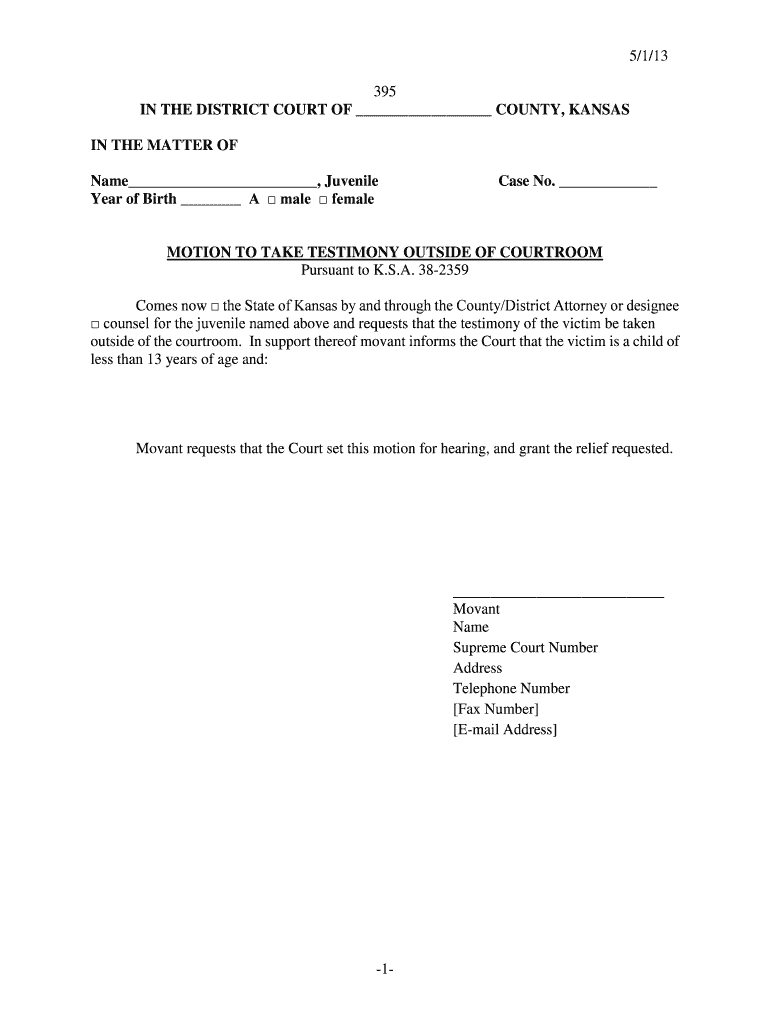
- Begin by filling in the juvenile's name and year of birth in the designated fields. Ensure accuracy as this information is crucial for identification.
- Select the gender of the juvenile by checking either the 'male' or 'female' box.
- Enter the case number in the provided space to link this motion to the correct legal proceedings.
- Indicate whether you are representing the State of Kansas or acting as counsel for the juvenile by checking the appropriate box.
- In the section requesting a hearing, provide your name, Supreme Court number, address, telephone number, and optional fax and email details for communication purposes.
Start using our platform today to streamline your document editing and form completion process for free!
It's free
See more 5 1 13 -1- 395 IN THE DISTRICT COURT OF COUNTY, KANSAS IN - kansasjudicialcouncil versions
| Versions | Form popularity | Fillable & printable |
|---|---|---|
| 2013 | 4.8 Satisfied (100 Votes) |
Got questions?
Can I sign my 5 1 13 -1- 395 IN THE DISTRICT COURT OF COUNTY, KANSAS IN - kansasjudicialcouncil on a mobile?
Of course, you’ll find numerous apps for this on the web. Nonetheless, if you need to eSign your 5 1 13 -1- 395 IN THE DISTRICT COURT OF COUNTY, KANSAS IN - kansasjudicialcouncil without installing additional software, DocHub is the optimum choice you can make. This robust editor works on mobile devices just like on desktops. Open our editor in any internet browser, register or sign in to your account, and start managing your paperwork.
How do you fill out 5 1 13 -1- 395 IN THE DISTRICT COURT OF COUNTY, KANSAS IN - kansasjudicialcouncil on Android?
It is a no-brainer on a computer or via a mobile device to fill out a 5 1 13 -1- 395 IN THE DISTRICT COURT OF COUNTY, KANSAS IN - kansasjudicialcouncil with DocHub. All you need to do is open any installed browser on your smartphone and go to the DocHub site. Once authenticated, add your document and open it in editing mode. Use our toolbar to make your edits and save changes. Optionally, keep your document in your files or send it to a recipient immediately.
Security and compliance
At DocHub, your data security is our priority. We follow HIPAA, SOC2, GDPR, and other standards, so you can work on your documents with confidence.
Learn more


