




Here's how it works



How to use or fill out 30018 517 personal search with our platform

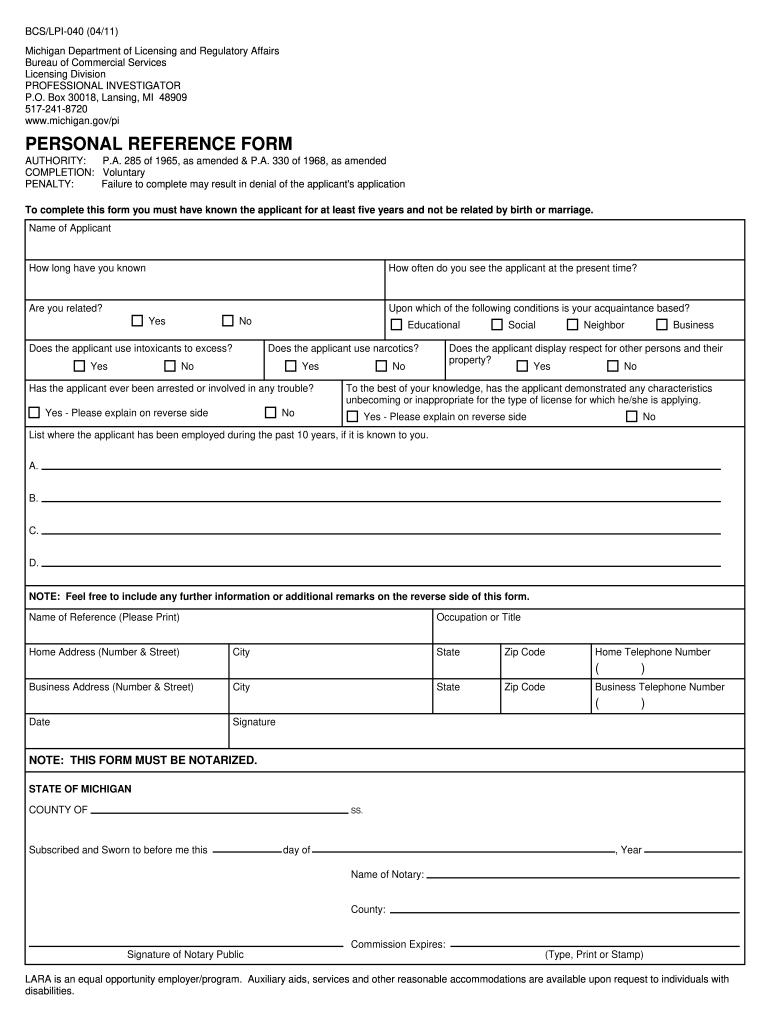
- Click ‘Get Form’ to open the 30018 517 personal search in the editor.
- Begin by entering the 'Name of Applicant' in the designated field. Ensure accuracy as this is crucial for identification.
- Indicate how long you have known the applicant and how often you see them currently. This information helps establish your relationship.
- Answer whether you are related to the applicant. This is important for compliance with licensing regulations.
- Respond to questions regarding the applicant's use of intoxicants and narcotics, providing honest answers based on your knowledge.
- If applicable, explain any past arrests or troubles on the reverse side of the form, ensuring clarity and detail.
- List where the applicant has been employed over the past ten years, if known, in sections A through D.
- Complete your details as a reference, including your name, address, occupation, and contact numbers.
- Finally, ensure that you sign and date the form. Remember that notarization is required for submission.
Start filling out your 30018 517 personal search form online for free today!
It's free
See more 30018 517 personal search versions
| Versions | Form popularity | Fillable & printable |
|---|---|---|
| 2011 | 4.9 Satisfied (391 Votes) |
Got questions?
What do I need to sign my 30018 517 personal search electronically?
Electronic document signing requires a software solution that works in compliance with data protection and eSignature regulations. DocHub is a great tool for that, since it fulfills all the aforementioned requirements. Whatever method you like to sign your 30018 517 personal search in DocHub, your electronic signature will be legally binding and court-admissible.
How do you edit 30018 517 personal search in Chrome?
If you use Chrome, there are two straightforward ways to edit your 30018 517 personal search online. First, visit the DocHub website, add your document, and edit it using our toolbar. You can also set up our Chrome extension and edit any document by dragging and dropping it in your web browser window.
Security and compliance
At DocHub, your data security is our priority. We follow HIPAA, SOC2, GDPR, and other standards, so you can work on your documents with confidence.
Learn more


