
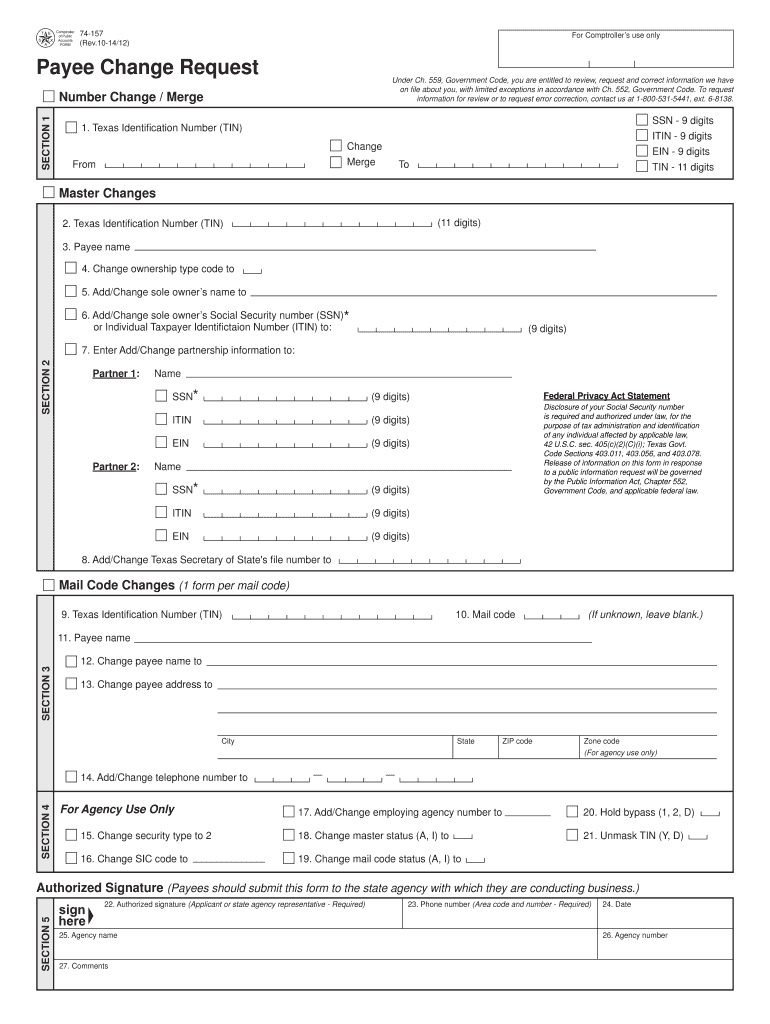




Here's how it works

01. Edit your form 74 157 online
Type text, add images, blackout confidential details, add comments, highlights and more.

02. Sign it in a few clicks
Draw your signature, type it, upload its image, or use your mobile device as a signature pad.

03. Share your form with others
Send 74 157 via email, link, or fax. You can also download it, export it or print it out.
How to use or fill out 74 157 with our platform

- Click ‘Get Form’ to open the 74 157 document in the editor.
- Begin with Section 1, where you will indicate if you are requesting a number change or merge. Enter the current Texas Identification Number (TIN) in the 'From' field and select the appropriate option.
- In Section 2, provide your Payee name and specify any changes needed by checking the relevant boxes. Ensure to enter any new sole owner’s name and their SSN or ITIN as required.
- Proceed to Section 3 for Mail Code Changes. Enter the TIN and mail code, then update the payee name and address, ensuring compliance with postal regulations.
- Complete Section 4 by providing necessary agency information and checking security levels as needed. Make sure all required fields are filled accurately.
- Finally, sign in Section 5, entering your phone number, date of signature, agency name, and any comments before submitting the form.
Start using our platform today to streamline your form completion process for free!
Fill out 74 157 online
It's free
It's free
Got questions?
We have answers to the most popular questions from our customers. If you can't find an answer to your question, please contact us.
Contact us
Is 157 over 74 blood pressure bad?
Normal pressure is 120/80 or lower. Your blood pressure is considered high (stage 1) if it reads 130 to 139 mmHg/80 to 89 mmHg. Stage 2 high blood pressure is 140/90 or higher. If you get a blood pressure reading of 180/120 or higher more than once, seek medical treatment right away.
What is a 2 1 mux pin configuration?
A 2-to-1 multiplexer consists of two inputs D0 and D1, one select input S and one output Y. Depends on the select signal, the output is connected to either of the inputs. Since there are two input signals only two ways are possible to connect the inputs to the outputs, so one select is needed to do these operations.
What is the IC name of multiplexer?
List of ICs which provide multiplexing IC No.FunctionOutput State 74x352 Dual 4:1 mux. Output is inverted input 74x151A 8:1 mux. Both outputs available (i.e., complementary outputs) 74x151 8:1 mux. Output is inverted input 74x150 16:1 mux. Output is inverted input3 more rows
What is the name of IC 74157?
74157 Quad 2-input Multiplexer Ic. The 74157 is a quad 2-input multiplexer. The device features select (S) and enable E inputs.
What is 74157 IC?
The 74157 is a quad 2-input multiplexer. The device features select (S) and enable E inputs.
Security and compliance
At DocHub, your data security is our priority. We follow HIPAA, SOC2, GDPR, and other standards, so you can work on your documents with confidence.
Learn more


People also ask
What is the name of IC used in Arduino?
IC: Microchip ATmega328P (8-bit AVR core) Clock Speed: 16 MHz on Uno board, though IC is capable of 20 MHz maximum at 5 Volts.