OFF-CAMPUS PHYSICAL EDUCATION STUDENT APPLICATION - nisdtx 2026

Get Form
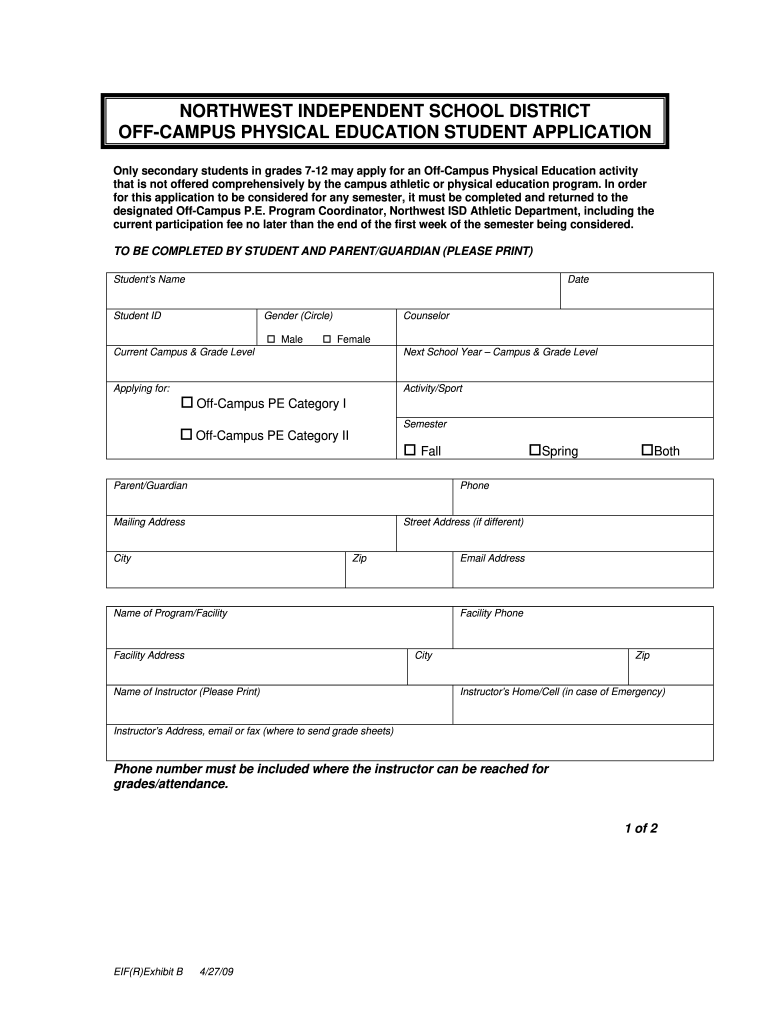
OFF-CAMPUS PHYSICAL EDUCATION STUDENT APPLICATION - nisdtx Preview on Page 1

Here's how it works

01. Edit your form online
Type text, add images, blackout confidential details, add comments, highlights and more.
02. Sign it in a few clicks
Draw your signature, type it, upload its image, or use your mobile device as a signature pad.
03. Share your form with others
Send it via email, link, or fax. You can also download it, export it or print it out.

How to use or fill out OFF-CAMPUS PHYSICAL EDUCATION STUDENT APPLICATION - nisdtx with our platform

Form edit decoration
9.5
Ease of Setup
DocHub User Ratings on G2
9.0
Ease of Use
DocHub User Ratings on G2
  1. Click ‘Get Form’ to open the OFF-CAMPUS PHYSICAL EDUCATION STUDENT APPLICATION in the editor.
  2. Begin by entering the student's name, date, and student ID in the designated fields. Ensure accuracy as this information is crucial for processing.
  3. Select the gender by circling either Male or Female. Then, fill in the current campus and grade level of the student.
  4. Indicate the next school year’s campus and grade level, along with the semester applying for (Fall, Spring, or Both).
  5. Provide details about the activity/sport and include parent/guardian contact information such as phone number and mailing address.
  6. Fill in the program/facility name, address, and instructor's contact details. Make sure to include a reliable phone number for emergency purposes.
  7. Review all entries for completeness and accuracy before signing. Both student and parent/guardian must sign and date at the bottom of the form.

Start using our platform today to easily complete your application online for free!

See more OFF-CAMPUS PHYSICAL EDUCATION STUDENT APPLICATION - nisdtx versions

We've got more versions of the OFF-CAMPUS PHYSICAL EDUCATION STUDENT APPLICATION - nisdtx form. Select the right OFF-CAMPUS PHYSICAL EDUCATION STUDENT APPLICATION - nisdtx version from the list and start editing it straight away!
Versions Form popularity Fillable & printable
2009 4.8 Satisfied (206 Votes)
be ready to get more

Complete this form in 5 minutes or less

Get form

Got questions?

We have answers to the most popular questions from our customers. If you can't find an answer to your question, please contact us.
Contact us

You should use only trustworthy software solutions with strong security compliance to sign your paperwork electronically. DocHub is just the type of software you need! It stores data on Amazon Web Servers and complies with all essential security criteria and eSignature laws, so it’s a trustworthy way to electronically sign your OFF-CAMPUS PHYSICAL EDUCATION STUDENT APPLICATION - nisdtx or other forms with this tool.

If you store your documents in Google Drive, there is no need to download your OFF-CAMPUS PHYSICAL EDUCATION STUDENT APPLICATION - nisdtx on the computer and upload it back to our editor. A much easier way is to set up a browser extension developed by DocHub to simplify this flow. The extension allows editing PDFs in your browser. Alternatively, you can integrate your DocHub and Gmail accounts for more efficient editing.

The TEC 28.002(l) requires students enrolled in grade levels six, seven, and eight to participate in moderate or vigorous daily physical activity for at least 30 minutes for at least four semesters during those grade levels as part of the districts physical education curriculum.
Physical Education Class Beginning with the 2008-09 school year, all middle school students will be subject to the provisions of Senate Bill 530 as enacted by the Texas Legislature in 2007. This statute requires that all middle school students complete four (4) semesters of Physical Education while in grades 6-8.

Security and compliance

At DocHub, your data security is our priority. We follow HIPAA, SOC2, GDPR, and other standards, so you can work on your documents with confidence.

Learn more
ccpa2
pci-dss
gdpr-compliance
hipaa
soc-compliance
be ready to get more

Complete this form in 5 minutes or less

Get form