




Here's how it works



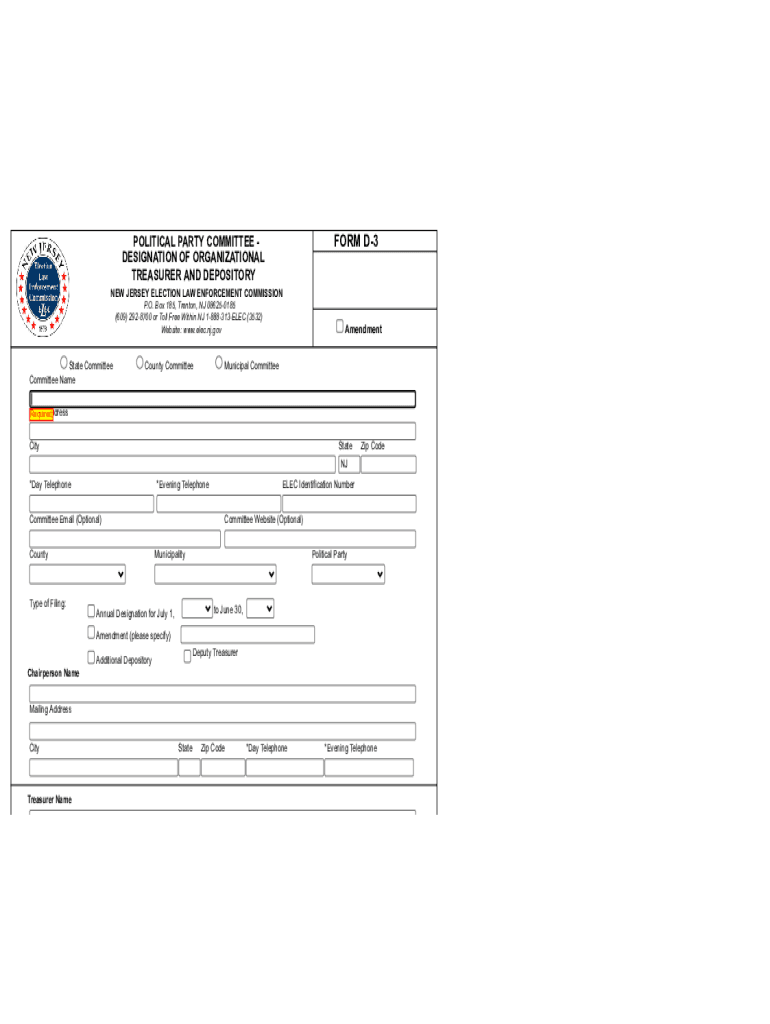
How to use or fill out d 3 political party with our platform

- Click ‘Get Form’ to open the d 3 political party form in the editor.
- Begin by entering the Committee Name and selecting the appropriate type of committee (State, County, or Municipal). Ensure all required fields are filled out accurately.
- Provide your mailing address, including Street Address, City, State (NJ), and Zip Code. Include both Day and Evening Telephone numbers for contact purposes.
- Fill in the Political Party designation and any relevant filing information such as the ELEC Identification Number and Committee Website if applicable.
- Complete the Treasurer and Deputy Treasurer sections with their names, addresses, and contact details. Make sure to include any additional depository information as needed.
- List any authorized signers for transactions along with their contact information. This is crucial for maintaining transparency within your committee.
- Finally, ensure that both Chairperson and Treasurer certify the document by signing and dating it. If training has been completed, include your Treasurer Training ID#.
Start using our platform today to streamline your form completion process for free!
It's free
See more d 3 political party versions
Got questions?
How do I sign my nj elec forms without printing?
Electronic signatures are a great alternative to traditional signing, as they save time, effort, and money people spend on printing, scanning, and paper delivery. You can electronically sign your nj elec forms using a reliable and powerful online document management services like DocHub. It complies with major eSignature policies (ESIGN and UETA), so all documents approved there are legally binding and have the same validity as manually signed ones.
How do you edit d 3 political party on iOS?
You can easily edit fill out your d 3 political party on any iOS gadget. Open an internet browser of your liking, visit the DocHub site, authorize or create a new account, add your file for editing, and make your desired alterations. Our service is mobile-friendly, so utilizing its functions on your phone will be a no-brainer, even on the first try.
What are the 3 political parties?
What does the D stand for in politics?
What are third party terms?
Security and compliance
At DocHub, your data security is our priority. We follow HIPAA, SOC2, GDPR, and other standards, so you can work on your documents with confidence.
Learn more


