01. Edit your vulnerable sector check scarborough online
Type text, add images, blackout confidential details, add comments, highlights and more.

02. Sign it in a few clicks
Draw your signature, type it, upload its image, or use your mobile device as a signature pad.

03. Share your form with others
Send it via email, link, or fax. You can also download it, export it or print it out.

How to use or fill out yrp149 with our platform
Ease of Setup
DocHub User Ratings on G2
Ease of Use
DocHub User Ratings on G2
Click ‘Get Form’ to open the yrp149 in the editor.
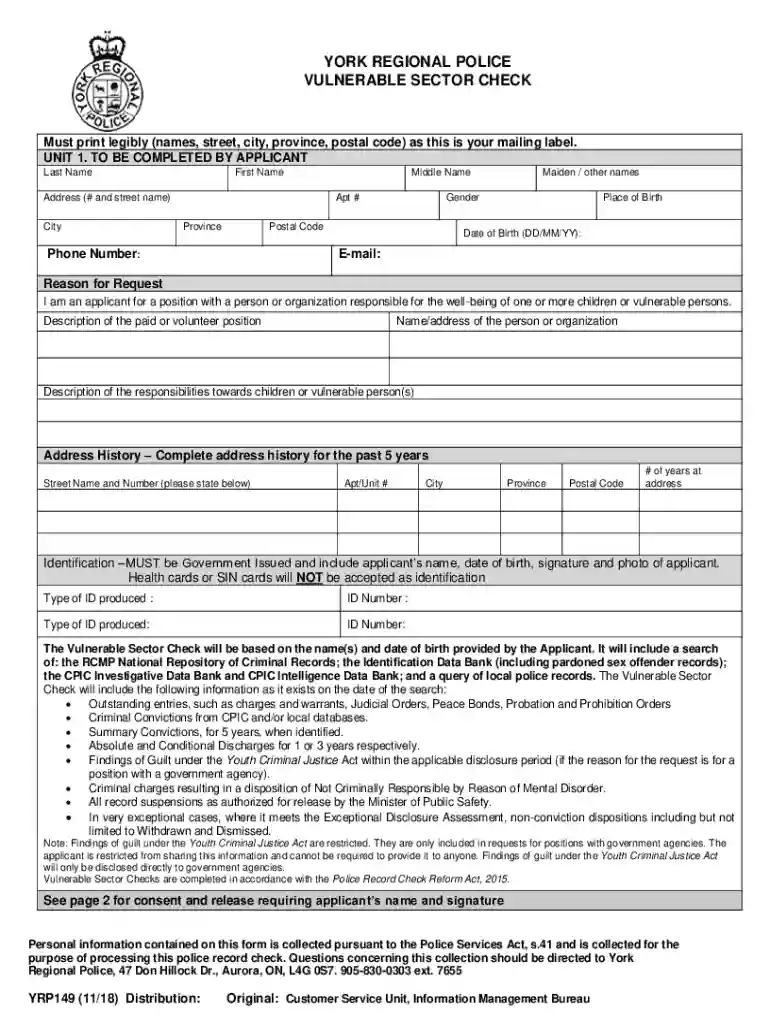
Begin by filling out your personal information in Unit 1. Enter your last name, first name, middle name, and any maiden or other names. Ensure all entries are legible.
Complete your address details including street number and name, city, province, postal code, and phone number. If applicable, include your apartment number.
Provide your place of birth and date of birth in the specified format (DD/MM/YY).
Indicate the reason for your request and describe the position you are applying for, along with responsibilities towards vulnerable persons.
Fill out your address history for the past five years, detailing each address along with how long you resided there.
List identification types produced along with their ID numbers. Remember that only government-issued IDs are accepted.
Review all entered information for accuracy before submitting the form through our platform.
Start using our editor today to complete your yrp149 form easily and for free!
YRP149 Vulnerable Sector Check - York Regional Police WebVULNERABLE SECTOR CHECK Must print legibly (names, street, city, province, postal code) as this is
Cookie consent notice
This site uses cookies to enhance site navigation and personalize your experience.
By using this site you agree to our use of cookies as described in our Privacy Notice.
You can modify your selections by visiting our Cookie and Advertising Notice.