Cricket tournament forms 2026

Get Form
tournament form cricket Preview on Page 1

Here's how it works

01. Edit your tournament form cricket online
Type text, add images, blackout confidential details, add comments, highlights and more.
02. Sign it in a few clicks
Draw your signature, type it, upload its image, or use your mobile device as a signature pad.
03. Share your form with others
Send cricket tournament entry form pdf via email, link, or fax. You can also download it, export it or print it out.

How to use or fill out cricket tournament forms with our platform

Form edit decoration
9.5
Ease of Setup
DocHub User Ratings on G2
9.0
Ease of Use
DocHub User Ratings on G2
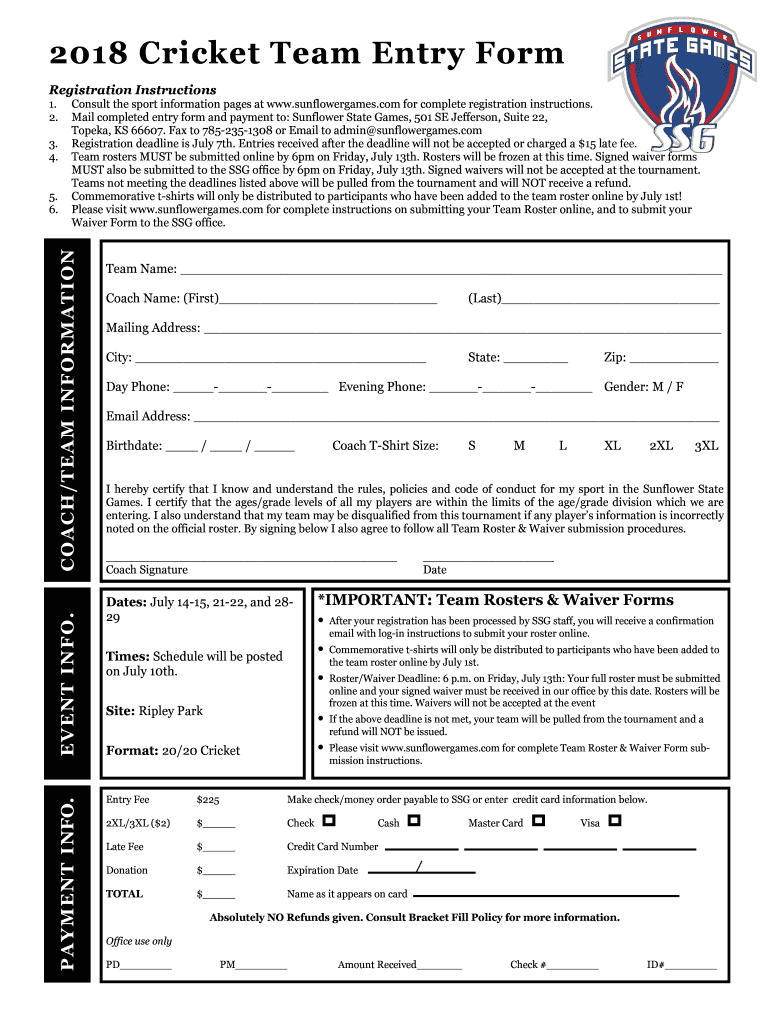
  1. Click ‘Get Form’ to open the cricket tournament entry form in the editor.
  2. Begin by filling out the 'Coach/Team Information' section. Enter your team name, coach's first and last name, and contact details including mailing address, phone numbers, and email address.
  3. In the 'Event Info' section, ensure you are aware of important deadlines such as the registration deadline on July 7th and roster submission by July 13th. This is crucial for your team's participation.
  4. Complete the 'Payment Info' section by selecting your payment method and entering any applicable fees. Make sure to include your credit card information if paying online.
  5. Review all entered information for accuracy. Ensure that all players' ages and grades comply with tournament rules to avoid disqualification.
  6. Finally, sign the form electronically to certify that you understand the rules and submission procedures before submitting it through our platform.

Start filling out your cricket tournament forms today for free using our editor!

See more cricket tournament forms versions

We've got more versions of the cricket tournament forms form. Select the right cricket tournament forms version from the list and start editing it straight away!
Versions Form popularity Fillable & printable
2018 4.8 Satisfied (127 Votes)
2016 4.3 Satisfied (38 Votes)
be ready to get more

Complete this form in 5 minutes or less

Get form

Got questions?

We have answers to the most popular questions from our customers. If you can't find an answer to your question, please contact us.
Contact us

Of course, it is possible with DocHub. This secure and compliant online service has a phone-based signing option. After you log in to your DocHub account and add your cricket entry form format to our editor, fill out all required areas and utilize the Sign feature on the top barf. Click on Create your signature and choose Phone from the available choices. Here, you scan a QR code using your smartphone and draw your signature on your phone screen, as you usually do when signing physical papers. If you access DocHub right from your mobile device, you can electronically sign your paperwork by drawing your electronic signature, uploading its photo, or simply with a typed name.

You may find and modify your cricket team entry online by using DocHub. Its simple but feature-rich design enables you to start productive work right after you sign up your account. Create your account and add your file, then our interface will guide you through our stress-free form completion experience.

Define Box Cricket Rules Team Size: Small teams of 68 players are common. Overs: Limit games to 610 overs for quick matches. Scoring Rules: Award extra points for hitting specific wall zones. Dismissals: Simplify dismissal rules with options like direct wall catches or one-handed catch outs.
Writing an invitation for a sports event involves clarity and enthusiasm. Start with a friendly greeting and clearly state the event details, including the type of sport, date, time, and venue. Encourage participation by highlighting exciting aspects of the event, like special guests or prizes.
ECL-T10 Cricket Tournament - Rules and Regulations. B. All standard ICC rules will be followed unless otherwise mentioned in this document. Each team can nominate a maximum of 16 players as their squad for the tournament. All teams must strive to complete their quota of overs in the given time.

Security and compliance

At DocHub, your data security is our priority. We follow HIPAA, SOC2, GDPR, and other standards, so you can work on your documents with confidence.

Learn more
ccpa2
pci-dss
gdpr-compliance
hipaa
soc-compliance
be ready to get more

Complete this form in 5 minutes or less

Get form