




Here's how it works



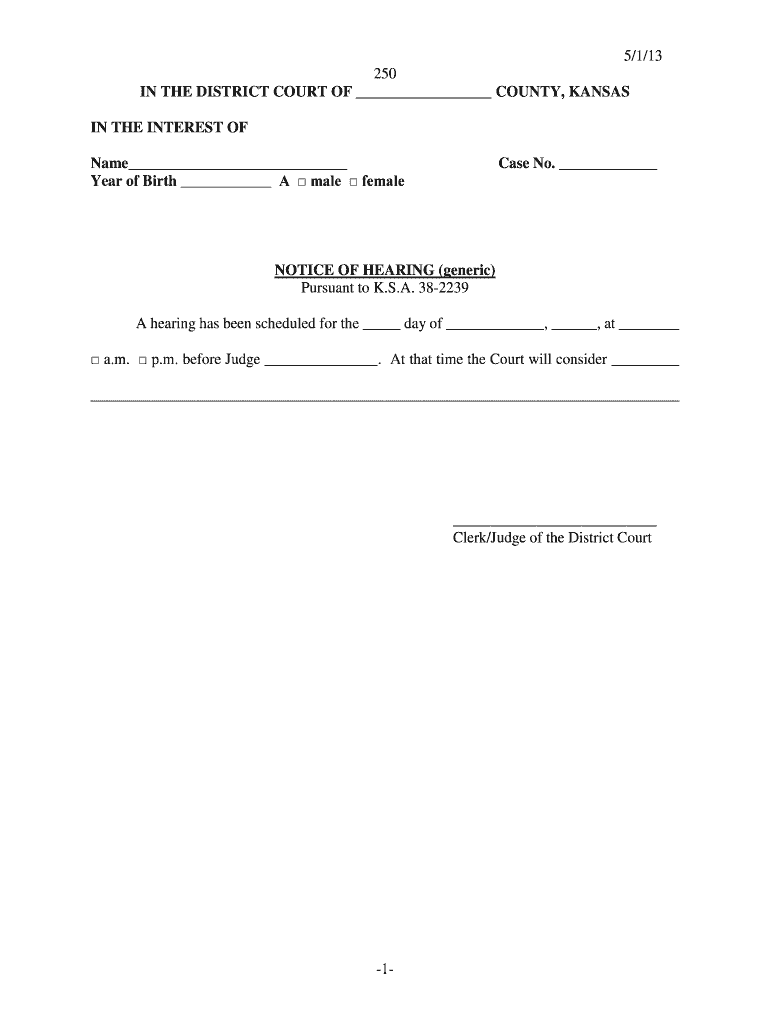
How to use or fill out 5 1 13 -1- 250 IN THE DISTRICT COURT OF - Kansas Judicial Council

- Click ‘Get Form’ to open it in the editor.
- Begin by entering the county name in the designated space at the top of the form.
- Fill in the name of the individual involved in the case and their year of birth, selecting their gender from the provided options.
- Input the case number in the appropriate field to ensure proper identification of your document.
- Complete the notice of hearing section by specifying the date, time, and judge's name for the scheduled hearing.
- Finally, review all entries for accuracy before saving or printing your completed form.
Start using our platform today to streamline your document editing and signing process for free!
It's free
See more 5 1 13 -1- 250 IN THE DISTRICT COURT OF - Kansas Judicial Council - kansasjudicialcouncil versions
| Versions | Form popularity | Fillable & printable |
|---|---|---|
| 2013 | 4.8 Satisfied (111 Votes) |
Got questions?
Can I sign my 5 1 13 -1- 250 IN THE DISTRICT COURT OF - Kansas Judicial Council - kansasjudicialcouncil in electronic format?
Based on eSignature laws, documents signed electronically have the same validity as those approved with pen and paper. You can eSign almost any business and personal paperwork. Four types of paperwork still call for wet signatures only - wills and testamentary trusts, court orders and other court forms, state statutes regulating divorce, adoption, or other family law, and notice of cancellation of utility services. If you follow the rules and utilize a safe and compliant software solution, like DocHub, you can eSign your 5 1 13 -1- 250 IN THE DISTRICT COURT OF - Kansas Judicial Council - kansasjudicialcouncil without printing it.
How do you get 5 1 13 -1- 250 IN THE DISTRICT COURT OF - Kansas Judicial Council - kansasjudicialcouncil?
You can find the latest and most relevant version of the 5 1 13 -1- 250 IN THE DISTRICT COURT OF - Kansas Judicial Council - kansasjudicialcouncil in our DocHub forms library. Search it by categories or utilize the search field to get the exact template that fits your situation. You may open this form for editing once you find it.
Security and compliance
At DocHub, your data security is our priority. We follow HIPAA, SOC2, GDPR, and other standards, so you can work on your documents with confidence.
Learn more


