




Here's how it works

01. Edit your chronic illness verification form online
Type text, add images, blackout confidential details, add comments, highlights and more.

02. Sign it in a few clicks
Draw your signature, type it, upload its image, or use your mobile device as a signature pad.

03. Share your form with others
Send chronic illness verification via email, link, or fax. You can also download it, export it or print it out.
How to use or fill out chronic illness verification form with our platform

- Click ‘Get Form’ to open the chronic illness verification form in the editor.
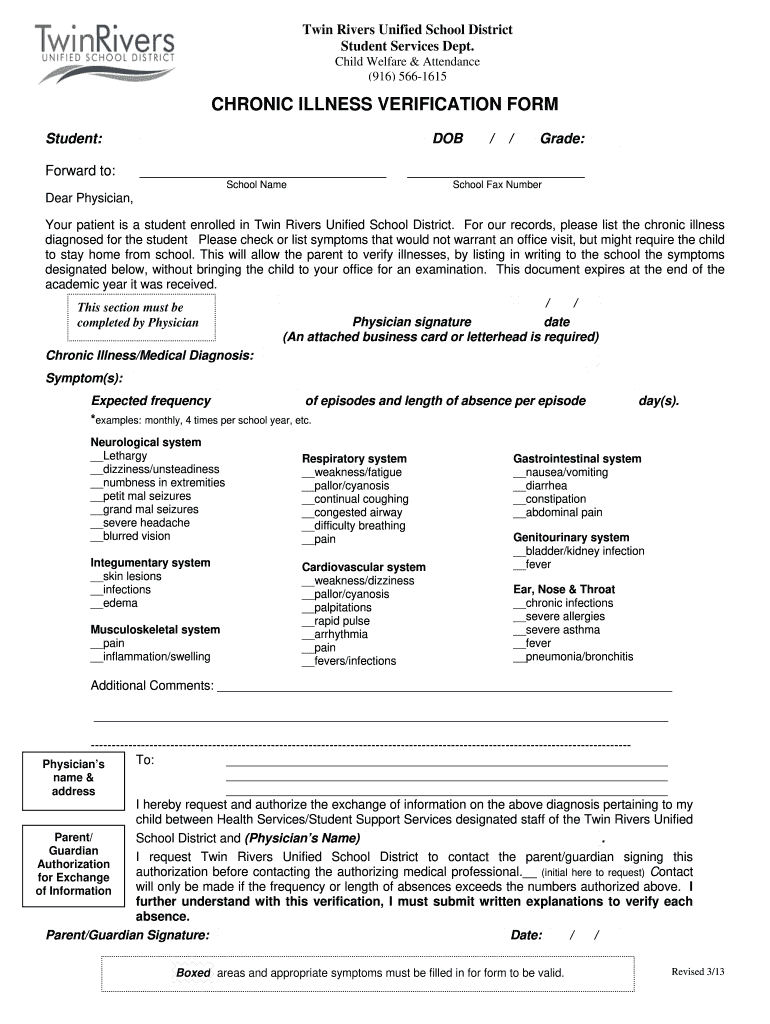
- Begin by entering the student's name, date of birth, grade, and school name in the designated fields. Ensure all information is accurate for proper record-keeping.
- Instruct your physician to list the diagnosed chronic illness and check any relevant symptoms that may require the student to stay home from school. This section is crucial for understanding the child's needs.
- The physician must provide their signature and date in the specified area. An attached business card or letterhead is required for validation.
- Fill out the expected frequency of episodes and length of absence per episode. This helps the school anticipate and manage attendance effectively.
- Complete any additional comments or notes that may assist in clarifying the student's condition or needs.
- Finally, ensure that a parent/guardian signature is obtained along with the date to authorize information exchange between health services and school staff.
Start using our platform today to easily fill out your chronic illness verification form online for free!
Fill out chronic illness verification form online
It's free
It's free
See more chronic illness verification form versions
We've got more versions of the chronic illness verification form form. Select the right chronic illness verification form version from the list and start editing it straight away!
| Versions | Form popularity | Fillable & printable |
|---|---|---|
| 2013 | 4.8 Satisfied (120 Votes) |
Security and compliance
At DocHub, your data security is our priority. We follow HIPAA, SOC2, GDPR, and other standards, so you can work on your documents with confidence.
Learn more


