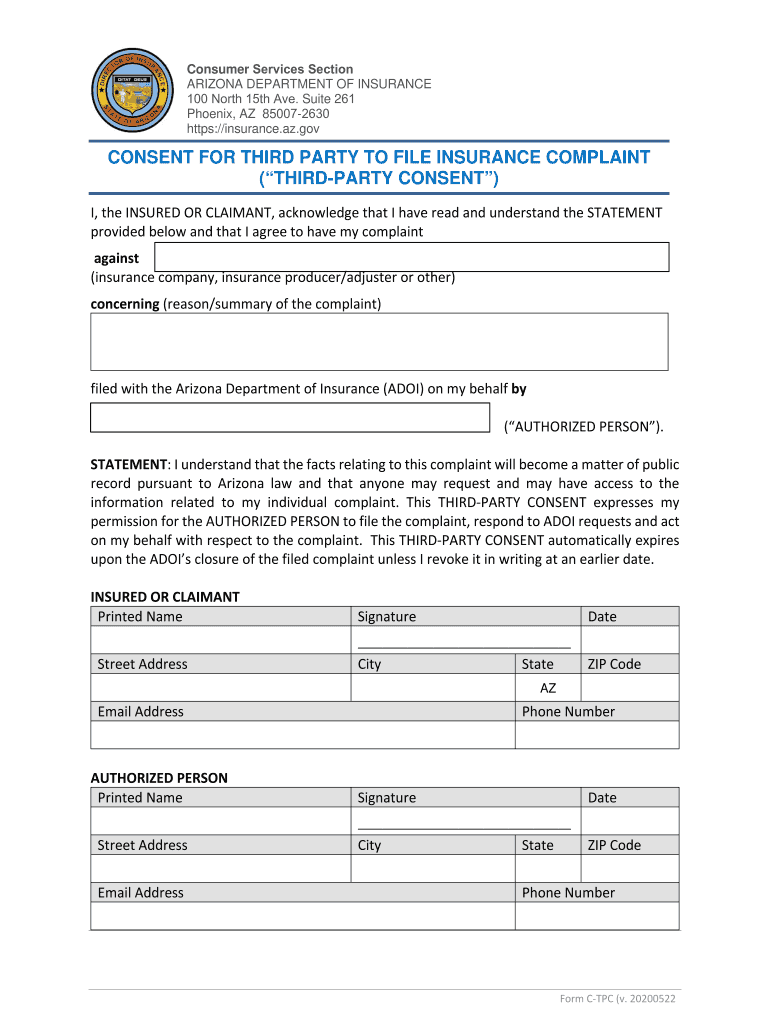
Third-Party Consent 20170721 docx 2026

Get Form
Third-Party Consent 20170721 docx Preview on Page 1

Here's how it works

01. Edit your form online
Type text, add images, blackout confidential details, add comments, highlights and more.
02. Sign it in a few clicks
Draw your signature, type it, upload its image, or use your mobile device as a signature pad.
03. Share your form with others
Send it via email, link, or fax. You can also download it, export it or print it out.

How to use or fill out Third-Party Consent 20170721 docx with our platform

Form edit decoration
9.5
Ease of Setup
DocHub User Ratings on G2
9.0
Ease of Use
DocHub User Ratings on G2
  1. Click ‘Get Form’ to open the Third-Party Consent document in the editor.
  2. Begin by entering your printed name as the Insured or Claimant in the designated field.
  3. Provide your signature and date in the respective fields to confirm your consent.
  4. Fill in your street address, city, state, and ZIP code accurately to ensure proper identification.
  5. Next, enter your email address for communication purposes.
  6. For the Authorized Person section, repeat steps 2 through 5, ensuring all information is correct and complete.
  7. Review all entered information for accuracy before finalizing your document.
  8. Once satisfied, save or export your completed form directly from our platform for free.

Start using our platform today to streamline your document editing and signing process!

See more Third-Party Consent 20170721 docx versions

We've got more versions of the Third-Party Consent 20170721 docx form. Select the right Third-Party Consent 20170721 docx version from the list and start editing it straight away!
Versions Form popularity Fillable & printable
2020 4.8 Satisfied (86 Votes)
2017 4.3 Satisfied (33 Votes)
be ready to get more

Complete this form in 5 minutes or less

Get form

Got questions?

We have answers to the most popular questions from our customers. If you can't find an answer to your question, please contact us.
Contact us
You can sue someone for recording you without your permission on your private property or in places where you have a Recording Without Consent: Privacy Rights Explained Related Customer Questions
These two-party consent states are California, Delaware, Florida, Illinois, Maryland, Massachusetts, Montana, Nevada, New Hampshire, Pennsylvania, and Washington.
A written consent provided in connection with a transaction by an entity not party to that transaction. For example, in asset acquisitions and certain types of mergers, third-party consents are required for the assignment of contracts that contain anti-assignment clauses.
To legally record conversations, every single participant needs to provide permission. Secretly recording someone without their explicit consent can result in criminal charges or penalties.
The categories of sources from which the business collected personal information. The purposes for which the business uses the personal information. The categories of third parties with whom the business shares the personal information. The categories of information that the business sells or discloses to third parties.

Security and compliance

At DocHub, your data security is our priority. We follow HIPAA, SOC2, GDPR, and other standards, so you can work on your documents with confidence.

Learn more
ccpa2
pci-dss
gdpr-compliance
hipaa
soc-compliance
be ready to get more

Complete this form in 5 minutes or less

Get form

People also ask

Third-party consent allows individuals with authority to permit searches affecting others. The consent must be clear, voluntary, and given by someone with common authority. Understanding this concept is crucial for protecting your legal rights in search situations.
A third party is someone who is not directly involved in a transaction, dispute, or agreement between two principal parties. The term often refers to an outside person or entity with a secondary or indirect role.

Related links