




Here's how it works



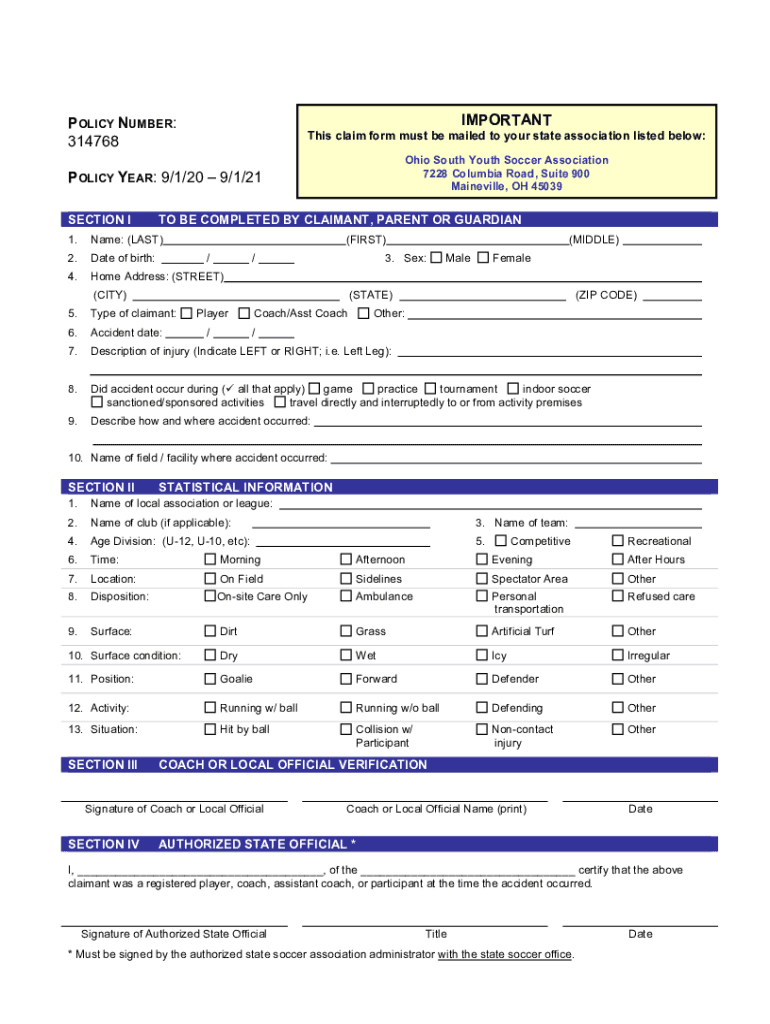
How to use or fill out OHIO SOUTH YOUTH SOCCER ASSOCIATION ACCIDENT MEDICAL CLAIM

- Begin by clicking ‘Get Form’ to open the OHIO SOUTH YOUTH SOCCER ASSOCIATION ACCIDENT MEDICAL CLAIM in our editor.
- In Section I, complete all fields including your name, date of birth, and home address. Ensure you indicate the type of claimant and provide a detailed description of the injury.
- Proceed to Section II to fill in statistical information such as the name of the local association, age division, and details about the accident's location and circumstances.
- In Section III, have a coach or local official sign for verification. This is crucial for validating your claim.
- Sign Section VI to authorize the release of information. This step is essential for processing your claim efficiently.
- Attach any itemized bills and other insurance EOBs if available before submitting your claim form to your State Association within 90 days of the accident.
Start using our platform today to streamline your claims process for free!
It's free
See more OHIO SOUTH YOUTH SOCCER ASSOCIATION ACCIDENT MEDICAL CLAIM versions
Got questions?
How do I sign my OHIO SOUTH YOUTH SOCCER ASSOCIATION ACCIDENT MEDICAL CLAIM online?
Sign in to your DocHub account and import your OHIO SOUTH YOUTH SOCCER ASSOCIATION ACCIDENT MEDICAL CLAIM to our editor using one of its upload options - from your device, cloud storage, protected URL, or your DocHub folders if you have already processed your form before. Open our editor, click the Sign button in the upper toolbar, and choose your signing method. You can use a picture of your handwritten signature, draw it, type in your name, or use a QR code as an alternative.
How to fill out OHIO SOUTH YOUTH SOCCER ASSOCIATION ACCIDENT MEDICAL CLAIM online free of charge in 2024?
Having a swift editing system like DocHub, you do not need anything but a browser and internet connection to modify your OHIO SOUTH YOUTH SOCCER ASSOCIATION ACCIDENT MEDICAL CLAIM on the internet swiftly. Upload your file or get the appropriate form in DocHub’s catalog, open our editor with a single click, and finish it digitally. To edit your forms at any time, sign up a free profile with DocHub.
Security and compliance
At DocHub, your data security is our priority. We follow HIPAA, SOC2, GDPR, and other standards, so you can work on your documents with confidence.
Learn more


