In pmh f1 form 2025

Get Form
pmh f1 form Preview on Page 1

Here's how it works

01. Edit your pmh f1 form online
Type text, add images, blackout confidential details, add comments, highlights and more.
02. Sign it in a few clicks
Draw your signature, type it, upload its image, or use your mobile device as a signature pad.
03. Share your form with others
Send in pmh f1 form via email, link, or fax. You can also download it, export it or print it out.

How to use or fill out in pmh f1 form with our platform

Form edit decoration
9.5
Ease of Setup
DocHub User Ratings on G2
9.0
Ease of Use
DocHub User Ratings on G2
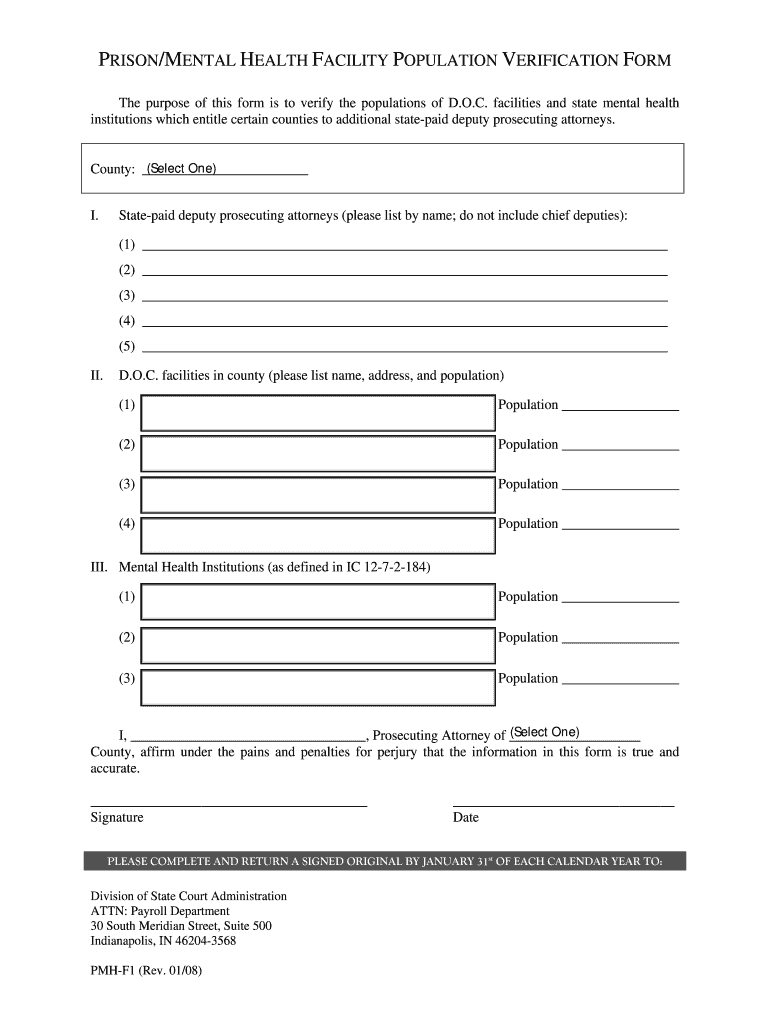
  1. Click ‘Get Form’ to open the in pmh f1 form in the editor.
  2. Begin by selecting your county from the dropdown menu provided at the top of the form.
  3. In Section I, list the names of state-paid deputy prosecuting attorneys. Ensure you do not include chief deputies and provide up to five names.
  4. Move to Section II, where you will list D.O.C. facilities in your county. For each facility, enter its name, address, and population.
  5. Proceed to Section III to document populations for mental health institutions as defined. Fill in the required fields accurately.
  6. Finally, complete the affirmation statement at the bottom by entering your name and county, then sign and date the form.

Start using our platform today for free to streamline your form completion process!

See more in pmh f1 form versions

We've got more versions of the in pmh f1 form form. Select the right in pmh f1 form version from the list and start editing it straight away!
Versions Form popularity Fillable & printable
2008 4.8 Satisfied (104 Votes)
be ready to get more

Complete this form in 5 minutes or less

Get form

Got questions?

We have answers to the most popular questions from our customers. If you can't find an answer to your question, please contact us.
Contact us

Yes, you can utilize DocHub for signing any business and private documentation, including your in pmh f1 form. All electronic signatures you generate with our tool are legally binding and court-admissible, as DocHub complies with criteria required by ESIGN and UETA. Save your completed paperwork with a detailed Audit Trail if necessary.

If you want to edit your in pmh f1 form online swiftly, it does not matter what web browser you use. DocHub’s simple editing instruments are accessible using any internet browser. Just open the appropriate tab in the editor, add your file, and fill it out without stress.