Jdf 888 2026

Get Form
jdf 888 Preview on Page 1

Here's how it works

01. Edit your jdf 888 online
Type text, add images, blackout confidential details, add comments, highlights and more.
02. Sign it in a few clicks
Draw your signature, type it, upload its image, or use your mobile device as a signature pad.
03. Share your form with others
Send it via email, link, or fax. You can also download it, export it or print it out.

How to use or fill out jdf 888 with our platform

Form edit decoration
9.5
Ease of Setup
DocHub User Ratings on G2
9.0
Ease of Use
DocHub User Ratings on G2
  1. Click ‘Get Form’ to open the jdf 888 in the editor.
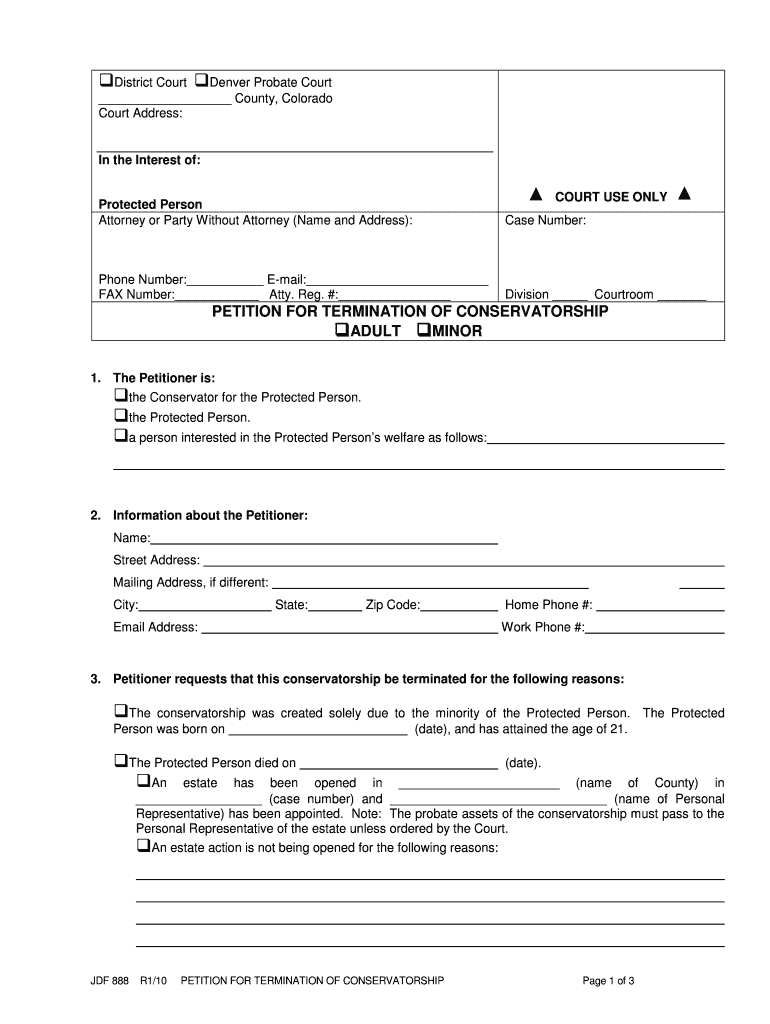
  2. Begin by filling in the court information at the top, including the county and court address. Ensure you specify whether it’s for an adult or minor conservatorship.
  3. In section 1, indicate who the petitioner is by selecting the appropriate checkbox. If you are the conservator, ensure your details are accurately filled in section 2, including name, address, and contact information.
  4. In section 3, provide reasons for terminating the conservatorship. Choose from options like age attainment or inability resolution and include any necessary dates.
  5. List individuals designated to receive notice in section 4. Fill out their names, addresses, and relationships to the protected person.
  6. Complete section 6 with a schedule of distribution detailing assets and their values. Specify who will receive these assets.
  7. Finally, verify your information by signing at the bottom and completing the certificate of service if applicable.

Start using our platform today to fill out your jdf 888 form online for free!

See more jdf 888 versions

We've got more versions of the jdf 888 form. Select the right jdf 888 version from the list and start editing it straight away!
Versions Form popularity Fillable & printable
2010 4.8 Satisfied (230 Votes)
be ready to get more

Complete this form in 5 minutes or less

Get form

Got questions?

We have answers to the most popular questions from our customers. If you can't find an answer to your question, please contact us.
Contact us

Log in to your DocHub account and add your jdf 888 to our editor using one of its upload options - from your device, cloud storage, protected URL, or your DocHub folders if you have already managed your form before. Open our editor, click the Sign button in the top toolbar, and choose your signing method. You can upload an image of your handwritten signature, draw it, enter your name, or utilize a QR code as an alternative.

It is a no-brainer on a computer or via a mobile device to fill out a jdf 888 with DocHub. All you need to do is open any installed web browser on your smartphone and go to the DocHub website. Once authenticated, add your document and open it in editing mode. Use our toolbar to make your edits and save changes. Optionally, keep your file in your files or send it to a recipient on the spot.

You must mail or hand-deliver a copy of JDF 888 Petition for Termination of Conservatorship to the Protected Person (if they are at least 12 years old) and all other interested persons. After mailing or hand-delivering a copy, fill out the Certificate of Service part of the form and file it with the court.
On motion and upon such terms as are just, the court may relieve a party or the partys legal representative from a final judgment, order, or proceeding for the following reasons: (1) Mistake, inadvertence, surprise or excusable neglect; (2) fraud (whether heretofore denominated intrinsic or extrinsic),
An entry of appearance shall state (a) the identity of the party for whom the appearance is made; (b) the attorneys office address; (c) the attorneys telephone number; (d) the attorneys E-Mail address; and (e) the attorneys registration number. (2)Withdrawal From an Active Case.

Security and compliance

At DocHub, your data security is our priority. We follow HIPAA, SOC2, GDPR, and other standards, so you can work on your documents with confidence.

Learn more

People also ask

Rule 58 - Entry of Judgment (a) Entry. Subject to the provisions of C.R.C.P. 54(b), upon a general or special verdict of a jury, or upon a decision by the court, the court shall promptly prepare, date, and sign a written judgment and the clerk shall enter it on the register of actions as provided in C.R.C.P. 79(a).
A judicial officer may issue an order to show cause why a case should not be dismissed for failure to prosecute or failure to comply with these rules, the Federal Rules of Civil Procedure, or a court order.
Personal service shall be as follows: (1) Upon a natural person whose age is eighteen years or older by delivering a copy thereof to the person, or by leaving a copy thereof at the persons usual place of abode, with any person whose age is eighteen years or older and who is a member of the persons family, or at the
Simply fill out the response form, telling the court why you disagree with the other partys position. When you file the response, you will be asked to pay a filing fee. You do not need to prove your case in the response; you simply need to tell the court what you believe to be true.
(a) Time for Serving the Notice, Claim and Summons to Appear for Trial. A copy of the notice, claim and summons to appear for trial shall be served at least fifteen days prior to the trial date.

Related links