Ct mediation notice 2026

Get Form
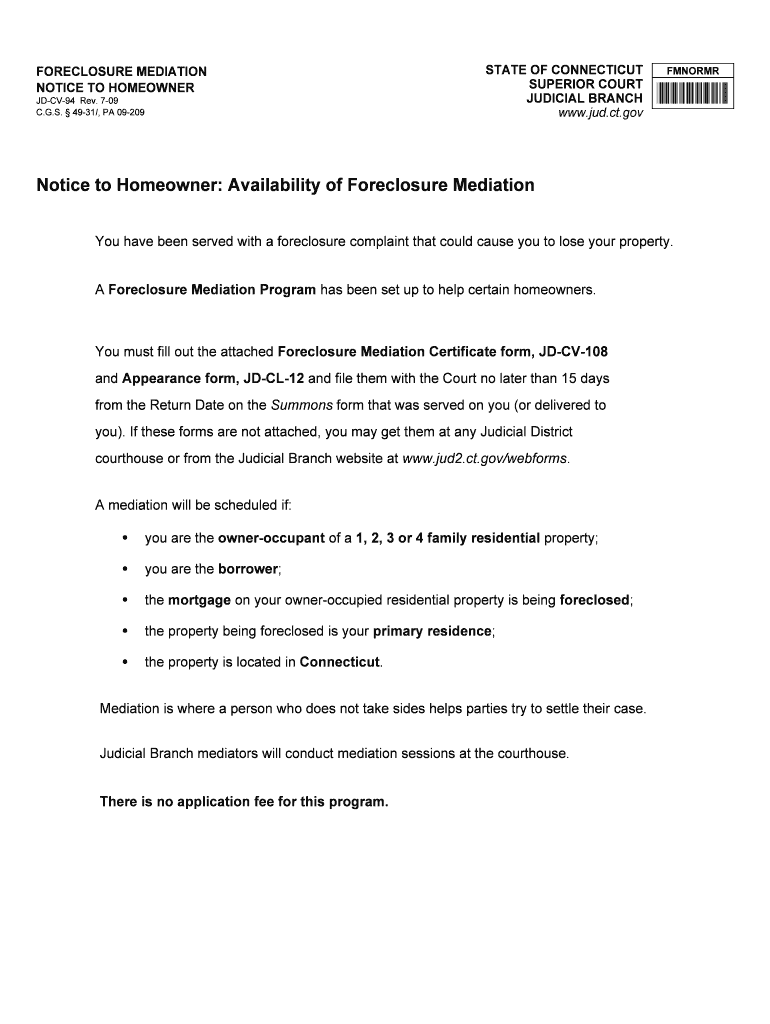
foreclosure mediation notice Preview on Page 1

Here's how it works

01. Edit your foreclosure mediation notice online
Type text, add images, blackout confidential details, add comments, highlights and more.
02. Sign it in a few clicks
Draw your signature, type it, upload its image, or use your mobile device as a signature pad.
03. Share your form with others
Send notice homeowner via email, link, or fax. You can also download it, export it or print it out.

How to use or fill out ct mediation notice with our platform

Form edit decoration
9.5
Ease of Setup
DocHub User Ratings on G2
9.0
Ease of Use
DocHub User Ratings on G2
  1. Click ‘Get Form’ to open the ct mediation notice in the editor.
  2. Begin by reviewing the 'Notice to Homeowner' section, which outlines your rights and the availability of the Foreclosure Mediation Program. Ensure you understand the implications of receiving a foreclosure complaint.
  3. Locate the attached Foreclosure Mediation Certificate form (JD-CV-108) and Appearance form (JD-CL-12). Fill out these forms accurately, providing all required information such as your name, address, and details about your mortgage.
  4. Ensure that you complete these forms within 15 days from the Return Date on the Summons form. Use our platform’s features to save your progress and make edits as needed.
  5. Once completed, file these forms with the Court. You can easily export them from our editor for submission.

Start using our platform today for free to streamline your document editing and ensure a smooth mediation process!

See more ct mediation notice versions

We've got more versions of the ct mediation notice form. Select the right ct mediation notice version from the list and start editing it straight away!
Versions Form popularity Fillable & printable
2009 4.8 Satisfied (64 Votes)
be ready to get more

Complete this form in 5 minutes or less

Get form

Got questions?

We have answers to the most popular questions from our customers. If you can't find an answer to your question, please contact us.
Contact us
Get good results at your mediation by keeping these basic tenets in mind. Rule 1: The decision makers must participate. Rule 2: Important documents must be physically present. Rule 3: Be right, but only to a point. Rule 4: Build a deal. Rule 5: Treat the other party with respect. Rule 6: Be persuasive.
Avoid Making Accusatory Statements Focusing on the past and assigning fault can derail the process and prevent parties from docHubing a mutually agreeable settlement. It is essential to remember that the goal of mediation is to find solutions, not to determine who is right or wrong.
Mediation is not a legal proceeding. It is strictly voluntary and all participants must agree to mediate. If a resolution is docHubed, it may be memorialized through an agreement that is acceptable to and binding on all parties. The process will be facilitated by a trained mediator who is a neutral third party.
Notice of Mediation shall identify the dispute at issue and designate an executive officer or other management official who will represent the party at the proceeding.
The total mediation cost of a mediated divorce in CT, depends on how many meetings are required. This is the least expensive form of divorce in CT. Total cost usually ranges between $1,500 and $6,000 and occasionally more if cases are more complex. This total cost is split between the spouses.

Security and compliance

At DocHub, your data security is our priority. We follow HIPAA, SOC2, GDPR, and other standards, so you can work on your documents with confidence.

Learn more
ccpa2
pci-dss
gdpr-compliance
hipaa
soc-compliance

People also ask

Therefore, a mediated divorce will typically take no longer than 3 to 4 months in total, and can be finalized as soon as the agreement is docHubed and the paperwork filed in Court.
Mediations tend to settle with a success rate of 80-92 percent, making them an effective means of docHubing an agreement. How do you negotiate a mediation settlement?

notice homeowner form