




Here's how it works



How to use or fill out Iowa Form 207 with DocHub

- Click ‘Get Form’ to open Iowa Form 207 in our editor.
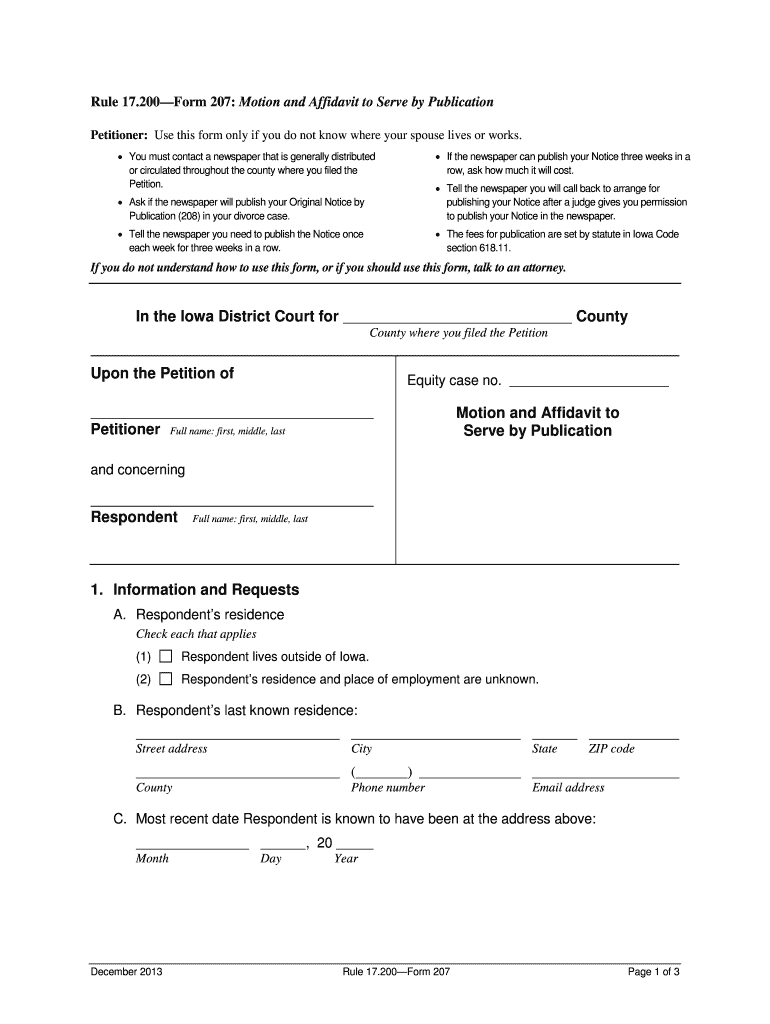
- Begin by entering your full name as the Petitioner at the top of the form. Ensure that you provide your first, middle, and last names accurately.
- In Section 1A, check the appropriate boxes regarding the Respondent’s residence. If applicable, indicate if they live outside Iowa or if their residence and employment are unknown.
- Fill in the Respondent’s last known address in Section 1B, including street address, city, county, state, and ZIP code. If you have a phone number or email address for them, include that as well.
- In Section 1D, describe the steps you have taken to locate the Respondent. This may include any attempts made to contact them or search for their whereabouts.
- Select a newspaper for publication in Section 1E and ensure it is widely circulated in your county. You will need to confirm with them about publishing your notice.
- Complete Sections 2 and 3 by indicating whether an attorney assisted you and providing your signature along with the date of signing.
Start using our platform today to fill out Iowa Form 207 easily and for free!
It's free
Got questions?
Is it safe to sign my iowa form 207 electronically?
You should use only trustworthy software solutions with strong security compliance to approve your documents electronically. DocHub is just the type of service you need! It stores data on Amazon Web Servers and complies with all essential security requirements and eSignature regulations, so it’s a trustworthy way to eSign your iowa form 207 or other forms with this tool.
How to manage my iowa form 207 from Gmail?
In case your go-to email service is Gmail, it is simple to integrate your DocHub editor in your work. Edit your iowa form 207 with DocHub tools and attach it to your drafts in Gmail. See how straightforward it can be to exchange files and collaborate having a swift PDF editing solution at hand.
Security and compliance
At DocHub, your data security is our priority. We follow HIPAA, SOC2, GDPR, and other standards, so you can work on your documents with confidence.
Learn more


