




Here's how it works



How to use or fill out gc 400 nl with our platform

- Click ‘Get Form’ to open the gc 400 nl in the editor.
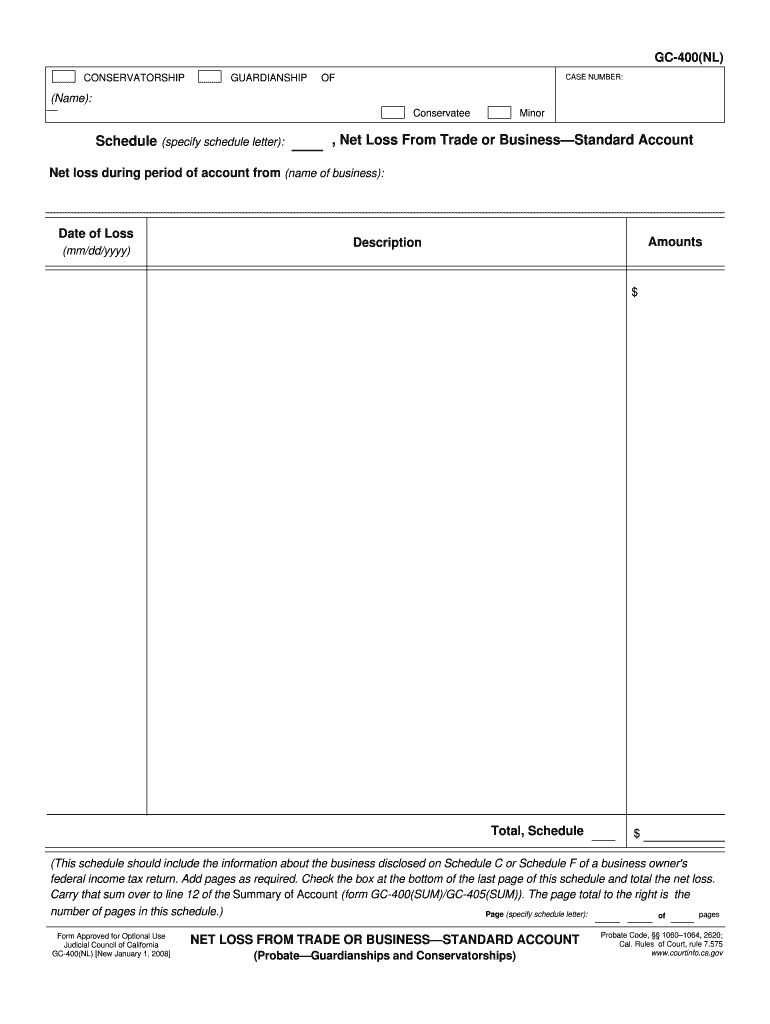
- Begin by entering the name of the conservatee in the designated field. Ensure that you provide accurate information as this is crucial for identification.
- Specify the schedule letter in the appropriate section. This helps categorize your submission correctly.
- In the 'Net Loss From Trade or Business' section, detail the net loss during the accounting period. Include the name of your business and relevant dates in mm/dd/yyyy format.
- Fill in the amounts and descriptions related to your business losses. Make sure to add pages if necessary and check the box at the bottom of each page.
- Finally, carry over your total net loss to line 12 of the Summary of Account form (GC-400(SUM)/GC-405(SUM)).
Start using our platform today for free to streamline your form completion process!
It's free
See more gc 400 nl versions
| Versions | Form popularity | Fillable & printable |
|---|---|---|
| 2008 | 4.8 Satisfied (212 Votes) |
Got questions?
What is the best way to send my business standard account form for eSignature?
Upload your business standard account form to DocHub (once you’ve set up an account for this). If you need to complete fields in it, use appropriate tools from the upper pane. For instance, add Signature Fields, assign each to specific party, and click on Sign → Request signatures from others. Change your message for your recipients and click Send Request. You can also send your document by fax or as a Signing link instead of using email (you’ll locate these options by navigating to the Menu → Send)
How do you get gc 400 nl?
You can find the latest and most relevant version of the gc 400 nl in our DocHub forms library. Browse it by categories or utilize the search field to get the exact template that suits your situation. You can open this form for editing after you find it.
Security and compliance
At DocHub, your data security is our priority. We follow HIPAA, SOC2, GDPR, and other standards, so you can work on your documents with confidence.
Learn more


