Payroll Information - Poway Unified School DistrictPayroll - Finance Office - University of San Dieg 2025

Get Form
Payroll Information - Poway Unified School DistrictPayroll - Finance Office - University of San Dieg Preview on Page 1

Here's how it works

01. Edit your form online
Type text, add images, blackout confidential details, add comments, highlights and more.
02. Sign it in a few clicks
Draw your signature, type it, upload its image, or use your mobile device as a signature pad.
03. Share your form with others
Send it via email, link, or fax. You can also download it, export it or print it out.

How to use or fill out Payroll Information - Poway Unified School DistrictPayroll - Finance Office - University of San Dieg with DocHub

Form edit decoration
9.5
Ease of Setup
DocHub User Ratings on G2
9.0
Ease of Use
DocHub User Ratings on G2
  1. Click ‘Get Form’ to open it in the editor.
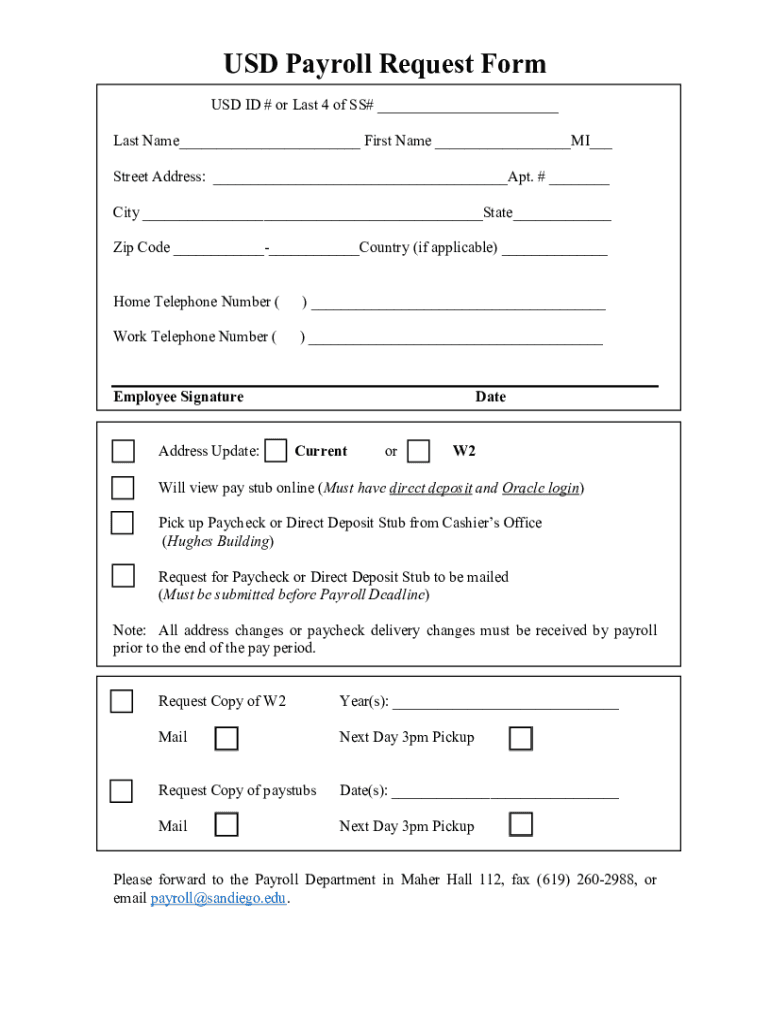
  2. Begin by entering your USD ID # or the last four digits of your Social Security Number in the designated field.
  3. Fill in your Last Name, First Name, and Middle Initial. Ensure accuracy for proper identification.
  4. Complete your Street Address, Apartment Number (if applicable), City, State, Zip Code, and Country (if necessary).
  5. Provide both Home and Work Telephone Numbers in the specified fields for contact purposes.
  6. Sign the form where indicated to confirm that all information is correct.
  7. Select your preference for paycheck delivery: online viewing, pickup from the Cashier’s Office, or mailing. Make sure to note any deadlines for changes.
  8. If requesting copies of W2s or paystubs, fill in the respective years and dates required before submission.
  9. Finally, forward the completed form to the Payroll Department via mail, fax, or email as instructed.

Start using our platform today to streamline your payroll information submission effortlessly!

See more Payroll Information - Poway Unified School DistrictPayroll - Finance Office - University of San Dieg versions

We've got more versions of the Payroll Information - Poway Unified School DistrictPayroll - Finance Office - University of San Dieg form. Select the right Payroll Information - Poway Unified School DistrictPayroll - Finance Office - University of San Dieg version from the list and start editing it straight away!
Versions Form popularity Fillable & printable
2020 4.8 Satisfied (165 Votes)
2013 4.4 Satisfied (70 Votes)
be ready to get more

Complete this form in 5 minutes or less

Get form

Got questions?

We have answers to the most popular questions from our customers. If you can't find an answer to your question, please contact us.
Contact us
You can retrieve a pay stub from a bank, especially if you receive direct deposits from your employer. You typically submit a request to your bank and it can retrieve the pay stub for you. You can also retrieve your pay stub directly from your employers employee website or from the payroll department.
New to NYS Payroll Online? Go to this web address: psonline.osc.ny.gov. Enter your NY.gov account (government issued) username and password. Complete the verification process the first time you log in with your nine-digit NYS Employee ID which is found on your pay stub.
If you would like to sign up for direct deposit, stop by the Payroll Office to fill out a Direct Deposit form or call us at (619)725-7736 for futher information. For questions regarding electronic or paper advices, please contact the Fiscal Control Department at (619) 725-7679.
If, like most Americans, you receive direct deposit, you can usually get your pay stub via an online portal through your employer. If you dont have access to a self-service portal, try contacting your companys HR or payroll department. They can typically provide you with physical or digital copies of your pay stub.
If time was submitted and pay was not issued: Submit an Off-Cycle Request, E078 Payroll Request for missed pay. For all other scenarios, submit a case to your Local Central Office: HHR via hhr.ucsd.edu, or call 619-543-3200.

People also ask

Employees can locate their payroll number on their payslip, which is a document detailing their pay and deductions for a particular pay period.
Ask your manager or the human resources department where you can locate them electronically. Typically, companies who house them electronically have them on a payroll service website which requires an employee login and password.
Toll-Free (800) 713-7007 Phone (925) 240-2400 Fax (925) 240-2411 info@californiapayroll.com Toll-Free (800) 713-7007. Phone (925) 240-2400. Fax (925) 240-2411.

Related links