




Here's how it works



How to use or fill out HomeCamp Hill Fire Department with our platform

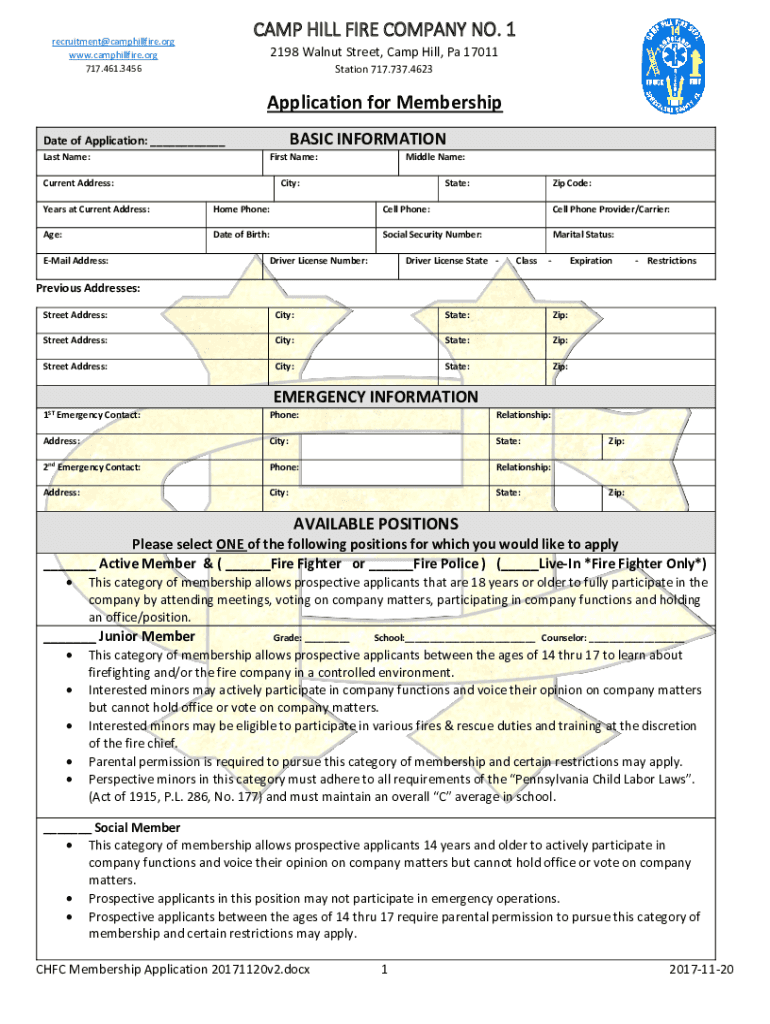
- Click ‘Get Form’ to open the HomeCamp Hill Fire Department application in the editor.
- Begin by filling out the 'BASIC INFORMATION' section. Enter your date of application, last name, first name, and current address. Ensure all fields are completed accurately for a smooth processing experience.
- Proceed to the 'EMERGENCY INFORMATION' section. Provide details for your first and second emergency contacts, including their names, phone numbers, and relationships to you.
- In the 'AVAILABLE POSITIONS' section, select one position that you wish to apply for. Make sure to read the descriptions carefully to choose the role that best fits your interests.
- Complete the 'EMPLOYMENT INFORMATION' section if applicable. If unemployed, list your last employer along with relevant details such as position title and years employed.
- Fill out any previous training certifications you may have in the 'PREVIOUS TRAINING' section. Attach copies of certifications if required.
- Finally, review all sections for accuracy before signing the application at the end. Ensure that all necessary attachments are included before submission.
Start using our platform today to complete your application effortlessly!
It's free
See more HomeCamp Hill Fire Department versions
| Versions | Form popularity | Fillable & printable |
|---|---|---|
| 2017 | 4.8 Satisfied (95 Votes) |
Got questions?
Can I sign my HomeCamp Hill Fire Department on a mobile?
Yes, you’ll find numerous apps for this on the web. Nonetheless, if you need to eSign your HomeCamp Hill Fire Department without installing extra software, DocHub is the best choice you can make. This powerful editor works on mobile devices just like on desktops. Open our editor in any internet browser, register or log in to your account, and start managing your documents.
How do you get HomeCamp Hill Fire Department for my state?
If you are searching for a state-specific HomeCamp Hill Fire Department sample, you can find it in our DocHub Forms & Templates catalog. Use the search field, key in your form’s name, and search through the results for your state. You can also filter out irrelevant results while exploring our catalog by categories.
What is the youngest age to be a firefighter?
How old do you have to be to be a volunteer firefighter?
What does 5 5 5 mean to a firefighter?
Security and compliance
At DocHub, your data security is our priority. We follow HIPAA, SOC2, GDPR, and other standards, so you can work on your documents with confidence.
Learn more


