




Here's how it works



How to use or fill out P Claims Transmittal Form Z6240 R0414 doc with DocHub

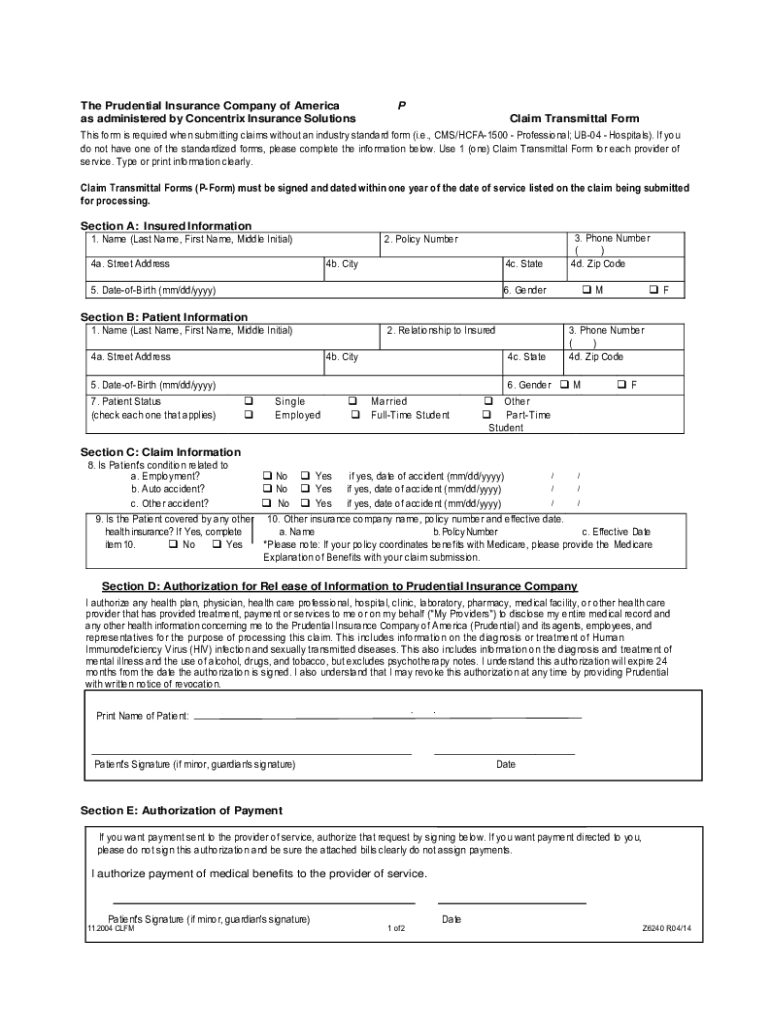
- Click ‘Get Form’ to open the P Claims Transmittal Form Z6240 R0414 in our editor.
- Begin with Section A: Insured Information. Fill in your name, policy number, date of birth, and gender clearly.
- Proceed to Section B: Patient Information. Enter the patient's details including their name, relationship to the insured, and contact information.
- In Section C: Claim Information, indicate if the patient's condition is related to employment or any accidents. If applicable, provide details about other health insurance coverage.
- Complete Section D: Authorization for Release of Information by signing and dating where indicated. Ensure that you understand the implications of this authorization.
- If you want payment sent directly to the provider, sign Section E: Authorization of Payment. Otherwise, leave it unsigned.
- Follow the instructions in Section F for submitting claims. Attach all required documents and ensure they are legible before mailing them to Prudential Insurance Company.
Start using our platform today for free to streamline your claims process!
It's free
See more P Claims Transmittal Form Z6240 R0414 doc versions
Got questions?
What is the simplest way to electronically sign my P Claims Transmittal Form Z6240 R0414 doc?
Many software solutions are available out there for document editing and signing. DocHub is one of the most in-demand online solutions that comply with all data protection and compliance standards and ensures your eSigned paperwork is legally enforceable. All you need to try it out is to create an account, add your P Claims Transmittal Form Z6240 R0414 doc, fill out the required information, and click Sign. Create your electronic signature by typing, drawing it, uploading its image to your document, or scanning a unique QR code.
How do you get P Claims Transmittal Form Z6240 R0414 doc?
You can find the latest and most relevant version of the P Claims Transmittal Form Z6240 R0414 doc in our DocHub forms library. Search it by categories or utilize the search field to locate the exact template that suits your situation. You can open this form for editing after you find it.
Security and compliance
At DocHub, your data security is our priority. We follow HIPAA, SOC2, GDPR, and other standards, so you can work on your documents with confidence.
Learn more


