




Here's how it works



How to use or fill out periodic asbestos medical questionnaire with our platform

- Click ‘Get Form’ to open the periodic asbestos medical questionnaire in the editor.
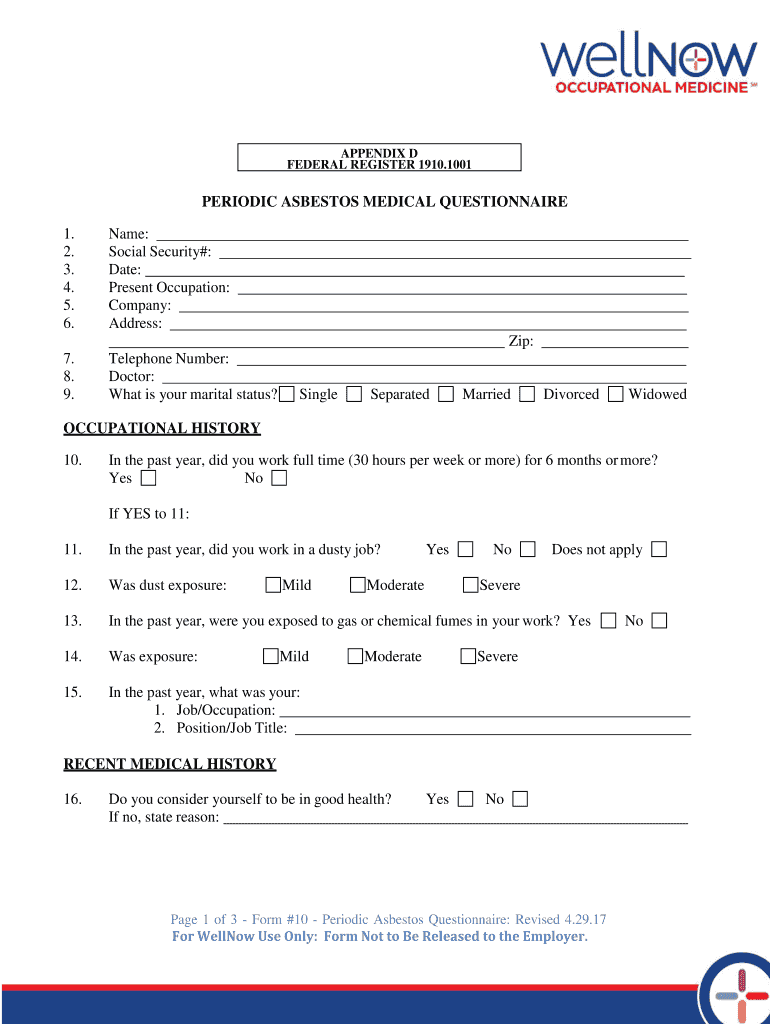
- Begin by filling in your personal information at the top of the form, including your name, social security number, date, present occupation, company, address, and zip code.
- Next, provide your telephone number and doctor's name. Indicate your marital status by selecting one of the options: Single, Separated, Married, Divorced, or Widowed.
- In the Occupational History section, answer whether you worked full-time for six months or more in the past year. If yes, continue to specify if you were in a dusty job and detail any exposure to gas or chemical fumes.
- Proceed to Recent Medical History and indicate if you consider yourself in good health. If not, provide a reason. Answer questions regarding any illnesses developed in the past year.
- Complete the Chest Colds and Chest Illness section by answering questions about colds and chest illnesses experienced over the past year.
- Finally, review your responses for accuracy before signing and dating the form at the end.
Start using our platform today to easily complete your periodic asbestos medical questionnaire online for free!
It's free
See more periodic asbestos medical questionnaire versions
| Versions | Form popularity | Fillable & printable |
|---|---|---|
| 2017 | 4.8 Satisfied (173 Votes) |
Got questions?
Can I type my electronic signature on my medical questionnaire form?
Sure, a typed name is recognized as a legitimate electronic signature when you add it to your form utilizing a compliant solution like DocHub. Simply upload your medical questionnaire form to our editor, click Sign in the top tool pane → Create your signature → Type your name in the appropriate tab, and choose how it will look on your document.
Do I need to install software to modify my page 3?
When you edit your page 3 with DocHub, you merely need a stable internet connection and virtually any browser installed on your device. No need to set up any third-party software or study guides. Simply open a tab with DocHub, drag and drop your file, and edit it immediately.
Security and compliance
At DocHub, your data security is our priority. We follow HIPAA, SOC2, GDPR, and other standards, so you can work on your documents with confidence.
Learn more


