Type text, add images, blackout confidential details, add comments, highlights and more.

02. Sign it in a few clicks
Draw your signature, type it, upload its image, or use your mobile device as a signature pad.

03. Share your form with others
Send wv bus app via email, link, or fax. You can also download it, export it or print it out.

How to use or fill out wv bus app with our platform
Ease of Setup
DocHub User Ratings on G2
Ease of Use
DocHub User Ratings on G2
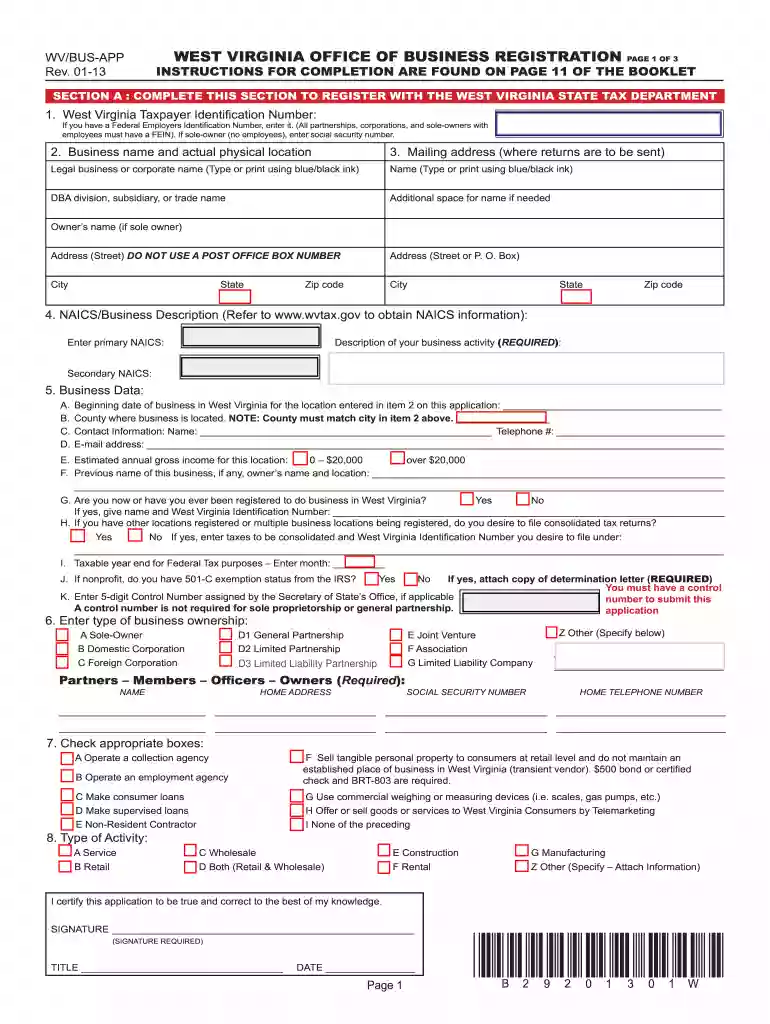
Click ‘Get Form’ to open the wv bus app in the editor.
Begin with Section A, where you will enter your West Virginia Taxpayer Identification Number. If applicable, provide your Federal Employers Identification Number or Social Security Number if you are a sole owner without employees.
Fill in your business name and physical location. Ensure that the mailing address is accurate for correspondence.
Complete the NAICS/Business Description section by entering your primary and secondary NAICS codes. You can find this information on the provided link.
In the Business Data section, provide details such as the beginning date of business, county of operation, contact information, and estimated annual gross income.
Review all entries for accuracy before signing at the bottom of the form. Ensure that all required fields are completed to avoid processing delays.
Start using our platform today to streamline your form completion process for free!
WV/BUS-APP fillable formWv bus app downloadWv bus app loginWV/BUS-APP instructionsWv bus app instructions pdfWV business Registration CertificateWV Business License application onlineWV business registration Certificate lookup
Security and compliance
At DocHub, your data security is our priority. We follow HIPAA, SOC2, GDPR, and other standards, so you can work on your documents with confidence.
Buses and Shuttles | Transportation, Parking and Mail Services
Aug 18, 2025 Its free to ride with a valid WVU ID card! View Mountain Line maps and schedules, use the Trip Planner or track a buss location using the BusRead more
Cookie consent notice
This site uses cookies to enhance site navigation and personalize your experience.
By using this site you agree to our use of cookies as described in our Privacy Notice.
You can modify your selections by visiting our Cookie and Advertising Notice.