NON MEDICAL INFORMATION EVALUATION OF DISABILITY 2026

Get Form
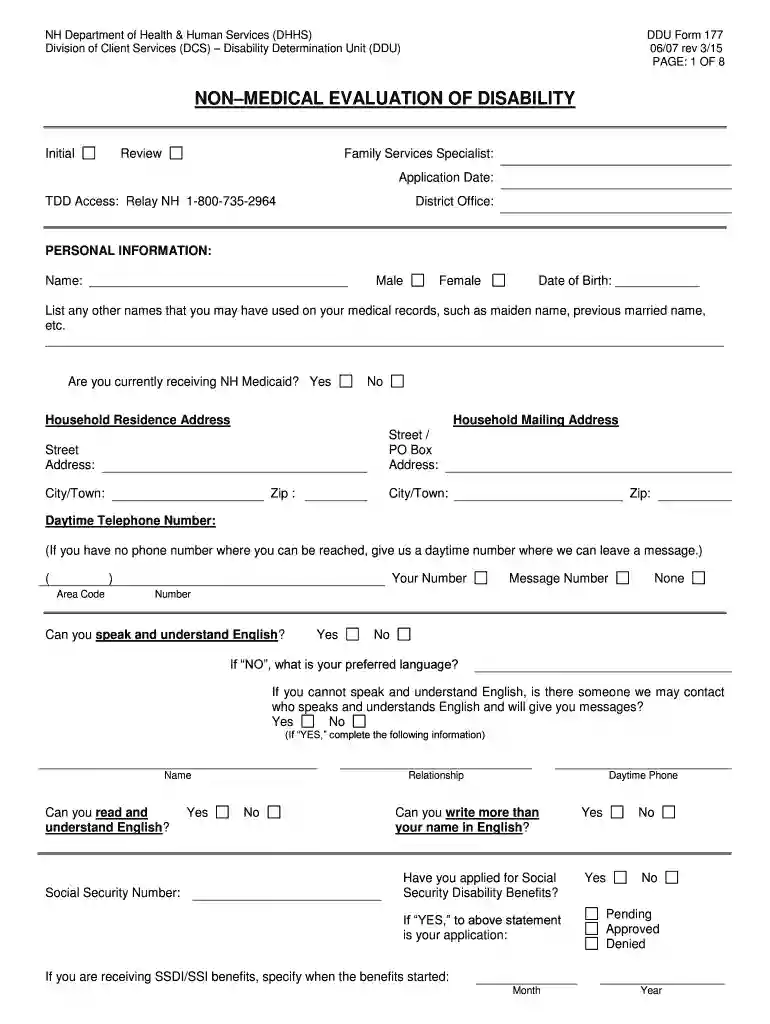
NON MEDICAL INFORMATION EVALUATION OF DISABILITY Preview on Page 1

Here's how it works

01. Edit your form online
Type text, add images, blackout confidential details, add comments, highlights and more.

02. Sign it in a few clicks
Draw your signature, type it, upload its image, or use your mobile device as a signature pad.

03. Share your form with others
Send it via email, link, or fax. You can also download it, export it or print it out.

How to use or fill out NON MEDICAL INFORMATION EVALUATION OF DISABILITY

Form edit decoration
9.5
Ease of Setup
DocHub User Ratings on G2
9.0
Ease of Use
DocHub User Ratings on G2
  1. Click ‘Get Form’ to open it in the editor.
  2. Begin with the 'Personal Information' section. Fill in your name, gender, date of birth, and any other names used on medical records. Indicate if you are currently receiving NH Medicaid and provide your household addresses and contact numbers.
  3. In the 'Ability to Work' section, describe any illnesses or conditions that limit your work ability. Answer questions regarding pain and job-related changes due to these conditions.
  4. Proceed to 'Vocational Rehabilitation'. Indicate if you are receiving services and provide details about past services received.
  5. Complete the 'Education' section by checking the highest grade completed and any special training attended.
  6. In the 'Employment' section, list jobs held in the last 15 years, including details like job title, type of business, hours worked, and rate of pay.
  7. Fill out the 'Mental Health Information' section if applicable, providing details about emotional health issues and services received.
  8. Finally, complete sections on insurance information and medication. Ensure all fields are filled accurately before submitting.

Start using our platform today for free to streamline your form completion process!

See more NON MEDICAL INFORMATION EVALUATION OF DISABILITY versions

We've got more versions of the NON MEDICAL INFORMATION EVALUATION OF DISABILITY form. Select the right NON MEDICAL INFORMATION EVALUATION OF DISABILITY version from the list and start editing it straight away!
Versions Form popularity Fillable & printable
2022 4.4 Satisfied (28 Votes)
2015 4.6 Satisfied (48 Votes)
2007 4 Satisfied (23 Votes)
be ready to get more

Complete this form in 5 minutes or less

Get form

Got questions?

We have answers to the most popular questions from our customers. If you can't find an answer to your question, please contact us.
Contact us

Upload your NON MEDICAL INFORMATION EVALUATION OF DISABILITY to DocHub (once you’ve set up an account for this). If you need to fill out fields in it, use appropriate tools from the upper pane. For instance, add Signature Fields, assign each to specific party, and click on Sign → Request signatures from others. Personalize your message for your recipients and click Send Request. You can also send your document by fax or as a Signing link instead of using email (you’ll find these options by navigating to the Menu → Send)

When you edit your NON MEDICAL INFORMATION EVALUATION OF DISABILITY with DocHub, you simply will not need to look for other applications or services to eSign it. An electronic signature is part of DocHub’s substantial editing toolset, which allows you to apply changes in your form without jumping between websites. Simply complete your form, double-check the correctness of the information and put your electronic signature at the end to make it submission-ready in minutes.

Security and compliance

At DocHub, your data security is our priority. We follow HIPAA, SOC2, GDPR, and other standards, so you can work on your documents with confidence.

Learn more
ccpa2
pci-dss
gdpr-compliance
hipaa
soc-compliance