




Here's how it works

01. Edit your virginia affidavit form online
Type text, add images, blackout confidential details, add comments, highlights and more.

02. Sign it in a few clicks
Draw your signature, type it, upload its image, or use your mobile device as a signature pad.

03. Share your form with others
Send virginia affidavit requirements via email, link, or fax. You can also download it, export it or print it out.
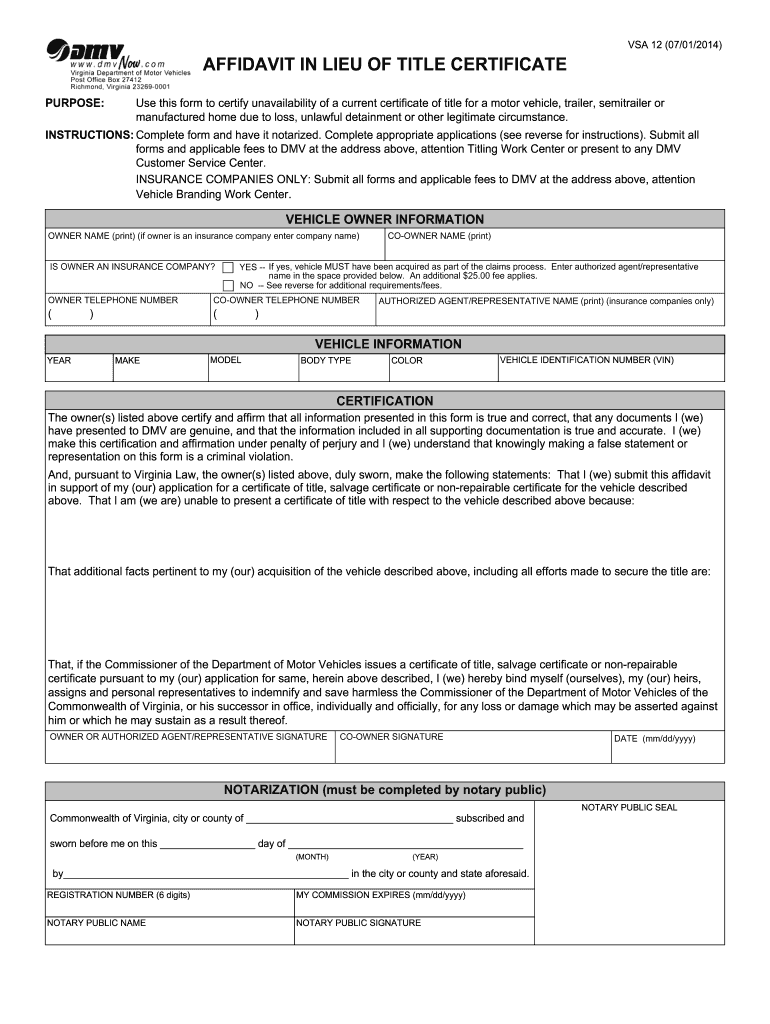
How to use or fill out va affidavit form 2014-2019 with our platform

- Click ‘Get Form’ to open the VA Affidavit Form in the editor.
- Begin by filling in the 'Vehicle Owner Information' section. Enter your name, telephone number, and if applicable, co-owner details. If you are an insurance company, indicate this and provide the authorized agent's name.
- Next, complete the 'Vehicle Information' section. Fill in the year, make, model, body type, color, and Vehicle Identification Number (VIN) of the vehicle.
- In the 'Certification' section, affirm that all information is accurate. Provide any additional facts regarding your acquisition of the vehicle and efforts made to secure the title.
- Sign and date the form where indicated. Ensure that a notary public completes the notarization section.
- Finally, submit all completed forms along with applicable fees to DMV as instructed.
Start using our platform today for free to easily fill out your VA Affidavit Form!
Fill out va affidavit form 2014-2019 online
It's free
It's free
See more va affidavit form 2014-2019 versions
We've got more versions of the va affidavit form 2014-2019 form. Select the right va affidavit form 2014-2019 version from the list and start editing it straight away!
Got questions?
We have answers to the most popular questions from our customers. If you can't find an answer to your question, please contact us.
Contact us
How to submit a VA form?
The best way to file for disability compensation is to apply online at .va.gov/disability. Or, you can fax it to: (844) 531-7818 (inside the U.S.) (248) 524-4260 (outside the U.S.)
Where do I submit VA form 21 4138?
After completing the form, mail to: Department of Veterans Affairs, Evidence Intake Center, P.O. Box 4444, Janesville, WI 53547-4444. You may complete the form online or by hand.
Where to submit VA form 21-4138?
Department of Veterans Affairs. Evidence Intake Center. PO Box 4444. Janesville, WI 53547-4444.
Where to mail VA forms?
The VA has updated the VA Form 21-4138 to improve the process of receiving disability benefits. This form is now replaced with five new forms that help veterans communicate their requests to the VA more effectively.
Security and compliance
At DocHub, your data security is our priority. We follow HIPAA, SOC2, GDPR, and other standards, so you can work on your documents with confidence.
Learn more


