Type text, add images, blackout confidential details, add comments, highlights and more.
02. Sign it in a few clicks
Draw your signature, type it, upload its image, or use your mobile device as a signature pad.
03. Share your form with others
Send it via email, link, or fax. You can also download it, export it or print it out.
How to use or fill out INSTRUCTIONS: DOMESTIC PARTNERSHIP DECLARATION RCW with our platform
Ease of Setup
DocHub User Ratings on G2
Ease of Use
DocHub User Ratings on G2
Click ‘Get Form’ to open the INSTRUCTIONS: DOMESTIC PARTNERSHIP DECLARATION RCW in the editor.
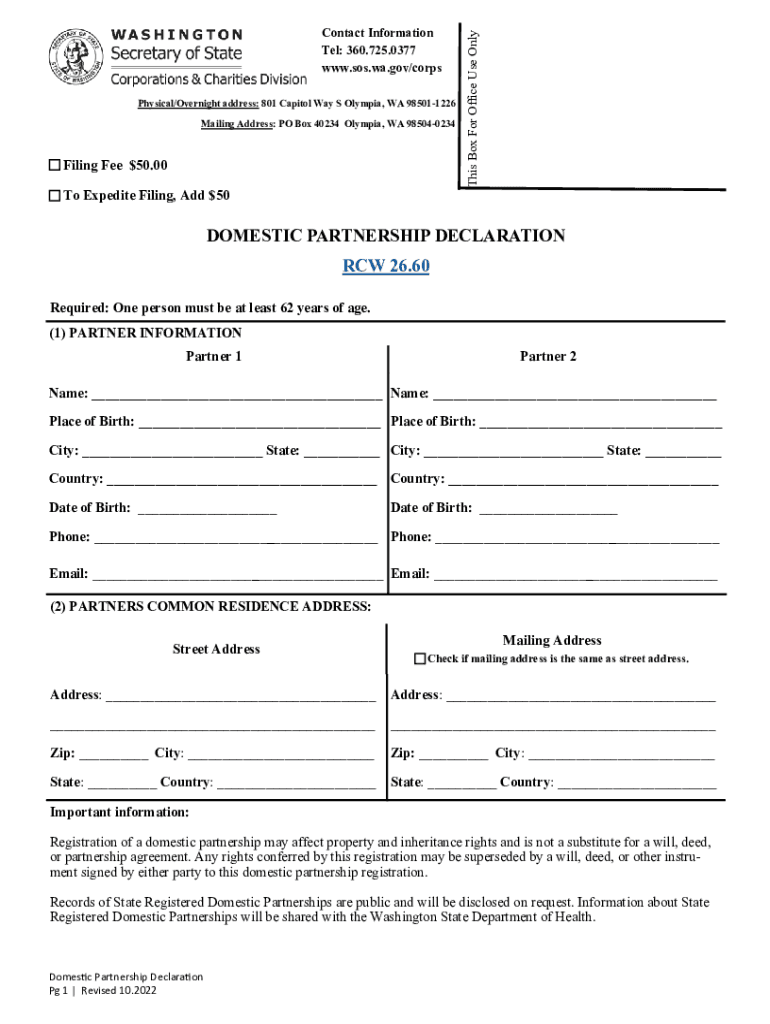
Begin by filling out the Partner Information section. Enter each partner's name, place of birth, date of birth, phone number, and email address in the designated fields.
Next, provide the Common Residence Address. Fill in the street address where both partners reside and check the box if the mailing address is the same as the residential address.
In the Declaration section, confirm that both partners meet all requirements for registration. Ensure that all statements are accurate before proceeding.
Finally, complete the Signature and Notarization section. Both partners must sign and have their signatures notarized. Make sure to include notary stamps before submission.
Start using our platform today to easily complete your Domestic Partnership Declaration!
Fill out INSTRUCTIONS: DOMESTIC PARTNERSHIP DECLARATION RCW online It's free
See more INSTRUCTIONS: DOMESTIC PARTNERSHIP DECLARATION RCW versions
We've got more versions of the INSTRUCTIONS: DOMESTIC PARTNERSHIP DECLARATION RCW form. Select the right INSTRUCTIONS: DOMESTIC PARTNERSHIP DECLARATION RCW version from the list and start editing it straight away!
INSTRUCTIONS: DOMESTIC PARTNERSHIP DECLARATION RCW 26.60. Purpose: A Domestic Partnership Declaration is used to record a domestic partnership as defined byRead more
Marriage or Start of State-Registered Domestic Partnership
Dec 12, 2025 This Life Event is when you acquire a new dependent(s) due to marriage or the start of a state-registered domestic partnership (SRDP).Read more
Clarified the instructions in the Readme, for the manual download version. Decreased the World Tension change when a country joins a faction. Replaced aRead more
Cookie consent notice
This site uses cookies to enhance site navigation and personalize your experience.
By using this site you agree to our use of cookies as described in our Privacy Notice.
You can modify your selections by visiting our Cookie and Advertising Notice.