Get - mbc ca 2026

Get Form
Get - mbc ca Preview on Page 1

Here's how it works

01. Edit your form online
Type text, add images, blackout confidential details, add comments, highlights and more.
02. Sign it in a few clicks
Draw your signature, type it, upload its image, or use your mobile device as a signature pad.
03. Share your form with others
Send it via email, link, or fax. You can also download it, export it or print it out.

How to use or fill out Get - mbc ca with our platform

Form edit decoration
9.5
Ease of Setup
DocHub User Ratings on G2
9.0
Ease of Use
DocHub User Ratings on G2
  1. Click ‘Get Form’ to open it in the editor.
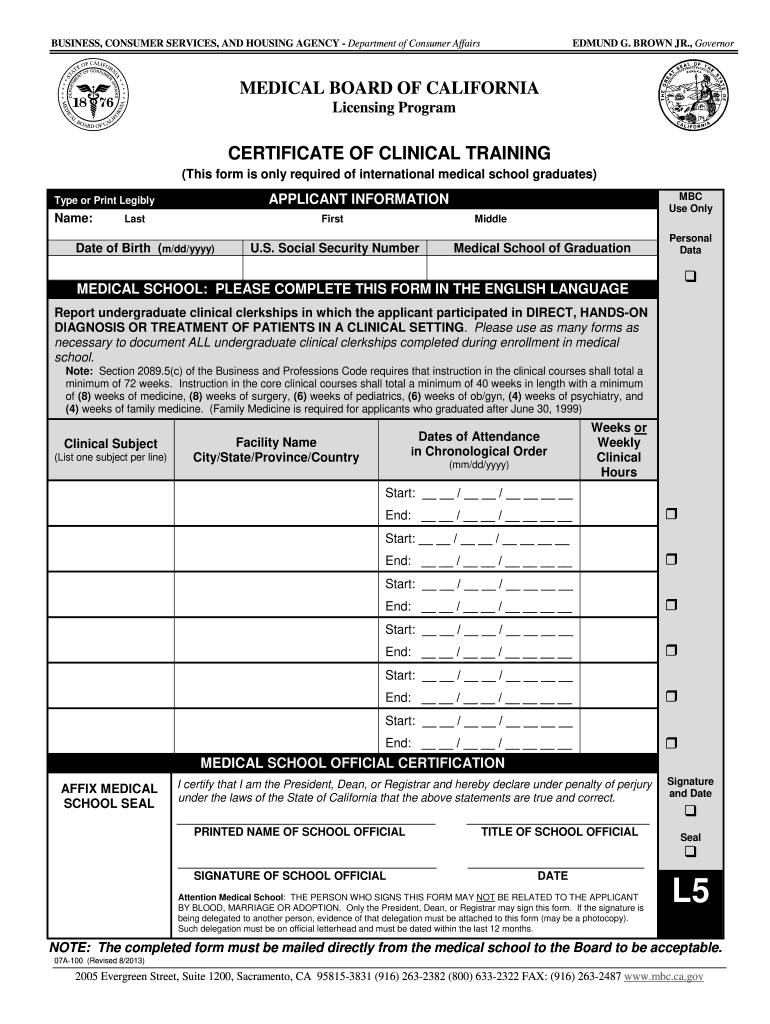
  2. Begin by entering your personal information in the 'APPLICANT INFORMATION' section. Fill in your last name, first name, middle name, date of birth, and U.S. Social Security Number clearly.
  3. Next, provide details about your medical school of graduation. Ensure that this is completed in English as specified.
  4. In the 'Clinical Subject' section, list each clinical clerkship you participated in. Document one subject per line along with the facility name and its location.
  5. For each clerkship, enter the dates of attendance in chronological order and specify the total weeks or weekly clinical hours spent at each facility.
  6. Once all sections are filled out, ensure that a medical school official certifies the form by affixing their seal and signing it. Remember that only authorized personnel may sign.

Start using our platform today to fill out your Get - mbc ca form easily and for free!

See more Get - mbc ca versions

We've got more versions of the Get - mbc ca form. Select the right Get - mbc ca version from the list and start editing it straight away!
Versions Form popularity Fillable & printable
2019 4.8 Satisfied (101 Votes)
2013 4.4 Satisfied (602 Votes)
be ready to get more

Complete this form in 5 minutes or less

Get form

Got questions?

We have answers to the most popular questions from our customers. If you can't find an answer to your question, please contact us.
Contact us
Around 300 physicians apply for a California Medical License each month, making California one of the most popular states for physicians. Depending on your credentials and practice history, expect the process to take between 3-6 months.
Fastest State Medical Licenses #1 - Colorado Medical Board. The Colorado Medical Board is able to issue a Physician Medical License within 30 days of filing an Expedited Medical License application. # 2 - Ohio Medical Board. # 3 - New York Medical Board. # 4 - Indiana Medical Board. # 5 - Michigan Medical Board.
To determine a doctors status, go to the Medical Boards website or call (800) 633-2322 and someone at the Medical Board will look up the doctor for you. To use the website, click on License Search on the home page.
To have your California medical license application approved by the Medical Board of California (MBC), youll need to gather up a good amount of paperwork and documentation to prove youre qualified to practice medicine. Keep in mind: This process is not going to be fun or exciting in the least.
With that, the overall process typically takes three to five months. This includes application preparation and finalization, credentials verification requests and follow-up to licensing. Time delaying factors include a history of malpractice claims, disciplinary action, arrests, lengthy state licensure history, etc.

Security and compliance

At DocHub, your data security is our priority. We follow HIPAA, SOC2, GDPR, and other standards, so you can work on your documents with confidence.

Learn more
ccpa2
pci-dss
gdpr-compliance
hipaa
soc-compliance

People also ask

The process for verifying your Medi-Cal eligibility, from the time your completed application is received to when you receive your Benefits Identification Card (BIC), normally takes 45 days.

Related links