




Here's how it works



How to use or fill out PPTC 155 E: Child General Passport Application for Canadians Under 16 Years of Age Applying in Canada with Our Platform

- Click ‘Get Form’ to open the PPTC 155 E application in our editor.
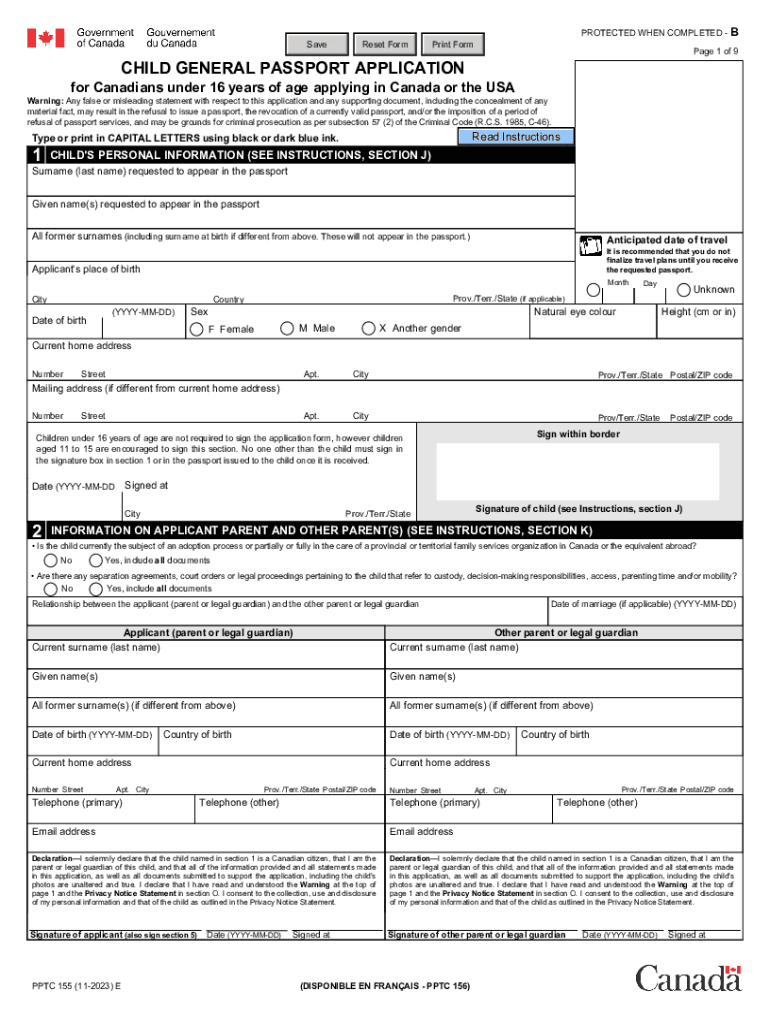
- Begin by filling out the child's personal information in Section 1. Ensure you enter the child's full name as it appears on their proof of citizenship, along with their date of birth and place of birth.
- In Section 2, provide details about the applicant parent and any other parents or guardians. Include current surnames, given names, and contact information.
- Complete Section 3 regarding any previous Canadian travel documents issued to the child. If applicable, include the document number and date of issue.
- For Section 4, submit proof of Canadian citizenship. This can be a birth certificate or a certificate of Canadian citizenship; ensure these are original documents.
- In Section 5, both parents or legal guardians must sign the declaration confirming all information is accurate and true.
- Finally, review all sections for completeness before saving your application. Use our platform's features to easily edit or add any necessary information.
Start your application today using our platform for free and streamline your passport process!
It's free
See more PPTC 155 E : Child General Passport Application for Canadians Under 16 Years of Age Applying in Cana versions
| Versions | Form popularity | Fillable & printable |
|---|---|---|
| 2025 | 4.3 Satisfied (35 Votes) | |
| 2023 | 4.6 Satisfied (40 Votes) | |
| 2022 | 4.6 Satisfied (58 Votes) | |
| 2022 | 4.8 Satisfied (45 Votes) | |
| 2021 | 4.8 Satisfied (87 Votes) | |
| 2020 | 4.3 Satisfied (55 Votes) | |
| 2019 | 4.3 Satisfied (174 Votes) | |
| 2018 | 4.4 Satisfied (51 Votes) | |
| 2017 | 4.3 Satisfied (122 Votes) | |
| 2015 | 4.3 Satisfied (49 Votes) | |
| 2014 | 4.3 Satisfied (39 Votes) | |
| 2014 | 4 Satisfied (40 Votes) | |
| 2012 | 4 Satisfied (27 Votes) |
Got questions?
How can I create an electronic signature in my renewing a child's passport on Android?
Signing documents on a mobile device is fast, straightforward, and doesn’t require software installation when you have an account with DocHub. Sign in from any browser, fill in your empty fields with your data, and click on Sign → Create your signature. You can draw your eSignature the same way you usually do on paper, add its picture to your renewing a child's passport, or type in your name and stylize its look. Whatever option you choose, your form will be valid.
How do you fill out child general passport application online?
You may find and modify your child general passport application online with the help of DocHub. Its simple yet feature-rich design enables you to begin productive work right after you sign up your account. Create your profile and add your document, and then our interface will guide you via our stress-free form completion experience.
Do both parents need to be present for a 16 year old passport?
What is the form for a passport under 16?
Do both parents need to be present for a 16 year old passport application?
Security and compliance
At DocHub, your data security is our priority. We follow HIPAA, SOC2, GDPR, and other standards, so you can work on your documents with confidence.
Learn more


