Bitclub network refund 2026

Get Form
bitclub network refund Preview on Page 1

Here's how it works

01. Edit your bitclub network refund online
Type text, add images, blackout confidential details, add comments, highlights and more.
02. Sign it in a few clicks
Draw your signature, type it, upload its image, or use your mobile device as a signature pad.
03. Share your form with others
Send bitclub network refund status via email, link, or fax. You can also download it, export it or print it out.

How to use or fill out bitclub network refund with our platform

Form edit decoration
9.5
Ease of Setup
DocHub User Ratings on G2
9.0
Ease of Use
DocHub User Ratings on G2
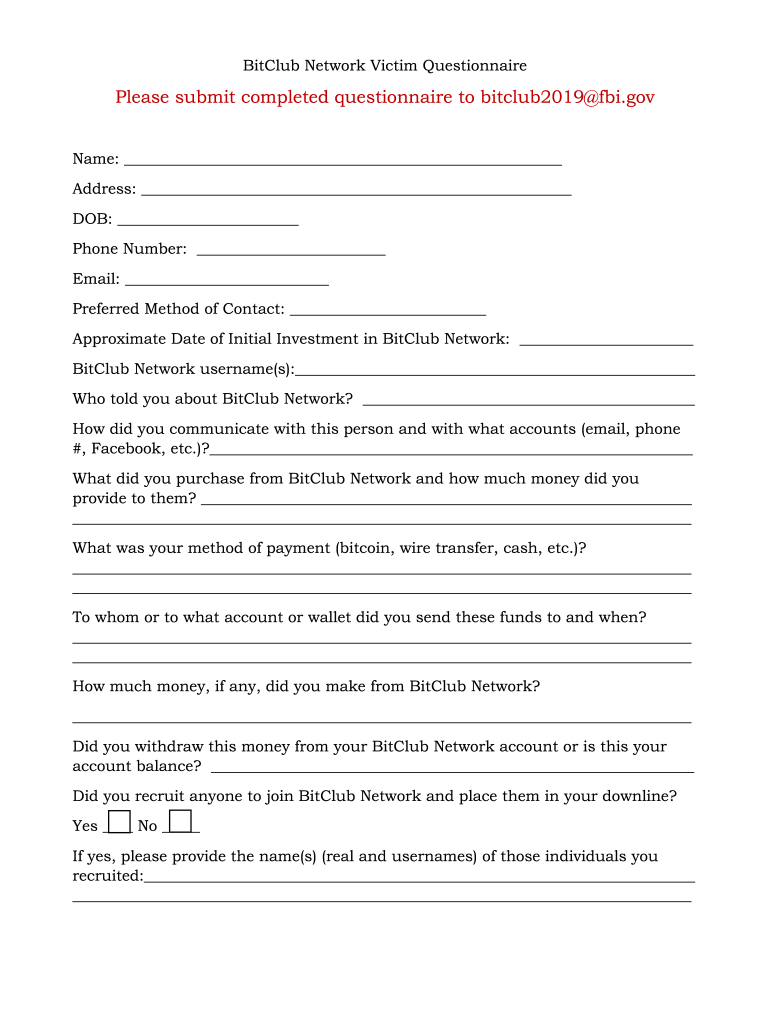
  1. Click ‘Get Form’ to open the BitClub Network Victim Questionnaire in the editor.
  2. Begin by entering your personal information in the designated fields: Name, Address, Date of Birth, Phone Number, and Email. Ensure accuracy for effective communication.
  3. Select your preferred method of contact from the options provided. This will help facilitate follow-up communications.
  4. Fill in the approximate date of your initial investment in BitClub Network and your username(s) associated with the account.
  5. Provide details on how you learned about BitClub Network and describe your communication methods with that person.
  6. Detail what you purchased from BitClub Network, including the amount invested and payment method used (e.g., bitcoin, wire transfer).
  7. Indicate to whom you sent funds and when, along with any earnings made from BitClub Network.
  8. Answer questions regarding recruitment efforts, event attendance, refund attempts, and possession of mining equipment as applicable.
  9. Finally, provide any additional information that may assist in processing your questionnaire effectively.

Start filling out your BitClub Network refund form today for free using our platform!

be ready to get more

Complete this form in 5 minutes or less

Get form

Got questions?

We have answers to the most popular questions from our customers. If you can't find an answer to your question, please contact us.
Contact us

Sure, a typed name is recognized as a legitimate electronic signature when you add it to your form using a compliant solution like DocHub. Simply add your bitclub network login to our editor, click Sign in the top tool pane → Create your signature → Type your name in the proper tab, and choose how it will look on your document.

You can easily edit and complete your bitclubnetwork com login on any iOS device. Open an internet browser of your choice, go to the DocHub site, authorize or create a new account, add your file for editing, and make your required changes. Our service is mobile-friendly, so utilizing its functions on your phone will be a no-brainer, even on the first try.

Security and compliance

At DocHub, your data security is our priority. We follow HIPAA, SOC2, GDPR, and other standards, so you can work on your documents with confidence.

Learn more